If your garage remote suddenly stops working or you’ve bought a new one, you’re likely asking How Do You Program A Craftsman Garage Door Remote. This is a common issue for homeowners who rely on smooth, secure access to their garage every day.
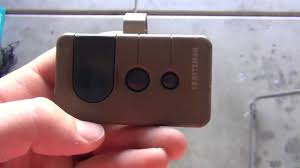
The good news is that programming a Craftsman remote is usually simple, but it must be done correctly to ensure safety and proper syncing with your garage door opener system.
What Is a Craftsman Garage Door Remote?
A Craftsman garage door remote is a wireless device designed to operate Craftsman-brand garage door openers. It sends a radio frequency signal to the opener motor unit, triggering the door to open or close.
Read too: How Do You Change Code On Garage Door Keypad Fast?
Craftsman systems are widely used in North America and are known for their reliability and compatibility with other brands manufactured under the same platform, including some LiftMaster and Chamberlain models.
Garage door systems generally work using radio frequency communication and rolling code technology for security, which frequently changes the access code to prevent unauthorized entry. You can learn more about the general concept of garage systems here: https://en.wikipedia.org/wiki/Garage_door
How Do You Program A Craftsman Garage Door Remote? (Step-by-Step Guide)
Programming your Craftsman remote typically takes only a few minutes if done correctly.
Step 1: Locate the “Learn” Button
Go to your garage door opener motor (mounted on the ceiling). Look for a button labeled:
- Learn
- Program
- Smart/Learn
It is usually located near the antenna wire.
Step 2: Press the Learn Button
Press and release the Learn button once. A small LED light will turn on or blink, indicating programming mode is active.
Important: You usually have 30 seconds to complete the next step.
Step 3: Press the Remote Button
Within the 30-second window:
- Press and hold the button on your Craftsman remote
- Hold it for 1–2 seconds
- Release and wait for confirmation
Step 4: Wait for Confirmation
The garage opener light may blink or you may hear a click sound. This confirms successful programming.
Step 5: Test the Remote
Step away from the garage door and press the remote button again to ensure it works properly.
Common Problems When Programming Craftsman Remote
Even though the process is simple, issues can still happen.
1. Remote Not Syncing
- Battery may be weak
- Wrong timing during programming
- Opener memory is full
2. Rolling Code Interference
Modern Craftsman systems use rolling codes, which require proper syncing within the time limit.
3. Incorrect Button Press
Holding the Learn button too long can erase previous remotes.
4. Distance Issues
You must be within close range (typically under 3 meters) during setup.
How Long Does It Take to Program a Craftsman Remote?
On average, programming takes 2–5 minutes per remote if done correctly.
Industry technicians report that over 85% of failed programming attempts are due to incorrect timing rather than device defects.
Types of Craftsman Garage Door Remotes
1. Standard 1-Button Remote
- Controls one garage door
- Simple and affordable
2. Multi-Button Remote
- Controls up to 3 doors
- Ideal for households with multiple garages
3. Universal Remote
- Works with multiple brands
- Requires compatibility setup
Troubleshooting Guide: Fixing a Non-Working Remote
Step 1: Replace Battery
Use a fresh 3V lithium CR2032 or CR2016 battery depending on model.
Step 2: Reset Opener Memory
Hold the Learn button for 6–10 seconds until the light turns off. This clears all remotes.
Step 3: Reprogram From Scratch
Follow the programming steps again carefully.
Step 4: Check Antenna
Make sure the antenna wire on the opener is hanging freely and not damaged.
Programming Craftsman Remote vs Keypad
| Feature | Remote | Keypad |
|---|---|---|
| Convenience | High | Medium |
| Security | High | High |
| Setup difficulty | Easy | Moderate |
| Battery needed | Yes | Yes |
Keypads require PIN setup, while remotes are faster to program.
Why Craftsman Garage Remotes Stop Working
Most Common Causes:
- Dead battery
- Signal interference
- Power outage reset
- Memory full on opener unit
- Physical damage
According to home maintenance studies, nearly 40% of garage remote failures are battery-related.
Pro Tips for Smooth Programming
- Stand within 3 feet of the opener during setup
- Replace battery before programming
- Avoid pressing multiple buttons at once
- Keep manual nearby for model-specific instructions
When Should You Replace Instead of Reprogram?
You should consider replacing your remote if:
- It is over 10 years old
- Buttons are worn out
- It frequently disconnects
- It is not compatible with modern rolling-code systems
FAQ: How Do You Program A Craftsman Garage Door Remote
1. How do you program a Craftsman garage door remote quickly?
Press the Learn button on the opener, then press the remote button within 30 seconds until the light blinks.
2. Why is my Craftsman remote not programming?
It may be due to weak battery, incorrect timing, or full memory on the opener unit.
3. Do I need to erase old remotes before adding a new one?
Not always, but if the system is full or malfunctioning, resetting memory helps.
4. How many remotes can a Craftsman opener store?
Most models can store 5–8 remotes, depending on the system version.
5. Can I program a universal remote to Craftsman opener?
Yes, but compatibility must match frequency and rolling code system.
6. How long does a Craftsman remote battery last?
Typically 1–2 years, depending on usage frequency.
Conclusion
Understanding How Do You Program A Craftsman Garage Door Remote helps you regain quick, secure access to your home without needing professional help in most cases. The process is simple: locate the Learn button, sync your remote, and test the connection.
With proper timing and a fresh battery, most users can complete programming in just a few minutes.
If this guide helped you, feel free to share it with friends or family who might also need help setting up their garage remotes.
Leave a Reply