If your garage remote suddenly stops working or you’ve just bought a new one, it can be frustrating not knowing what to do next. The good news is that learning How Do You Program A Craftsman Garage Door Opener Remote is quick and beginner-friendly. With just a few steps, you can restore full control and convenience.
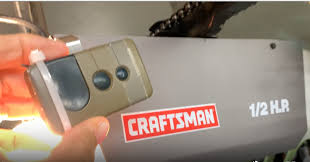
What Does Programming a Craftsman Garage Door Remote Mean?
Programming a remote means syncing it with your garage door opener so both devices communicate securely.
Read too: How Do You Change Code On Garage Door Keypad Fast?
Why It’s Important:
- Enables wireless control of your garage
- Replaces lost or damaged remotes
- Ensures compatibility with your opener system
- Enhances home security
Most modern Craftsman systems use rolling code technology, which changes the signal after each use to prevent hacking.
How Do You Program A Craftsman Garage Door Opener Remote (Step-by-Step)
This is the main solution you’re looking for. Follow each step carefully.
Step 1: Locate the Learn Button
- Find the garage door opener unit mounted on the ceiling
- Look for a button labeled “Learn”
- Common colors: yellow, purple, red/orange, or green
📍 It’s usually near the antenna wire.
Step 2: Activate Programming Mode
- Press and release the Learn button
- A small LED light will turn on
- You now have 30 seconds to complete the next step
⏱ Timing is critical—act quickly.
Step 3: Press the Remote Button
- Press and hold the desired button on your remote
- Hold for about 2–3 seconds, then release
- Repeat once if needed
💡 The opener light will blink or you’ll hear a click.
Step 4: Test the Remote
- Press the remote button again
- The garage door should open or close
✅ If it works, programming is complete!
Why Is My Craftsman Remote Not Programming?
If the steps don’t work, here are common issues:
Possible Causes:
- Dead batteries
- Wrong remote model
- Interference from nearby devices
- Memory full in the opener
How Do You Reset a Craftsman Garage Door Opener?
Resetting clears all stored remotes.
Reset Steps:
- Press and hold the Learn button for 6–10 seconds
- Wait until the LED light turns off
- All remotes will be erased
- Reprogram devices from scratch
⚠️ Use this only if necessary.
Learn Button Colors and Their Meaning
Understanding the Learn button color helps ensure compatibility.
Quick Reference Table:
| Color | Frequency | Year Range | Compatibility |
|---|---|---|---|
| Yellow | 310/390 MHz | 2011–present | New remotes |
| Purple | 315 MHz | 2005–2014 | Mid-range |
| Red/Orange | 390 MHz | 1997–2005 | Older models |
| Green | 390 MHz | Pre-1997 | Limited |
Can You Program Multiple Remotes?
Yes, most Craftsman openers support multiple devices.
Typical Capacity:
- 5–7 remotes
- Additional keypads and smart devices
💡 If memory is full, perform a reset first.
Advantages vs Disadvantages of DIY Programming
Pros and Cons
| Advantages | Disadvantages |
|---|---|
| Fast (under 5 minutes) | Requires correct steps |
| No technician needed | Compatibility issues possible |
| Saves money | May require reset |
How Secure Are Craftsman Garage Door Remotes?
Modern systems offer strong security features:
Security Highlights:
- Rolling code encryption
- Billions of code combinations
- Reduced risk of signal duplication
To understand how garage systems work, visit:
https://en.wikipedia.org/wiki/Garage_door_opener
Expert Insight: Why Proper Programming Matters
According to home improvement specialists, improper programming can cause:
- Delayed door response
- Signal interference issues
- Security vulnerabilities
A properly synced remote ensures smooth and reliable operation.
Maintenance Tips After Programming
Keep your remote working efficiently:
- Replace batteries every 6–12 months
- Keep remote clean and dry
- Test functionality monthly
- Avoid dropping the remote
Signs You Need to Reprogram Your Remote
Watch for these signs:
- Remote works inconsistently
- Reduced operating range
- Delayed response
- Door doesn’t respond at all
FAQ: How Do You Program A Craftsman Garage Door Opener Remote
Q1: How long does it take to program a remote?
Answer: Usually less than 5 minutes.
Q2: Can I use a universal remote with a Craftsman opener?
Answer: Yes, as long as it matches the frequency and Learn button type.
Q3: Why does my remote work only sometimes?
Answer: Weak batteries or signal interference are common causes.
Q4: Do I need a professional to program my remote?
Answer: No, most homeowners can do it easily themselves.
Q5: What happens if I press the Learn button too long?
Answer: It resets the system and deletes all programmed remotes.
Q6: Can I program a remote without the Learn button?
Answer: No, the Learn button is required for syncing.
Conclusion
Learning How Do You Program A Craftsman Garage Door Opener Remote is a simple yet essential skill for every homeowner. In just a few minutes, you can restore convenience, improve security, and avoid unnecessary service costs.
Follow the steps in this guide, and you’ll have your remote working smoothly in no time. If this article helped you, share it on social media—someone else might need this quick solution too!
Leave a Reply