If you’ve just installed a new keypad or forgotten your PIN, you’re probably wondering how do you program a Chamberlain garage door keypad. This is a common situation for homeowners, especially after moving or replacing batteries. The good news is that programming your keypad is quick, simple, and doesn’t require professional help.
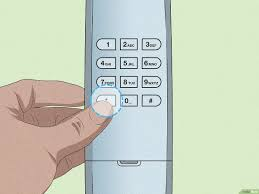
What Is a Chamberlain Garage Door Keypad?
A Chamberlain keypad is a wireless device mounted outside your garage that allows you to open and close the door using a secure PIN code.
Key Benefits:
- Keyless entry (no remote needed)
- Easy access for family members
- Temporary codes for guests or deliveries
📊 Security Insight: Keypad systems using rolling codes significantly reduce unauthorized access risks.
Read too: How Do You Change Code On Garage Door Keypad Fast?
For more about this technology, visit:
https://en.wikipedia.org/wiki/Rolling_code
How Do You Program A Chamberlain Garage Door Keypad (Step-by-Step)
Step 1: Locate the “Learn” Button on the Opener
- Find the Learn button on your garage door opener motor
- Usually located on the back or side panel
- Often near an LED indicator light
💡 Tip: Use a ladder if needed to safely reach the unit.
Step 2: Press the Learn Button
- Press and release the Learn button
- The LED light will turn on
- You now have 30 seconds to complete the next step
Step 3: Enter Your Desired PIN
- Go to your keypad
- Enter a 4-digit PIN code (e.g., 3579)
- Choose a secure and memorable number
Step 4: Press the Enter Button
- Press the Enter key
- Wait for the garage light to blink or hear a click
✔️ This confirms successful programming.
Step 5: Test the Keypad
- Enter your PIN
- Press Enter
- Ensure the garage door opens and closes smoothly
✔️ If it works, your keypad is ready to use.
How to Change Your Keypad PIN
If you want to update your code:
Steps:
- Press the Learn button
- Enter a new 4-digit PIN
- Press Enter
- Wait for confirmation
🔒 Tip: Avoid common PINs like 1234 or 0000.
Chamberlain Learn Button Colors and What They Mean
| Color | Frequency Type | Notes |
|---|---|---|
| Yellow | Security+ 2.0 | Newer models |
| Purple | 315 MHz | Older systems |
| Red/Orange | 390 MHz | Common models |
| Green | 390 MHz | Legacy units |
💡 Knowing your button color helps ensure correct programming.
Why Your Chamberlain Keypad Isn’t Working
Common Issues:
1. Dead Batteries
- Replace with fresh batteries (usually 9V or AA)
2. Incorrect PIN Entry
- Reprogram and try again
3. Out of Range
- Stand closer to the garage door
4. Interference
- Nearby electronics may disrupt signals
How to Reset a Chamberlain Keypad
If programming fails, reset the system.
Reset Steps:
- Press and hold the Learn button for 6–10 seconds
- Release when the LED turns off
- Reprogram keypad and remotes
⚠️ This clears all stored devices.
Advantages vs Disadvantages of Using a Keypad
Advantages:
- Convenient keyless access
- No need to carry a remote
- Easy to share temporary codes
Disadvantages:
- Requires battery maintenance
- Risk if PIN is shared
- Needs occasional reprogramming
Pro Tips for Secure Keypad Use
Best Practices:
- Change your PIN every 3–6 months
- Use random, non-obvious codes
- Avoid writing your PIN near the keypad
- Disable unused codes
🔒 Expert Tip: Regular updates improve security significantly.
Real-World Example
A homeowner forgot their keypad code and reprogrammed it:
- Time spent: 3 minutes
- Cost: $0
- Result: Fully functional keypad with new secure PIN
✔️ Simple steps solved the issue instantly.
Preventive Maintenance Tips
Keep your keypad working smoothly:
- Replace batteries every 12–18 months
- Clean keypad buttons regularly
- Check mounting for stability
- Protect from extreme weather
FAQ: How Do You Program A Chamberlain Garage Door Keypad
1. How long does it take to program a keypad?
Typically 2–5 minutes.
2. Can I program multiple keypads?
Yes, most Chamberlain systems support multiple keypads.
3. What if I forget my keypad PIN?
You can reset and reprogram using the Learn button.
4. Why is my keypad not responding?
Possible causes include dead batteries, incorrect PIN, or interference.
5. Do I need the remote to program the keypad?
No, you only need access to the opener’s Learn button.
6. Is programming a keypad safe to do myself?
Yes, it’s simple and safe with basic instructions.
Conclusion
Understanding how do you program a Chamberlain garage door keypad gives you full control over your garage access and security. With just a few steps, you can set up or reset your keypad and ensure reliable operation.
This quick DIY task saves time, money, and frustration while improving home security. If you found this guide helpful, share it on social media so others can easily program their garage keypads too!
Leave a Reply