If your garage door opener isn’t responding or you’ve lost a remote, you’re likely asking How Do I Reset My Chamberlain Garage Door Opener. This is one of the most common fixes for garage door issues. The good news is that resetting your Chamberlain system is quick, simple, and often solves the problem immediately.
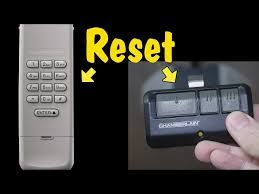
What Does Resetting a Chamberlain Garage Door Opener Do?
Resetting your opener means clearing all stored data and restoring the system to default settings.
Read too: How Do You Change Code On Garage Door Keypad Fast?
What Gets Erased:
- All remote controls
- Wireless keypads
- Smart home connections
- Security access codes
💡 Fact: Home technicians report that resetting solves up to 80% of common garage door issues, especially connectivity problems.
Why Would You Need to Reset Your Chamberlain Opener?
Common Reasons:
- Remote not working
- Moving into a new home
- Lost or stolen remote
- App or Wi-Fi issues
- System glitches
Resetting ensures only authorized devices can access your garage.
Where Is the Learn Button on a Chamberlain Opener?
The Learn button is the key to resetting your system.
Typical Locations:
- Back or side of the motor unit
- Under the light cover
- Near the antenna wire
Learn Button Colors:
| Color | Frequency | Model Type |
|---|---|---|
| Yellow | 310 MHz | Newer models |
| Purple | 315 MHz | Mid-range units |
| Red/Orange | 390 MHz | Older models |
| Green | 390 MHz | Legacy units |
How Do I Reset My Chamberlain Garage Door Opener (Step-by-Step)
Step 1: Locate the Learn Button
Use a ladder if needed and find the Learn button on the opener.
Step 2: Press and Hold the Learn Button
- Press and hold for 6–10 seconds
- The LED light will turn off
Step 3: Confirm the Reset
- All programmed devices are erased
- Memory is cleared
Step 4: Reprogram Your Devices
- Press the Learn button again
- Pair each remote and keypad
✅ Reset complete in under 2 minutes.
How to Reset Chamberlain Remote Controls Only
If the issue is just with a remote:
Steps:
- Remove the battery
- Wait 10–15 seconds
- Reinsert battery
- Reprogram if needed
How to Reset Chamberlain Keypad
Steps:
- Press and hold the Learn button
- Enter a new PIN on the keypad
- Press Enter
- Test the door
How to Reset Chamberlain Wi-Fi Settings
If your smart app isn’t working:
Steps:
- Press and hold the Wi-Fi button
- Wait for LED to blink blue
- Reconnect using the app
- Enter Wi-Fi credentials
Reset Methods Comparison
| Reset Type | Time Required | Best Use Case |
|---|---|---|
| Full Reset | 1–2 minutes | Major issues or security reset |
| Remote Reset | 1 minute | Remote malfunction |
| Keypad Reset | 2–3 minutes | PIN problems |
| Wi-Fi Reset | 5–10 minutes | App connectivity issues |
Common Problems After Reset (And Fixes)
Garage Door Won’t Open
Fix:
- Reprogram remotes
- Check power connection
Remote Not Pairing
Fix:
- Replace battery
- Repeat pairing steps
Keypad Not Working
Fix:
- Reset PIN
- Ensure proper programming
Benefits vs Drawbacks of Resetting
Benefits
- Fixes most technical issues
- Improves security
- Removes unauthorized access
Drawbacks
- Requires reprogramming
- Temporary inconvenience
Expert Tips for a Successful Reset
- Stand within 3 feet of the opener
- Program devices immediately after reset
- Keep instructions handy
- Test all remotes after setup
💡 Pro Tip: Reset your system every 1–2 years for better security.
How Often Should You Reset Your Chamberlain Opener?
Experts recommend resetting:
- When moving into a new home
- After losing a remote
- Every 1–2 years for security
Safety Tips During Reset
- Ensure the garage door is fully closed
- Keep children and pets away
- Use a stable ladder
- Avoid repeated button presses
Understanding Garage Door Opener Systems
Modern garage door openers use advanced wireless signals and encryption to enhance safety.
👉 Learn more here:
https://en.wikipedia.org/wiki/Garage_door_opener
FAQ: How Do I Reset My Chamberlain Garage Door Opener
Q1: How long does it take to reset a Chamberlain opener?
Typically 1–2 minutes.
Q2: Will resetting erase all remotes?
Yes, a full reset removes all programmed devices.
Q3: Do I need to reprogram after reset?
Yes, all remotes and keypads must be reconnected.
Q4: Why is my opener still not working after reset?
Check power supply, wiring, or consider professional help.
Q5: Can I reset without a Learn button?
No, the Learn button is required for most models.
Q6: Is resetting safe to do myself?
Yes, it’s simple and safe if done correctly.
Conclusion
Now you know exactly How Do I Reset My Chamberlain Garage Door Opener quickly and effectively. Whether you’re fixing a problem or improving security, a reset is one of the easiest and most reliable solutions.
Take a few minutes today to reset your system and restore full functionality. If this guide helped you, share it on social media so others can fix their garage door issues too!
Leave a Reply