If your garage remote stops working or you’ve replaced a remote, you’re probably asking How Do I Reprogram My Chamberlain Garage Door Opener. This is a common issue for homeowners who rely on Chamberlain systems for daily convenience and security.
The good news is that reprogramming a Chamberlain opener is usually quick and does not require professional help when you follow the correct steps.
Read too: How Do You Change Code On Garage Door Keypad Fast?
What Is a Chamberlain Garage Door Opener?
A Chamberlain garage door opener is a motorized system that allows you to open and close your garage door using a remote control, keypad, or smart device.
Chamberlain is one of the most widely used garage opener brands in the U.S., known for reliability and compatibility with modern smart home systems.
These systems use radio frequency signals and rolling code technology to enhance security by changing access codes after each use.
Garage door automation is a key part of residential security systems, widely adopted across millions of homes. You can learn more about general garage door systems here: https://en.wikipedia.org/wiki/Garage_door
How Do I Reprogram My Chamberlain Garage Door Opener? (Step-by-Step Guide)
Reprogramming your Chamberlain garage door opener is straightforward if you follow the correct sequence.
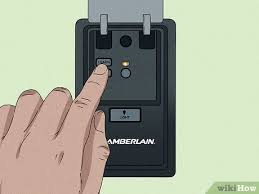
Step 1: Locate the Learn Button
Find the Learn button on your garage door opener motor unit (mounted on the ceiling).
- Usually located near the antenna wire
- Color may vary: yellow, purple, red, or green depending on model
Step 2: Clear Previous Programming (Optional)
If your remote is not responding:
- Press and hold the Learn button for 6–10 seconds
- The indicator light will turn off
- This erases all previously programmed remotes
⚠️ Note: This step will remove ALL connected remotes.
Step 3: Enter Programming Mode
Press the Learn button once.
- A light will turn on or blink
- You have 30 seconds to complete the next step
Step 4: Program the Remote
Within the 30-second window:
- Press and hold the button on your remote
- Hold for 1–3 seconds
- Release when the garage light blinks or clicks
Step 5: Test the Remote
Stand a few meters away and test:
- Press remote button
- Confirm door opens or closes
If successful, programming is complete.
Why Do You Need To Reprogram A Chamberlain Garage Door Opener?
There are several common reasons homeowners need to reprogram their opener:
1. New Remote Replacement
Old remote is lost or damaged.
2. Battery Replacement
Sometimes power interruption resets signal sync.
3. Security Reset
Changing codes improves home safety.
4. Moving Into a New Home
Ensures previous owner’s access is removed.
Expert Insight on Garage Security
Home security professionals recommend resetting garage access systems regularly. According to general residential security studies, garage doors account for nearly 30% of home entry points used during unauthorized access incidents.
This is why reprogramming systems like Chamberlain is an important security habit, not just a technical fix.
Chamberlain Reprogramming Methods Explained
1. Remote Reprogramming
- Uses Learn button
- Fast and simple
- Most common method
2. Keypad Reprogramming
- Requires PIN setup
- Often used for family access
3. Smart App Reprogramming
- Controlled via smartphone
- Found in newer Chamberlain models
- Allows remote management
Comparison: Old Programming vs New Programming
| Feature | Old Setup | Reprogrammed Setup |
|---|---|---|
| Security | Lower | Higher |
| Access control | Shared risk | Controlled |
| Reliability | May fail over time | Stable connection |
| Recommended status | Outdated | Best practice |
Common Problems When Reprogramming Chamberlain Opener
1. Remote Not Syncing
- Battery may be weak
- Incorrect timing during setup
2. Learn Button Not Responding
- Power interruption
- Circuit issue
3. Signal Interference
- Nearby electronics affecting frequency
4. Full Memory Storage
- Some models only store limited remotes
Troubleshooting Guide
Step 1: Replace Remote Battery
Use a fresh CR2032 or CR2016 battery depending on model.
Step 2: Reset Opener
Hold Learn button for 10–15 seconds.
Step 3: Reprogram Again
Repeat full process carefully.
Step 4: Check Distance
Stay within 2–3 meters of motor unit.
How Long Does It Take To Reprogram Chamberlain Garage Opener?
On average:
- 2–5 minutes per remote
- Faster if system memory is already cleared
- Slightly longer for older models
Real-Life Example
A homeowner in Texas reported that after reprogramming their Chamberlain garage opener, they resolved a long-standing issue where the remote would randomly stop working. The issue was caused by outdated sync data, and reprogramming restored full functionality in under 5 minutes.
Tips for Successful Reprogramming
- Keep remote close to opener during setup
- Replace batteries before starting
- Avoid pressing multiple buttons at once
- Follow timing strictly (30-second window)
- Ensure garage unit has stable power
FAQ: How Do I Reprogram My Chamberlain Garage Door Opener
1. How do I reprogram my Chamberlain garage door opener quickly?
Press the Learn button on the motor, then press your remote button within 30 seconds to sync.
2. Why is my Chamberlain remote not working after reprogramming?
It may be due to weak battery, incorrect timing, or memory issues in the opener.
3. Do I need to erase old remotes before adding a new one?
Not always, but resetting improves performance and security.
4. How long does it take to reprogram a Chamberlain opener?
Usually between 2–5 minutes per remote.
5. Can I reprogram Chamberlain garage opener without a remote?
Some models allow keypad or app-based programming, but most require a remote for initial setup.
6. How often should I reprogram my garage opener?
Only when replacing remotes, moving homes, or experiencing connection issues.
Conclusion
Understanding How Do I Reprogram My Chamberlain Garage Door Opener helps you quickly restore access, improve security, and fix common remote issues without professional assistance.
With just a few simple steps, you can reset and re-sync your system in minutes, ensuring smooth and secure garage operation.
If this guide helped you, share it with friends or family who might also need help reprogramming their garage door opener system.
Leave a Reply