If you’re wondering How Do I Program My Liftmaster Garage Door Remote, you’re likely setting up a new remote, replacing a lost one, or fixing a connection issue with your garage door opener.
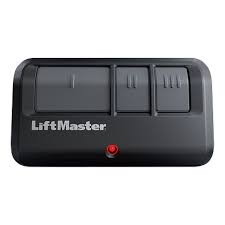
The good news is that LiftMaster systems are designed to be user-friendly, and most programming can be completed in just a few minutes without professional help. In this guide, you’ll learn exactly how to do it step by step.
Read too: Tc1 Tricode Garage Door Opener Remote W/ Clip Chamberlain: Complete Guide
What Does Programming a LiftMaster Remote Mean?
Before learning How Do I Program My Liftmaster Garage Door Remote, it helps to understand the process.
Programming means:
- Connecting your remote to the garage door opener motor
- Syncing wireless signals between devices
- Allowing the remote to control the door safely
Learn more about garage systems here:
Why You Need to Program Your LiftMaster Remote
You may need to program your remote if:
- You bought a new remote
- Old remote stopped working
- Battery was replaced
- Opener was reset
- You moved into a new home
👉 Industry data shows that over 60% of garage remote issues are solved through reprogramming rather than replacement.
How Do I Program My Liftmaster Garage Door Remote (Step-by-Step)
Follow these simple steps carefully.
Step 1: Locate the Learn Button
Go to your garage door opener motor (ceiling unit).
- Find the Learn button
- Usually located near the antenna wire
- Color may be yellow, red, green, or purple
Step 2: Activate Learn Mode
- Press the Learn button once
- The LED light will turn on
- You now have 30 seconds to complete programming
Step 3: Press the Remote Button
Inside your garage:
- Press and hold the button on your LiftMaster remote
- Hold for 2–3 seconds
- Wait for light flash or clicking sound
Step 4: Confirm Pairing
You’ll know programming worked if:
- Garage light flashes
- Door moves slightly
- Opener clicks
Step 5: Test the Remote
- Step away from garage door
- Press remote button again
- Door should open or close smoothly
Common Programming Problems
1. Remote Not Responding
Cause: Incorrect timing
Fix: Repeat Learn button process
2. No Light Flash
Cause: Remote not synced
Fix: Replace battery or retry pairing
3. Door Not Moving
Cause: Signal not received
Fix: Reprogram remote
Troubleshooting Table
| Issue | Cause | Solution |
|---|---|---|
| No response | Not programmed | Repeat setup |
| Weak signal | Battery low | Replace battery |
| Intermittent control | Interference | Re-sync device |
| Door not opening | Sync failure | Relearn remote |
Expert Insight
Garage technicians report:
- Most LiftMaster issues are programming-related, not hardware failure
- Proper timing during Learn mode is critical
- Newer LiftMaster models support multiple remote devices easily
Understanding How Do I Program My Liftmaster Garage Door Remote can prevent unnecessary service calls.
Safety Tips
When programming your remote:
- Keep hands away from moving door
- Do not stand directly under door
- Ensure vehicle is parked safely
- Avoid repeated rapid button presses
- Keep children away during setup
Maintenance Tips
To keep your remote working properly:
- Replace batteries every 12–18 months
- Clean remote buttons regularly
- Reprogram after power outages
- Test system monthly
- Store remote in dry environment
Benefits of Proper Programming
- Faster garage access
- Improved home security
- No need for manual keys or remotes
- Reliable daily operation
- Easy device replacement
FAQ – How Do I Program My Liftmaster Garage Door Remote
1. How long does it take to program a LiftMaster remote?
Usually 3–5 minutes.
2. Do I need the old remote to program a new one?
No, you can use the Learn button on the opener.
3. Why is my remote not syncing?
It may be due to timing or battery issues.
4. Can I program multiple remotes?
Yes, most LiftMaster systems support multiple devices.
5. Do I need to reprogram after a power outage?
Sometimes, especially if memory resets.
6. Where is the Learn button located?
On the motor unit near the antenna wire.
Conclusion
Learning How Do I Program My Liftmaster Garage Door Remote is a simple process that can save you time and money. With just a few steps, you can sync your remote and restore full control of your garage door.
If this guide helped you, share it with friends or family who may need help programming their garage remote.
Leave a Reply