If you’ve just installed a new remote or your existing one suddenly stopped working, you’re probably wondering: How Do I Program My Liftmaster Garage Door Opener without calling a technician. The good news is that most LiftMaster systems are designed for simple, homeowner-friendly programming.
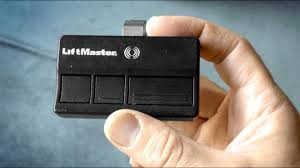
In this guide, you’ll learn exactly how to sync your remote, keypad, or car system with your garage door opener—using clear, step-by-step instructions that anyone can follow.
What Is a LiftMaster Garage Door Opener?
A LiftMaster garage door opener is a motorized device that opens and closes your garage door using a remote control, wall button, or smart system. It is widely used in residential homes due to its durability, safety features, and smart connectivity options.
Read too: Tc1 Tricode Garage Door Opener Remote W/ Clip Chamberlain: Complete Guide
According to general information from Wikipedia, garage door systems have evolved significantly from simple mechanical lifts to advanced smart-enabled automation systems with rolling code security.
LiftMaster units often include:
- Remote controls
- Wireless keypad entry systems
- Wall-mounted control panels
- Smart home integration (Wi-Fi models)
How Do I Program My Liftmaster Garage Door Opener Step by Step?
This is the core process most users need. Follow these instructions carefully:
Step 1: Locate the “Learn” Button
Open your garage door opener unit (mounted on the ceiling). Look for a small button labeled “Learn” or “Program.”
It is usually located:
- On the back or side of the motor unit
- Near the antenna wire
Step 2: Press the Learn Button
Press and release the Learn button once.
- A small LED light will turn on or blink
- You usually have 30 seconds to complete the next step
Step 3: Activate Your Remote
Take your garage remote control and press the button you want to program.
Hold it for about 2–3 seconds, then release.
If successful:
- The garage light may flash
- You may hear a clicking sound
This means the system has accepted the code.
Step 4: Test the System
Wait a few seconds, then press the remote button again.
If the door moves, programming is complete.
If not, repeat the steps.
How Do I Program My Liftmaster Garage Door Opener Keypad?
Many homeowners also use a wireless keypad outside the garage. Here’s how to program it:
Step-by-Step Keypad Setup
- Press the Learn button on the opener unit
- Enter a 4-digit PIN on your keypad
- Press Enter
- Wait for the light to blink or click
Your keypad should now be synced.
Pro tip: Choose a PIN that is easy to remember but hard for others to guess.
Why Isn’t My LiftMaster Programming Working?
Sometimes users struggle with programming. Here are common issues:
1. Timing Issue
You may have exceeded the 30-second pairing window.
2. Weak Battery
Replace the remote battery with a fresh one (usually CR2032 or similar).
3. Memory Full
Some LiftMaster units can only store a limited number of remotes.
4. Interference
Nearby electronics or LED lights may disrupt the signal.
Expert Insight: How Garage Security Has Improved
Modern garage systems use rolling code technology, meaning the access code changes every time you use the remote. This helps prevent hacking or unauthorized access.
Security experts note that smart garage systems significantly reduce break-in risks compared to older fixed-code systems.
LiftMaster Programming Methods Comparison
| Method | Difficulty | Time Needed | Best For |
|---|---|---|---|
| Remote Control | Easy | 2–5 minutes | Daily users |
| Keypad | Easy | 3–5 minutes | Family access |
| Car Integration | Medium | 5–10 minutes | Smart vehicles |
| Smart App (Wi-Fi models) | Easy | 5–15 minutes | Remote monitoring |
How Do I Program My Liftmaster Garage Door Opener in a Car?
Many modern vehicles allow direct garage integration:
Steps:
- Turn ignition ON (do not start engine)
- Hold your car’s garage button
- Press the Learn button on the opener
- Return to car and hold button again
Wait for confirmation blink or click.
This connects your vehicle directly to your garage system.
Safety Tips Before Programming
Before learning How Do I Program My Liftmaster Garage Door Opener, keep these safety tips in mind:
- Keep hands away from moving parts
- Ensure the garage door is fully closed
- Do not stand directly under the door
- Keep children and pets away during setup
Safety should always come first when dealing with motorized systems.
Common Mistakes to Avoid
Many users make simple errors:
- Pressing Learn button too long (resets memory instead of pairing)
- Using old or weak batteries
- Not waiting for confirmation signal
- Programming multiple devices too quickly
Avoiding these mistakes makes setup much smoother.
When Should You Reset Your LiftMaster System?
A full reset is needed when:
- You lose a remote
- You move into a new home
- The system behaves erratically
Resetting clears all stored codes and allows fresh programming.
FAQ: How Do I Program My Liftmaster Garage Door Opener
1. How long does it take to program a LiftMaster remote?
Usually between 2 to 5 minutes, depending on your model and experience.
2. Do I need Wi-Fi to program my LiftMaster garage door opener?
No, basic remote programming does not require Wi-Fi. Only smart app features need internet connection.
3. Why is my LiftMaster remote not working after programming?
Most likely causes include dead batteries, signal interference, or incorrect programming timing.
4. Can I program multiple remotes to one opener?
Yes, most LiftMaster systems allow multiple remotes, but there is a memory limit.
5. How do I erase all programmed remotes?
Hold the Learn button for about 6–10 seconds until the indicator light turns off. This clears all stored devices.
6. Do all LiftMaster models use the same programming method?
The basic process is similar, but smart Wi-Fi models may require app-based setup in addition to manual pairing.
Conclusion
Understanding How Do I Program My Liftmaster Garage Door Opener is much easier than it seems. With just a few simple steps—pressing the Learn button, syncing your remote, and testing the connection—you can complete the setup in minutes without professional help.
LiftMaster systems are designed for convenience, safety, and reliability, making them one of the most user-friendly garage door solutions available today.
If this guide helped you, feel free to share it with friends or family who might also need help setting up their garage door opener.
Leave a Reply