If your remote stopped working or you just installed a new Chamberlain system, you’re probably asking: How Do I Program My Chamberlain Garage Door Opener without calling a technician. The process may sound technical, but it is actually designed for homeowners to complete in just a few minutes.
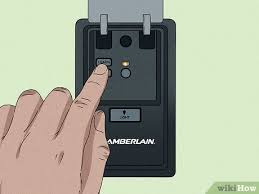
This guide will walk you through the exact steps to program your Chamberlain garage door opener safely and correctly—even if you’ve never done it before.
Read too: Tc1 Tricode Garage Door Opener Remote W/ Clip Chamberlain: Complete Guide
What Is a Chamberlain Garage Door Opener?
A Chamberlain garage door opener is a motorized system that allows you to open and close your garage door using a remote control, keypad, or smart device.
It works using encrypted wireless signals to ensure secure access. These systems are widely used in residential homes due to their reliability and safety features.
According to general principles of wireless access systems described by Wikipedia, modern garage openers use rolling code technology to prevent unauthorized duplication of signals.
Why Do You Need to Program a Chamberlain Garage Door Opener?
There are several common reasons homeowners need to program or reprogram their system:
- New remote control purchase
- Moving into a new home
- Lost or stolen remote
- Battery replacement issues
- System reset after malfunction
Programming ensures only authorized devices can operate your garage door.
How Do I Program My Chamberlain Garage Door Opener Step by Step?
This is the most important section. Follow each step carefully.
Step 1: Locate the Learn Button
Go to your garage door motor unit mounted on the ceiling.
Look for:
- A small button labeled Learn
- Usually near the antenna wire or light cover
- Often colored yellow, purple, or red depending on model
Step 2: Press the Learn Button
Press and release the Learn button once.
- A small LED light will turn on
- You now have 30 seconds to complete programming
👉 Timing is very important here.
Step 3: Activate Your Remote
Take your Chamberlain remote:
- Press and hold the button you want to program
- Hold for 2–3 seconds
- Release when garage light blinks or you hear a click
This means the signal has been accepted.
Step 4: Test the System
Wait a few seconds, then press the remote again.
If the door opens or closes, programming is successful.
If not, repeat the steps carefully.
How To Program Chamberlain Keypad (Bonus Guide)
If you also use a keypad:
Steps:
- Press Learn button on motor unit
- Enter a 4-digit PIN
- Press Enter or #
- Wait for light confirmation
Your keypad is now synced.
How Long Does It Take To Program A Chamberlain Garage Door Opener?
On average:
- Remote programming: 2–5 minutes
- Keypad setup: 3–7 minutes
- Full system reset: 5–10 minutes
Most users complete setup in under 10 minutes.
Types of Chamberlain Programming Systems
1. Standard Remote System
- Basic push-button programming
- Fast and simple setup
2. Keypad Entry System
- PIN-based access
- Ideal for families
3. Smart MyQ System
- App-based control
- Remote access from smartphone
- Real-time notifications
Comparison: Manual vs Smart Programming
| Feature | Manual Remote | Smart System |
|---|---|---|
| Setup Time | Fast | Medium |
| Convenience | Basic | High |
| Remote Access | No | Yes |
| Security Level | High | Very High |
Expert Insight: Why Chamberlain Systems Are Secure
Modern Chamberlain systems use rolling code encryption. This means the access code changes every time the remote is used, making it extremely difficult for hackers to replicate signals.
Security research in wireless systems shows that rolling code technology significantly reduces replay attack risks, making it a standard in residential access systems.
Common Problems When Programming Chamberlain Openers
1. Remote Not Syncing
- Weak battery
- Wrong timing during Learn mode
2. Learn Button Not Responding
- System memory full
- Requires reset
3. Door Not Moving
- Misalignment of sensors
- Signal interference
4. Keypad Not Working
- Incorrect PIN entry
- Outdated programming
How To Reset Chamberlain Garage Door Opener
If programming fails:
Reset Steps:
- Press and hold Learn button for 6–10 seconds
- Wait for LED to turn off
- Release button
- Reprogram all devices
This clears all stored remotes and keypads.
Safety Tips Before Programming
- Keep garage door closed
- Stand away from moving parts
- Use stable ladder if needed
- Keep children and pets away
Safety is important when working near motorized systems.
How Many Devices Can You Program?
Most Chamberlain systems support:
- 3–5 remotes
- Multiple keypads
- Smart device integration (depending on model)
Always check your model specifications for exact limits.
Maintenance Tips for Long-Term Performance
To keep your system working properly:
- Replace remote batteries every 12–18 months
- Clean keypad regularly
- Test system monthly
- Avoid moisture exposure
FAQ: How Do I Program My Chamberlain Garage Door Opener
1. How do I program my Chamberlain garage door opener for the first time?
Press the Learn button, activate your remote within 30 seconds, and wait for confirmation light or click.
2. Why is my Chamberlain remote not working after programming?
Most likely causes include weak batteries, incorrect timing, or interference.
3. Do I need Wi-Fi to program Chamberlain garage door openers?
No. Basic programming works without Wi-Fi. Only smart MyQ features require internet.
4. How do I erase old remotes from Chamberlain opener?
Hold the Learn button for 6–10 seconds until the LED turns off.
5. Can I program multiple remotes to one system?
Yes, most systems support several remotes depending on memory capacity.
6. How long does Chamberlain programming last?
Once programmed correctly, it remains active until manually reset or replaced.
Conclusion
Understanding How Do I Program My Chamberlain Garage Door Opener is easier than most homeowners expect. With just a few simple steps—pressing the Learn button, syncing your remote, and testing the system—you can complete the setup in minutes.
Chamberlain systems are designed for convenience, safety, and modern security, making them one of the most reliable garage solutions available today.
If this guide helped you, consider sharing it on social media so others can also easily set up their garage door opener.
Leave a Reply