If you’ve recently installed a keypad or lost access, you may be asking: How Do I Program A Genie Garage Door Keypad? Don’t worry—the process is easier than it sounds. With just a few simple steps, you can set a secure PIN and get your garage door working smoothly again.
How Do I Program A Genie Garage Door Keypad (Quick Overview)
Programming a Genie keypad typically takes 5–10 minutes and involves syncing the keypad with your garage door opener.
Read too: Tc1 Tricode Garage Door Opener Remote W/ Clip Chamberlain: Complete Guide
👉 The process includes:
- Entering programming mode
- Setting a PIN
- Pairing with the opener
What Do You Need Before Programming?
Before starting, make sure you have:
- A working Genie garage door opener
- Access to the “Learn” or “Program” button
- A ladder (if the opener is mounted high)
- A new PIN code (3–8 digits recommended)
👉 Being prepared can reduce setup time by up to 50%.
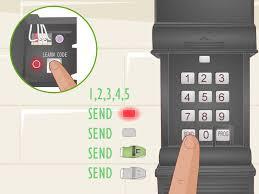
Step-by-Step: How To Program A Genie Garage Door Keypad
Follow these exact steps for most Genie models:
Step 1: Locate the “Learn” Button on the Opener
- Found on the motor unit (ceiling-mounted)
- Usually behind a light cover
Step 2: Press the Learn Button
- Press and release the button
- LED light will begin blinking
⏱️ You have about 30 seconds to complete the next step.
Step 3: Enter Your PIN on the Keypad
- Type your desired 3–8 digit PIN
- Press the “Up/Down” or “Enter” button
Step 4: Wait for Confirmation
- Garage door opener light will blink
- Or you’ll hear a clicking sound
Step 5: Test the Keypad
- Enter your PIN
- Press the Enter button
- Door should open/close
✅ Programming complete!
Why Isn’t My Genie Keypad Working?
This is one of the most common issues homeowners face.
Top Causes
- Dead batteries
- Incorrect PIN entry
- Timing errors during setup
- Signal interference
Quick Troubleshooting Checklist
- Replace batteries (use fresh alkaline batteries)
- Re-enter programming steps
- Stand within 5–10 feet of the opener
- Reset and try again
👉 Around 35% of issues are battery-related.
How to Reset a Genie Garage Door Keypad
If programming fails, a reset can solve the problem.
Reset Steps
- Open keypad cover
- Press and hold Program + Up/Down buttons
- Wait for LED to stop blinking
- Release buttons
- Reprogram from scratch
⚠️ This clears all previous settings.
How Many PIN Codes Can You Set?
Most Genie keypads support:
- 1 primary PIN
- Temporary PINs (on select models)
👉 Temporary PINs are useful for guests or deliveries.
What If My Genie Opener Doesn’t Have a Learn Button?
Older models may use DIP switches instead.
What Are DIP Switches?
Small toggles inside the opener and keypad that must match exactly.
How to Program DIP Switch Models
- Open both opener and keypad
- Match switch positions
- Set PIN
- Test operation
How Genie Keypad Technology Works
Modern Genie systems use rolling code technology, which changes the access code each time you use it.
👉 This improves security and prevents unauthorized entry.
Learn more about garage door technology here:
https://en.wikipedia.org/wiki/Garage_door_opener
Common Mistakes to Avoid
Avoid these errors to ensure smooth programming:
- ❌ Holding the Learn button too long
- ❌ Using weak batteries
- ❌ Entering PIN too slowly
- ❌ Standing too far away
Genie Keypad vs Remote Control
| Feature | Keypad | Remote Control |
|---|---|---|
| Access method | PIN | Button press |
| Security | High | Medium |
| Convenience | No remote needed | Portable |
| Multi-user access | Yes | Limited |
How Long Does Programming Take?
- First-time setup: 10–15 minutes
- Reprogramming: 5 minutes or less
👉 Most users complete the process quickly with proper steps.
Advanced Tip: Add a Temporary PIN
Some Genie models allow temporary PINs.
Benefits
- Grant access to guests
- Set expiration times
- Improve security
How to Maintain Your Genie Keypad
Best Practices
- Replace batteries every 6–12 months
- Clean keypad surface regularly
- Test monthly
- Keep firmware updated (if applicable)
When Should You Call a Professional?
Call a technician if:
- Keypad won’t sync after multiple attempts
- Opener isn’t responding
- Wiring issues are suspected
- System behaves inconsistently
FAQ: How Do I Program A Genie Garage Door Keypad
1. How long does it take to program a Genie keypad?
Usually 5–10 minutes for most users.
2. Why is my Genie keypad blinking but not working?
This often indicates a programming error or low battery.
3. Can I program multiple keypads to one opener?
Yes. Most systems support multiple keypads.
4. What PIN length should I use?
Use 3–8 digits for optimal security.
5. Do I need Wi-Fi to program a Genie keypad?
No. Programming is done locally via the opener.
6. What should I do if I forget my PIN?
Reset the keypad and create a new one.
Conclusion
Now you know exactly How Do I Program A Genie Garage Door Keypad—and it’s much simpler than it seems. By following the step-by-step instructions, you can quickly set up your keypad, improve security, and enjoy convenient access to your garage.
Whether you’re installing a new keypad or troubleshooting an issue, this guide gives you everything you need to get it working smoothly.
If this article helped you, share it on social media so others can fix their garage door issues faster too!
Leave a Reply