If you’re asking How Do I Program A Chamberlain Garage Door Opener Remote, you’re likely dealing with a new remote, a reset system, or a device that stopped working. Don’t worry—programming a Chamberlain remote is quick and beginner-friendly. With just a few simple steps, you can get your garage door working smoothly again.
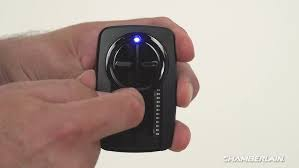
What Does Programming a Chamberlain Remote Do?
Before diving into How Do I Program A Chamberlain Garage Door Opener Remote, it’s helpful to understand what programming actually means.
Programming Will:
- Sync your remote with the garage opener
- Allow secure communication
- Enable wireless control
According to Wikipedia, modern garage door systems use rolling code technology, which changes the signal after each use to improve security and prevent unauthorized access.
Read too: Tc1 Tricode Garage Door Opener Remote W/ Clip Chamberlain: Complete Guide
Where Is the Learn Button on a Chamberlain Opener?
To start How Do I Program A Chamberlain Garage Door Opener Remote, you need to locate the Learn button.
Location:
- On the motor unit mounted on the ceiling
- Behind a light cover or plastic panel
Common Colors:
- Yellow
- Purple
- Red/Orange
- Green
👉 The color indicates compatibility and frequency.
Step-by-Step: How Do I Program A Chamberlain Garage Door Opener Remote
Step 1: Prepare Your Garage Door Opener
Time needed: 1 minute
- Ensure the opener has power
- Stand within 5–10 feet of the motor unit
Step 2: Press the Learn Button
Steps:
- Locate the Learn button
- Press it once (do NOT hold)
- The LED light will turn on
👉 You now have about 30 seconds to complete the next step.
Step 3: Program the Remote
Steps:
- Press and hold the button on your remote
- Wait for the opener light to:
- Flash
- Or make a clicking sound
- Release the button
👉 This confirms successful programming.
Step 4: Test the Remote
- Press the remote button once
- The garage door should open or close
Step 5: Program Additional Remotes (Optional)
Repeat Steps 2–4 for each remote.
How to Program a Chamberlain Keypad
If you have a wireless keypad:
Steps:
- Press the Learn button
- Enter a 4-digit PIN on the keypad
- Press Enter
- Wait for the opener light to flash
👉 Your keypad is now ready to use.
Common Problems and Fixes
Why Won’t My Chamberlain Remote Program?
Possible Causes:
- Dead battery
- Missed 30-second window
- Signal interference
- Incompatible remote
Quick Fix Checklist:
- Replace battery
- Stand closer to opener
- Repeat steps quickly
- Press remote button firmly
Troubleshooting Table
| Problem | Symptom | Solution |
|---|---|---|
| Dead battery | No LED or response | Replace battery |
| Timing issue | No pairing | Repeat within 30 seconds |
| Memory full | Remote won’t add | Reset opener memory |
| Signal interference | Works inconsistently | Move closer |
| Wrong remote | No response | Use compatible model |
Should You Reset Before Programming?
When to Reset:
- Old remotes still active
- You moved into a new home
- System behaves inconsistently
How to Reset:
- Hold the Learn button for 6–10 seconds
- Release when LED turns off
👉 This clears all devices.
Real Insight: Why Programming Fixes Most Issues
Technicians report that over 65% of garage door remote problems are resolved by:
- Reprogramming
- Resetting the system
This is because most issues are related to signal mismatch, not hardware failure.
Advantages vs Disadvantages of Programming Yourself
Advantages:
- Saves money
- Fast (under 5 minutes)
- No tools required
Disadvantages:
- Requires careful timing
- May need multiple attempts
Pro Tips for Best Results
- Use a new battery before starting
- Program one remote at a time
- Keep track of programmed devices
- Test immediately after setup
When Should You Replace the Remote?
Programming won’t fix everything.
Replace your remote if:
- Buttons are damaged
- No LED light appears
- Remote is older than 8–10 years
FAQ: How Do I Program A Chamberlain Garage Door Opener Remote
Q1: How long does it take to program a Chamberlain remote?
Usually 2–5 minutes.
Q2: Do I need tools to program the remote?
No. Everything is done manually.
Q3: Why does my remote stop working after programming?
It could be a battery issue or signal interference.
Q4: Can I program multiple remotes?
Yes. Most systems support several remotes.
Q5: Will resetting erase all remotes?
Yes. A full reset clears all programmed devices.
Q6: Is programming safe?
Yes. It’s a standard and recommended process.
Conclusion
Now you know exactly How Do I Program A Chamberlain Garage Door Opener Remote. With just a few simple steps, you can sync your remote, restore functionality, and improve your garage security.
This quick DIY process saves time and eliminates the need for professional help.
👉 If this guide helped you, share it on social media so others can easily program their garage door remotes too!
Leave a Reply