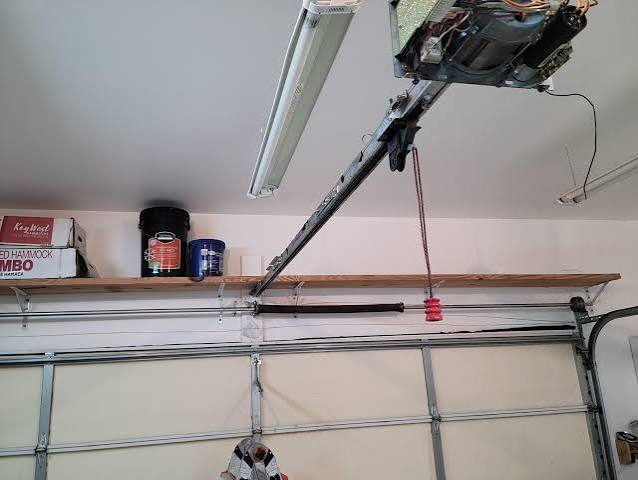
There is nothing more frustrating than standing in your driveway, pressing the button on your Genie garage door remote, and watching your door rise perfectly—only for it to refuse to come back down. This specific issue, where a Genie garage door remote opens but does not close, is a common headache for homeowners across the US. It disrupts your routine, compromises your home’s security, and can leave you stranded if you are trying to leave for work.
The good news? In most cases, this is not a catastrophic failure requiring an expensive technician. Often, it is a simple misalignment, a dirty sensor, or a minor setting adjustment. As an SEO and content specialist with over a decade of experience analyzing home improvement trends, I have compiled the most effective, step-by-step solutions to get your garage door functioning correctly again. Let’s dive into the diagnostics and fixes.
Why Does My Genie Remote Open the Door But Not Close?
Before we start turning screws and resetting circuits, it is crucial to understand why this happens. Modern garage doors are equipped with sophisticated safety mechanisms designed to prevent injury and property damage. If any part of this system detects a potential hazard, it will allow the door to open (since opening poses no risk) but will strictly prohibit closing.
According to safety standards outlined by organizations like the Consumer Product Safety Commission, automatic reversal systems are mandatory. You can read more about these federal safety standards on Wikipedia.
The most common culprits include:
- Obstructed Safety Eyes: The infrared sensors near the floor are blocked or misaligned.
- Travel Limit Issues: The “down” limit is set incorrectly, making the opener think the door has already hit the ground.
- Force Settings: The closing force is too low to overcome friction or weather stripping resistance.
- Remote Signal Interference: Weak batteries or frequency conflicts.
Understanding these root causes helps us apply the right fix rather than guessing randomly.
Check and Align the Safety Sensors (Photo-Eyes)
The number one reason a Genie garage door remote opens but does not close is a problem with the safety sensors, often called “photo-eyes.” These are the small units mounted on either side of the garage door track, about 6 inches off the ground.
How to Diagnose Sensor Issues
Look at the LED lights on each sensor. Typically, one unit has a green light (power) and the other has an amber or red light (signal).
- Solid Lights: Both lights should be solid and bright.
- Blinking Light: If the receiving sensor (usually the one with the amber/red light) is blinking, it means the beam is broken or misaligned.
Step-by-Step Alignment Fix
- Clean the Lenses: Use a soft, dry cloth to wipe away dust, spiderwebs, or dirt from both sensor lenses. Even a thin layer of grime can block the infrared beam.
- Check for Obstructions: Ensure no boxes, bikes, or trash cans are blocking the path between the two sensors.
- Adjust the Brackets: Loosen the wing nut on the sensor bracket slightly. Gently move the sensor until the blinking light turns solid. You may need a helper to watch the light while you adjust.
- Tighten Securely: Once the light is solid, tighten the wing nut. Be careful not to overtighten, which might shift the alignment again.
If the lights are solid but the door still won’t close, proceed to the next step.
Inspect the Travel Limits and Force Settings
If your sensors are aligned but the door reverses immediately after touching the floor, or refuses to go down at all, the issue likely lies in the travel limits or force settings on the motor head.
Adjusting the Down Limit
The “down limit” tells the motor how far to travel before stopping. If this is set too high, the door thinks it has hit an obstacle before it actually reaches the floor.
- Locate the limit adjustment screws on your Genie opener motor. They are usually labeled “Up” and “Down” or marked with arrows.
- Turn the Down limit screw in small increments (usually clockwise to increase travel distance).
- Test the remote after each small adjustment.
Checking the Force Settings
Garage door openers have a force setting that determines how much power is used to close the door. If the weather stripping is tight or the tracks are slightly sticky, the default force might be too low, causing the door to reverse as a safety precaution.
- Increase Closing Force: Locate the force adjustment dial or screw. Increase it slightly.
- Test Balance: Disconnect the opener from the door (pull the red emergency release cord). Manually lift the door halfway and let go. It should stay in place. If it slams down, your springs are unbalanced, and no amount of remote tweaking will fix it—you need a professional spring repair.
Troubleshoot the Remote Control Itself
Sometimes the issue is not the door, but the messenger: the remote. If your Genie garage door remote opens but does not close, it might be sending a weak or inconsistent signal.
Battery Replacement
Even if the remote works for opening, a weak battery might not have enough power to complete the full cycle command consistently. Replace the CR2032 or AA batteries with fresh, high-quality alkaline ones.
Reprogramming the Remote
Interference from neighbors’ openers or LED light bulbs can disrupt signals. Reprogramming can clear this confusion.
- Press the “Learn” button on your Genie motor head (usually located under the light cover). The LED will blink.
- Within 30 seconds, press and hold the button on your remote.
- Wait for the motor light to flash or click, indicating success.
- Test the remote multiple times to ensure consistent operation.
LED Bulb Interference
A surprisingly common modern issue is interference from LED light bulbs in the garage opener unit. Some LEDs emit electromagnetic noise that interferes with the remote’s frequency. Try switching back to incandescent bulbs temporarily to see if the problem resolves.
When to Call a Professional Technician
While DIY fixes resolve 80% of issues, some scenarios require expert attention. Do not attempt to repair broken springs or cables yourself, as they are under extreme tension and can cause severe injury.
| Symptom | Likely Cause | Action |
|---|---|---|
| Door reverses immediately | Misaligned sensors | Clean and align sensors |
| Door stops 1 inch from floor | Down limit set wrong | Adjust down limit screw |
| Remote works intermittently | Weak battery/interference | Replace battery/reprogram |
| Loud grinding noise | Gear/sprocket wear | Call professional |
| Door falls rapidly | Broken spring | Call professional immediately |
FAQ Section
Q: Why does my Genie garage door close when I use the wall button but not the remote?
A: This indicates the issue is with the remote, not the opener mechanism. Try replacing the remote batteries or reprogramming the remote. If it still fails, the remote itself may be damaged and need replacement.
Q: Can cold weather affect my Genie garage door closing?
A: Yes. Cold temperatures can cause metal tracks to contract and lubricants to thicken, increasing friction. This can trigger the safety reverse feature. Apply a silicone-based lubricant to the rollers and tracks to mitigate this.
Q: How do I reset my Genie garage door opener?
A: To perform a hard reset, unplug the opener from the power source for 30 seconds. Plug it back in. This clears temporary memory glitches. You may need to reprogram your remotes afterward.
Q: Is it dangerous if my garage door doesn’t close properly?
A: Yes. An open garage is an invitation to burglars and pests. Furthermore, a malfunctioning door can pose a safety risk to children and pets. Address the issue immediately.
Q: What does it mean if the Genie motor light blinks 5 times?
A: On many Genie models, a blinking light code indicates a specific error. Five blinks often point to a sensor wire issue or a short circuit. Check the wires connecting the sensors to the motor head for cuts or chew marks from rodents.
Conclusion
Dealing with a Genie garage door remote that opens but does not close is stressful, but it is rarely a disaster. By systematically checking your safety sensors, adjusting travel limits, and ensuring your remote is functioning correctly, you can restore full functionality to your garage door in under an hour.
Remember, safety is paramount. Always keep the area clear while testing, and never bypass safety sensors. If you have tried these steps and the issue persists, or if you suspect spring damage, contact a certified Genie dealer or garage door professional.
Did this guide help you fix your garage door? Share this article with your neighbors or on social media to help others solve their garage door woes!
Leave a Reply