Introduction
Buying a new truck is an exciting milestone, but figuring out the tech features can sometimes feel like solving a puzzle. You want the convenience of pulling into your driveway and having your garage door open automatically without fumbling for a remote. If you are wondering, “Does the 2025 GMC Canyon have a garage door opener?” the short answer is yes, but with some important details regarding trim levels and setup.
In this guide, we will break down exactly which models come equipped with this feature, how to program it safely, and what alternatives exist if your specific trim doesn’t include it. We aim to make your transition to your new GMC as smooth as possible, ensuring you get the most out of your vehicle’s smart capabilities.
Which 2025 GMC Canyon Trims Include a Garage Door Opener?
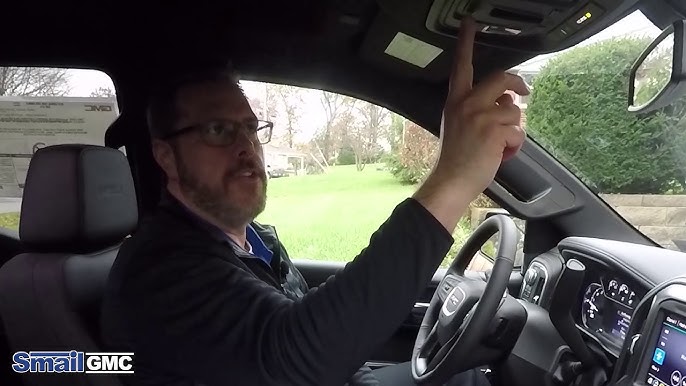
Not every truck on the lot is built the same. GMC typically segments its features across different trim levels to offer variety in pricing and luxury. Understanding where the garage door opener fits into this hierarchy is crucial for your buying decision or current ownership experience.
The Role of HomeLink®
The integrated garage door opener in the GMC Canyon is powered by HomeLink®. This is a universal transceiver that allows your vehicle to communicate with most garage door openers, gate operators, and even home lighting systems. It eliminates the need for cluttered visor clips holding multiple remotes.
Trim Level Breakdown
For the 2025 model year, the availability of HomeLink® generally follows this pattern:
- Elevation (Base Model): Often comes with basic connectivity. HomeLink® may be optional or part of a specific convenience package. You must check the specific window sticker or build configuration.
- AT4 and AT4X: These off-road-oriented trims usually include HomeLink® as part of their premium interior packages, given their higher price point and focus on advanced features.
- Denali: As the luxury flagship of the Canyon lineup, the Denali trim almost universally includes HomeLink® as a standard feature. It is designed for maximum comfort and convenience.
Pro Tip: If you are looking at a used or dealer-stock 2025 Canyon, always look for the three-button panel on the rearview mirror or the overhead console. If those buttons are present, the hardware is there, even if it hasn’t been programmed yet.
How to Program Your 2025 GMC Canyon HomeLink®
Having the hardware is only half the battle. Programming it correctly ensures it works reliably every time. While the process is straightforward, following the exact steps prevents synchronization errors.
Step-by-Step Programming Guide
Before you begin, ensure your garage door area is clear of people and objects. Safety is paramount when dealing with automatic doors.
- Clear Existing Codes (If Necessary): If the buttons were previously programmed, hold down the two outer HomeLink® buttons for about 20 seconds until the indicator light flashes rapidly. This clears old memory.
- Position Your Vehicle: Park your 2025 GMC Canyon outside the garage, facing the door. Keep the engine running or in accessory mode to ensure consistent power during programming.
- Initiate Learning Mode: Press and hold the desired HomeLink® button in your truck. Do not release it yet.
- Sync with Your Garage Remote: While holding the truck button, bring your original handheld garage remote within 1–3 inches of the HomeLink® buttons. Press and hold the button on your handheld remote.
- Wait for the Signal: Continue holding both buttons. The HomeLink® indicator light in your truck will change from a slow blink to a rapid flash. This indicates that the frequency has been successfully learned.
- Test the Connection: Release both buttons. Press the programmed HomeLink® button in your Canyon. The garage door should activate. If it doesn’t, repeat the process, ensuring you are close enough to the receiver.
Troubleshooting Common Issues
Sometimes, the door might move but not stay open, or it might reverse immediately. This is often due to safety sensor alignment or rolling code technology.
- Rolling Codes: Many modern garage openers use security codes that change with every use. If your door reverses after closing, you may need to locate the “Learn” button on your garage door motor unit (usually hanging from the ceiling) and press it to finalize the pairing.
- Interference: LED bulbs in your garage can sometimes emit frequencies that interfere with the signal. Try switching to incandescent bulbs temporarily to test if this is the issue.
HomeLink® vs. Aftermarket Solutions: A Comparison
If your 2025 GMC Canyon trim does not include HomeLink®, or if you prefer a different setup, you have options. Here is how the factory-integrated system compares to aftermarket alternatives.
| Feature | Factory HomeLink® | Aftermarket Visor Clip | Smartphone App Control |
|---|---|---|---|
| Convenience | High (Integrated) | Medium (Separate Remote) | High (Phone Required) |
| Aesthetics | Clean, OEM Look | Cluttered Visor | No Hardware Needed |
| Reliability | Very High | High | Depends on Wi-Fi/Cellular |
| Cost | Included in Trim/Package | $20–$50 | $30–$100 + Subscription |
| Security | Encrypted Signal | Standard RF Signal | App-Based Encryption |
As seen in the table, HomeLink® offers the best balance of aesthetics and reliability. However, smartphone-controlled openers (like MyQ or RatGDO) are gaining popularity for their ability to operate the door from anywhere in the world, not just when you are in the driveway.
Why Integrated Garage Openers Matter for Security
Beyond convenience, an integrated system like HomeLink® offers security benefits. Unlike a plastic remote clipped to your visor, which can be stolen if a window is broken, HomeLink® is hardwired into the vehicle’s system.
According to general automotive security standards, integrated transceivers use encrypted signals that are harder to intercept than older, fixed-code remotes. This aligns with GMC’s commitment to protecting your home and vehicle. For more information on universal transceiver standards, you can refer to the HomeLink Wikipedia page which details the history and technical evolution of these systems.
Frequently Asked Questions (FAQ)
1. Can I program multiple garage doors to my 2025 GMC Canyon?
Yes, the HomeLink® system in the 2025 Canyon typically supports up to three different devices. You can program one button for your home garage, one for a vacation home, and one for a gated community entrance.
2. What if my garage door opener is very old?
HomeLink® is compatible with the vast majority of garage door openers manufactured since 1982. However, if you have an extremely old model, you might need a compatibility bridge or repeater kit, which can be purchased from the HomeLink® website.
3. Does using HomeLink® drain my truck’s battery?
No. The HomeLink® system draws negligible power when not in use. It is designed to operate efficiently within the vehicle’s electrical architecture without impacting battery life.
4. Can I reset HomeLink® if I sell my truck?
Absolutely. It is highly recommended to clear all programmed codes before selling or trading in your 2025 GMC Canyon. Follow the “Clear Existing Codes” step mentioned earlier to wipe the memory clean for the next owner.
5. Is there a mobile app for the GMC Canyon garage opener?
While HomeLink® itself is a radio-frequency device and does not use an app, GMC’s broader connectivity suite (via the GMC Mobile App) may offer integration with smart home devices depending on your subscription plan and home setup. However, direct control of the garage door via the truck’s infotainment screen is not a standard feature; it relies on the physical buttons.
Conclusion
So, does the 2025 GMC Canyon have a garage door opener? Yes, most trims—especially the AT4, AT4X, and Denali—come equipped with the convenient and secure HomeLink® system. Even if you opt for the base Elevation model, it is often available as an option or package add-on.
This feature transforms your daily routine, allowing you to enter your home seamlessly while keeping your hands on the wheel and your eyes on the road. Whether you are hauling gear for a weekend adventure or commuting to work, the integrated garage door opener is a small detail that makes a big difference in daily comfort.
If you found this guide helpful, please share it with fellow GMC owners or friends who are considering buying a 2025 Canyon. Stay safe, drive smart, and enjoy the convenience of your new truck!
Leave a Reply