Introduction
Is there anything more frustrating than sitting in your driveway, pressing your garage remote repeatedly, only to watch your door stay stubbornly closed? You are not alone; millions of homeowners face this exact issue when their old remotes fail or new ones refuse to sync. Whether you just purchased a replacement or found an old unit in your glovebox, understanding how to properly operate the Craftsman 30498 3 Function Visor Remote Control Garage Door Opener is essential for restoring convenience and security to your home. This guide will walk you through everything you need to know, from initial setup to advanced troubleshooting, ensuring you get back to seamless access quickly.
What Is the Craftsman 30498 Remote and How Does It Work?
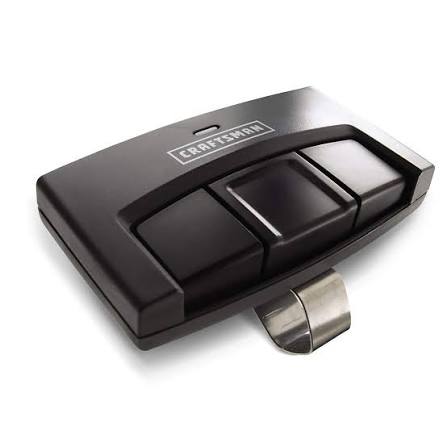
The Craftsman 30498 is a compact, visor-clip style remote designed for ease of use and portability. Unlike bulky handheld remotes, this model is engineered to clip securely onto your car’s sun visor, keeping it within easy reach while driving. It features three distinct buttons, allowing you to control up to three different garage door openers or gate operators independently.
This device operates using radio frequency (RF) signals, typically in the 315 MHz or 390 MHz range, depending on the manufacturing year and the specific opener it is paired with. The “3 Function” aspect means each button can be programmed to a unique receiver, making it ideal for households with multiple entry points, such as a main garage door, a side gate, and a workshop door.
Understanding the basic mechanics helps in troubleshooting. When you press a button, the remote sends a coded signal to the motor unit of your garage door opener. If the code matches the one stored in the opener’s memory, the door activates. If the codes do not match—due to interference, dead batteries, or incorrect programming—the door remains stationary.
Is the Craftsman 30498 Compatible With My Garage Door Opener?
One of the most common questions users ask is whether this specific remote will work with their existing system. The Craftsman 30498 is primarily designed to work with Craftsman garage door openers manufactured between 1997 and 2005. However, compatibility extends beyond just the brand name.
Key Compatibility Factors
- Frequency Match: Ensure your opener operates on the same frequency as the remote. Most Craftsman openers from this era use 315 MHz or 390 MHz.
- Learn Button Color: The color of the “Learn” button on your garage door motor unit is a critical indicator. The 30498 generally works with openers that have a Purple, Red, or Orange learn button. It may not be compatible with newer models featuring a yellow learn button, which often require Security+ 2.0 rolling code technology.
- DIP Switches: Older openers (pre-1997) use DIP switches instead of a learn button. The 30498 is not compatible with these older DIP-switch models without a universal receiver kit.
To verify compatibility, locate your garage door motor unit and check the label for the model number and frequency. You can also refer to the Wikipedia page on Garage Door Openers for a broader understanding of how different frequencies and security protocols have evolved over the decades.
Step-by-Step: How to Program the Craftsman 30498 Remote
Programming your remote correctly is the key to reliable operation. Follow these precise steps to sync your Craftsman 30498 3 Function Visor Remote Control Garage Door Opener with your motor unit.
Prerequisites
- A sturdy ladder to reach the motor unit.
- Fresh AAA batteries installed in the remote.
- Clear access to the “Learn” button on the garage door opener.
Programming Instructions
- Locate the Learn Button: Climb your ladder and find the motor unit hanging from your garage ceiling. Look for a small button labeled “Learn,” “Smart,” or “Program.” It is usually located near the antenna wire. Note the color of this button.
- Clear Old Codes (Optional but Recommended): If you are replacing an old remote, press and hold the Learn button for about 6–10 seconds until the indicator light turns off. This clears all previously programmed remotes. Warning: This will erase all other remotes, so you will need to reprogram them as well.
- Initiate Programming Mode: Press and release the Learn button once. The indicator light on the motor unit should turn on or start blinking. You typically have 30 seconds to complete the next step.
- Sync the Remote: Within those 30 seconds, go to your car or stand within range of the opener. Press and hold the desired button on your Craftsman 30498 remote. Keep holding it until the lights on the motor unit blink or turn off, indicating the code has been accepted.
- Test the Connection: Press the button again briefly. The garage door should activate. If it does, repeat the process for the remaining two buttons if you have other doors to program.
Pro Tip: If the light on the motor unit does not blink when you press the remote button, try changing the batteries in the remote first. Weak batteries are the most common cause of programming failure.
Troubleshooting Common Issues With the 30498 Remote
Even after successful programming, you might encounter issues. Here is how to diagnose and fix the most frequent problems.
Issue 1: Remote Works Intermittently
If the remote works sometimes but not others, the issue is likely related to battery power or signal interference.
- Solution: Replace the batteries with high-quality alkaline AAA batteries. Avoid rechargeable batteries as they may not provide consistent voltage. Also, check if LED bulbs in your garage are causing interference; some LEDs emit noise that disrupts RF signals.
Issue 2: Remote Stops Working After Reprogramming
If you recently reprogrammed the opener, all previous remotes were erased.
- Solution: You must reprogram every remote you own, including keypad entries and car homelink systems, following the steps outlined above.
Issue 3: Visor Clip Breaks or Becomes Loose
The plastic clip on the 30498 can become brittle over time due to heat exposure in the car.
- Solution: Use a strong adhesive like epoxy to reinforce the clip, or consider mounting the remote using double-sided industrial tape if the clip fails completely.
Comparison: Craftsman 30498 vs. Newer Models
| Feature | Craftsman 30498 | Modern Security+ 2.0 Remotes |
|---|---|---|
| Security Code | Fixed Code / Early Rolling Code | Advanced Rolling Code |
| Compatibility | 1997–2005 Craftsman Models | 2005–Present Craftsman/LiftMaster |
| Battery Type | AAA | CR2032 Coin Cell |
| Range | Up to 150 feet | Up to 1,500 feet |
| Interference Resistance | Moderate | High |
As seen in the table, while the 30498 is reliable for its era, newer models offer significantly better range and security. However, for older systems, the 30498 remains the most cost-effective and compatible choice.
Maintaining Your Remote for Long-Term Performance
To ensure your Craftsman 30498 3 Function Visor Remote Control Garage Door Opener lasts for years, follow these maintenance tips:
- Battery Care: Remove batteries if you plan to store the remote for an extended period to prevent corrosion.
- Clean Contacts: Occasionally clean the battery terminals inside the remote with a cotton swab dipped in rubbing alcohol to ensure good connectivity.
- Avoid Extreme Heat: While designed for car visors, prolonged exposure to extreme heat can damage internal components. Try to park in shaded areas when possible.
FAQ Section
Q1: Can I use the Craftsman 30498 with a LiftMaster opener?
A: Yes, in many cases. Since LiftMaster manufactures Craftsman openers, the 30498 is often compatible with LiftMaster models from the same era (late 90s to early 2000s) that use similar frequencies and learn button colors. Always check the learn button color first.
Q2: How do I know if my batteries are dead?
A: If the LED light on the remote does not illuminate when you press a button, the batteries are likely dead or inserted incorrectly. Replace them with fresh AAA batteries and ensure the polarity (+/-) matches the markings in the compartment.
Q3: Why does my remote only work when I am very close to the garage?
A: This is a sign of weak batteries or signal interference. Replace the batteries first. If the issue persists, check for nearby sources of interference, such as large metal objects, LED lights, or other wireless devices operating on the same frequency.
Q4: Can I program the 30498 to work with a Chamberlain opener?
A: It depends on the age of the Chamberlain opener. If it is an older model with a purple, red, or orange learn button, it is likely compatible. Newer Chamberlain models with yellow learn buttons use Security+ 2.0 technology and will not work with the 30498.
Q5: What should I do if I lose the manual for the 30498?
A: You can find digital copies of the manual on the Sears Parts Direct website or various online manual repositories. The programming steps provided in this article are sufficient for most standard setups.
Conclusion
Mastering your Craftsman 30498 3 Function Visor Remote Control Garage Door Opener doesn’t have to be a headache. By understanding its compatibility limits, following the precise programming steps, and performing regular maintenance, you can ensure reliable access to your home for years to come. Remember, the key to success lies in matching the frequency and learn button color of your opener, and keeping fresh batteries in your remote.
If you found this guide helpful, please share it with friends or family who might be struggling with their garage door remotes. A simple share on social media can save someone else from the frustration of a stuck garage door!
Leave a Reply