Introduction
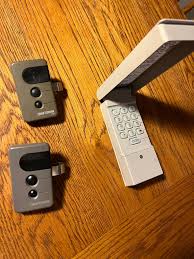
Dealing with a Craftsman 1/2 HP garage door opener keypad not working can be incredibly frustrating, especially when you are locked out of your own home or rushing to leave for work. You are not alone; thousands of homeowners face this exact issue, usually due to simple battery drains or minor synchronization errors. Fortunately, most of these problems can be resolved quickly and safely with a few straightforward troubleshooting steps.
Common Reasons Your Craftsman 1/2 HP Garage Door Opener Keypad Is Not Working
Before diving into repairs, it is helpful to understand why the issue is happening. A non-responsive keypad is rarely a sign of a broken motor. Instead, it is almost always a communication or power issue.
According to the International Door Association (IDA), over 30% of all garage door service calls are related to simple electronic sync failures or dead batteries, not actual motor breakdowns.
Here are the most frequent culprits:
- Depleted Battery: The 9V battery inside the keypad is the most common point of failure.
- Sync Loss: Power surges or recent electrical outages can erase the keypad’s memory, disconnecting it from the main opener unit.
- Locked Mode: Many Craftsman models feature a “Lock” function that temporarily disables all wireless keypad entries for security.
- Weather Damage: Extreme heat, freezing temperatures, or moisture can degrade the internal rubber contacts over time.
Understanding the basic mechanics of a garage door opener can help you diagnose whether the issue lies with the external keypad or the main motor unit itself.
Step-by-Step Guide to Resetting Your Craftsman Keypad
If your keypad is completely unresponsive, a full reset is the best first step. This clears old, corrupted codes and prepares the device for fresh programming.
What you will need:
- A sturdy step ladder
- A fresh 9V alkaline battery
- Your desired 4-digit PIN
The Reset Process:
- Locate the LEARN Button: Climb your ladder and find the motor unit mounted on your garage ceiling. The LEARN button is typically located on the back or side panel. It is usually yellow, purple, red, or green.
- Clear the Memory: Press and hold the LEARN button for exactly 6 seconds. The small indicator light next to it will turn on, and then blink off. This confirms the opener’s memory has been wiped.
- Reset the Keypad: On your outdoor keypad, press and hold the
*(star) and#(pound) keys simultaneously for 3 seconds until the LED light blinks. - Enter a Temporary Code: Type
0000and pressENTER. The light should blink rapidly, confirming the factory reset is complete.
Pro Tip: Always perform this reset with the garage door fully closed to prevent any accidental safety hazards.
Battery Replacement: A Quick Win for Keypad Issues
If the reset process did not work, the battery is the next logical suspect. Even if the keypad light flickers, the voltage may be too low to transmit a strong signal to the 1/2 HP motor.
How to replace the battery correctly:
- Slide the keypad cover downward to expose the battery compartment.
- Remove the old 9V battery. Note: If you see any white, powdery corrosion on the terminals, clean it gently with a cotton swab dipped in white vinegar.
- Insert a brand-new, high-quality 9V alkaline battery. Avoid heavy-duty or zinc-carbon batteries, as they drain faster in extreme outdoor temperatures.
- Snap the cover back into place securely to maintain the weatherproof seal.
A high-quality alkaline battery should last between 12 to 18 months, depending on your local climate and usage frequency.
Reprogramming the Keypad to Your Craftsman 1/2 HP Opener
Once the keypad is reset and powered, you must sync it back to the main unit. This process re-establishes the encrypted rolling code connection.
- Press and hold the
*and#buttons on the keypad for 3 seconds until the light blinks. - Within 30 seconds, go to the motor unit and press the LEARN button once. The indicator light will illuminate steadily.
- Return to the keypad within 30 seconds.
- Enter your desired 4-digit PIN (e.g.,
1234). - Immediately press and hold the
ENTERbutton. - Watch the motor unit: the light will blink twice to confirm the new code has been successfully learned.
Test the system by closing the garage door and using the new PIN to open it.
DIY Troubleshooting vs. Professional Help
Sometimes, a keypad issue points to a deeper problem with the logic board or antenna. Use this quick comparison to decide your next move.
| Factor | DIY Troubleshooting | Professional Repair |
|---|---|---|
| Cost | $10 – $15 (Cost of a new battery) | $85 – $150 (Service call + parts) |
| Time Required | 15 – 30 minutes | 1 – 3 hours (scheduling dependent) |
| Expertise Needed | Beginner (No tools required) | Certified Technician |
| Risk Level | Very Low (Safe if door is closed) | Low (Handled by insured pros) |
| Best For | Dead batteries, lost sync, locked mode | Fried logic boards, damaged antenna wires |
If you have tried resetting, replacing the battery, and reprogramming without success, it is highly recommended to consult a certified garage door technician.
Frequently Asked Questions (FAQ)
Q1: How do I know if my Craftsman keypad battery is truly dead?
A: If pressing any button fails to illuminate the LED light on the keypad, the battery is completely dead. If the light is dim or flickers, the battery is weak and lacks the voltage needed to send a signal to the opener.
Q2: Can rain or extreme weather damage my outdoor garage door keypad?
A: Yes. While Craftsman keypads are designed to be weather-resistant, prolonged exposure to heavy rain, snow, or extreme heat can compromise the rubber gasket. This allows moisture to corrode the internal circuit board over time.
Q3: What does it mean if the Craftsman opener light blinks 10 times when I press the keypad?
A: A 10-blink sequence typically indicates that the safety reversal sensors are misaligned or obstructed. The opener will refuse to close (or open, in some models) if the sensor beam is broken, regardless of the keypad input. Check for dirt, spider webs, or misalignment on the sensors near the floor.
Q4: How often should I replace my garage door keypad battery?
A: It is best practice to replace the 9V battery once a year, ideally at the start of winter. Cold temperatures reduce battery efficiency, and a proactive replacement prevents unexpected lockouts.
Q5: Is it safe to use a universal keypad with a Craftsman 1/2 HP opener?
A: Yes, most universal keypads (like those from Chamberlain or LiftMaster) are fully compatible with Craftsman 1/2 HP openers manufactured after 1993, as they share the same parent company and rolling-code technology. Just ensure the universal remote explicitly lists “Craftsman” on its packaging.
Conclusion
A Craftsman 1/2 HP garage door opener keypad not working is a highly common, highly solvable problem. By systematically checking the battery, performing a clean reset, and carefully reprogramming the device, you can restore secure, convenient access to your garage in under 30 minutes. Remember, regular maintenance—like an annual battery swap—can prevent this issue from ever happening again.
Did this guide help you get your garage door working again? Share this article on Facebook, X (Twitter), or Pinterest to help a friend or family member who might be struggling with the same frustrating keypad issue!
Disclaimer: Always prioritize safety. Ensure the garage door is fully closed before performing any resets or reprogramming on the motor unit to prevent accidental movement.
Leave a Reply