If you’re looking into Changing The Code On A Chamberlain Garage Door Opener, you’re likely focused on improving security or fixing access issues. Whether you’ve moved into a new home or suspect unauthorized access, updating your garage code is a smart move. The process is simple—and you can do it yourself in just a few minutes.
Why Should You Change Your Garage Door Code?
Understanding the importance of Changing The Code On A Chamberlain Garage Door Opener helps you stay proactive about home security.
Top Reasons:
- Moving into a new home
- Lost or stolen remote
- Old tenants or users still have access
- Routine security maintenance
According to Wikipedia, modern garage door systems use rolling code technology, which enhances security by generating a new code after each use—but your keypad PIN still needs manual updates.
Read too: Tc1 Tricode Garage Door Opener Remote W/ Clip Chamberlain: Complete Guide
What Types of Codes Can You Change?
There are two main types of codes in a Chamberlain system:
1. Keypad PIN Code
- Used for exterior access
- Typically 4 digits
2. Remote/Opener Code
- Synced via Learn button
- Controls wireless access
👉 Most users are referring to the keypad PIN when changing the code.
Where Is the Learn Button on a Chamberlain Opener?
Before starting, locate the Learn button.
Location:
- On the motor unit mounted to the ceiling
- Behind a light cover
Common Colors:
- Yellow
- Purple
- Red/Orange
- Green
👉 This button is essential for programming and resetting codes.
Changing The Code On A Chamberlain Garage Door Opener (Step-by-Step)
Method 1: Change Keypad Code (Most Common)
Time Required: 2–3 minutes
Steps:
- Press and hold the Learn button on the opener
- Release when the LED lights up
- Within 30 seconds, go to your keypad
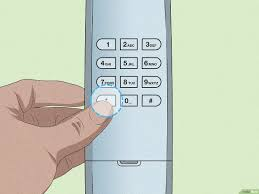
- Enter your new 4-digit PIN
- Press and hold the Enter button
- Wait for the garage opener light to blink
👉 This confirms your new code is saved.
Method 2: Reset All Codes (Full Security Reset)
Use this if you want to remove all old remotes and codes.
Steps:
- Press and hold the Learn button for 6–10 seconds
- Release when the LED turns off
What Happens:
- All remotes are erased
- Keypads are disconnected
- You must reprogram everything
Method 3: Reprogram Remote Controls
After resetting, reconnect your remotes.
Steps:
- Press the Learn button
- Press the remote button
- Wait for the opener light to flash
👉 Repeat for each remote.
Common Problems and Fixes
Why Won’t My New Code Work?
Possible Causes:
- Missed 30-second programming window
- Incorrect PIN entry
- Dead keypad battery
Quick Fix Checklist:
- Replace keypad battery
- Re-enter PIN carefully
- Repeat programming steps
- Stand close to opener
Troubleshooting Table
| Problem | Symptom | Solution |
|---|---|---|
| Dead keypad battery | No response | Replace battery |
| Incorrect PIN | Door won’t open | Reprogram code |
| Timing issue | Code not saved | Repeat within 30 seconds |
| Memory conflict | Old codes still work | Perform full reset |
| Signal issue | Intermittent operation | Move closer |
Real Insight: Why Changing Codes Matters
Home security experts recommend updating garage codes regularly. In fact, garages are one of the most common entry points for break-ins due to outdated or shared access codes.
👉 Changing your code reduces unauthorized access risk instantly.
Advantages vs Disadvantages of Changing Garage Code
Advantages:
- Improves security
- Removes old users
- Quick and easy process
Disadvantages:
- Requires reprogramming remotes (if reset)
- Temporary inconvenience
Pro Tips for Maximum Security
- Change your code every 6–12 months
- Avoid simple PINs like “1234”
- Use a unique combination
- Keep your keypad clean and functional
When Should You Call a Professional?
You may need help if:
- Keypad doesn’t respond at all
- Opener light doesn’t react
- System fails after multiple attempts
FAQ: Changing The Code On A Chamberlain Garage Door Opener
Q1: How long does it take to change the code?
Usually 2–5 minutes.
Q2: Do I need tools to change the code?
No. The process is completely manual.
Q3: Will changing the code affect my remote?
No, unless you perform a full reset.
Q4: How many digits can my PIN be?
Most Chamberlain keypads use 4-digit PINs.
Q5: Why does my keypad not respond?
It may have a dead battery or need reprogramming.
Q6: Is it safe to change the code frequently?
Yes. It’s recommended for better security.
Conclusion
Mastering Changing The Code On A Chamberlain Garage Door Opener is one of the easiest ways to improve your home’s security. Whether you’re updating your PIN or performing a full reset, the process is fast, simple, and highly effective.
By following this guide, you can confidently manage access to your garage and protect your home.
👉 If this guide helped you, share it on social media so others can secure their garage systems easily too!
Leave a Reply