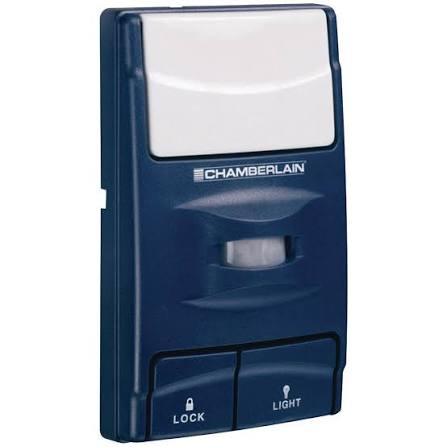
Have you ever fumbled for your keys in a dark garage, wishing the lights would just turn on automatically? Or perhaps you’ve worried about leaving the garage door open while you’re asleep or away from home? The Chamberlain Garage Door Opener Motion Detecting Wall Control Panel 935Cb is designed to solve these exact problems, bringing a new level of intelligence and safety to your daily routine.
In this guide, we will explore how this innovative device transforms a standard garage into a smart, secure, and user-friendly space. Whether you are a tech enthusiast or simply looking for practical home improvements, understanding the capabilities of the 935Cb can help you make an informed decision for your home.
What Is the Chamberlain 935Cb Motion Detecting Wall Control?
The Chamberlain 935Cb is not just a simple button to open and close your garage door; it is a sophisticated wall-mounted console that integrates motion detection technology with standard garage door operations. Unlike traditional wall controls that only offer basic functionality, the 935Cb adds a layer of automation by detecting movement within the garage.
When motion is detected, the panel automatically triggers the garage door opener’s light to illuminate the space. This feature is particularly useful for homeowners who frequently enter their garage through a side door or need hands-free lighting while carrying groceries or tools. By integrating seamlessly with most Chamberlain and LiftMaster garage door openers, the 935Cb serves as a central hub for both control and awareness.
Key Technical Specifications
| Feature | Specification |
|---|---|
| Model Number | 935Cb |
| Compatibility | Most Chamberlain & LiftMaster Openers |
| Power Source | Hardwired (Low Voltage) |
| Motion Detection Range | Up to 10-15 feet (adjustable sensitivity) |
| Light Control | Automatic On/Off via Motion |
| Security Features | Lock Button, Timer-to-Close |
How Does the Motion Detection Feature Enhance Security?
One of the primary concerns for homeowners is the security of their garage, which often serves as a direct entry point into the house. The motion detection capability of the Chamberlain Garage Door Opener Motion Detecting Wall Control Panel 935Cb plays a crucial role in deterring potential intruders and increasing visibility.
When the sensor detects movement, it doesn’t just turn on the light; it signals activity. For many burglars, a well-lit environment is a deterrent because it increases the risk of being seen. Furthermore, if you have a camera system installed in your garage, the sudden illumination triggered by the 935Cb ensures that any motion is captured in clear detail rather than in grainy night vision.
According to general home security principles, lighting is one of the most effective non-intrusive security measures. By automating this process, the 935Cb ensures that your garage is never left in darkness when someone is present, whether it’s you returning home late at night or an unexpected visitor.
Expert Insight: Integrating automated lighting with access control points significantly reduces the “dark spots” in home security perimeters. Devices like the 935Cb bridge the gap between passive monitoring and active deterrence.
For more information on how home automation contributes to broader security ecosystems, you can refer to resources on Home Automation.
Is the Chamberlain 935Cb Compatible With My Existing Opener?
Before purchasing any new garage accessory, compatibility is a critical factor. The good news is that the Chamberlain 935Cb is designed to work with a wide range of Chamberlain and LiftMaster garage door openers manufactured after 1993. These models typically use a standard two-wire connection for wall controls, making the installation process straightforward for most users.
Checking Your Compatibility
To ensure the 935Cb will work with your current setup, follow these steps:
- Identify Your Opener Model: Look for the model number on the motor unit of your garage door opener. It is usually located on the back or side of the unit.
- Check the Year of Manufacture: If your opener was made after 1993, it is highly likely to be compatible.
- Inspect the Wall Control Port: Most compatible openers have a terminal labeled “Wall Control” or similar, which accepts a two-wire connection.
If you have an older model or a non-Chamberlain brand, you may need to consult a professional installer or consider upgrading your entire garage door opener system to enjoy the benefits of smart motion detection.
Step-by-Step Installation Guide for the 935Cb
Installing the Chamberlain Garage Door Opener Motion Detecting Wall Control Panel 935Cb is a DIY-friendly task that typically takes less than 30 minutes. However, safety should always be your top priority. Ensure that the garage door opener is unplugged or the power is disconnected before starting any wiring work.
Tools You Will Need
- Screwdriver (Phillips head)
- Wire strippers
- Drill and bits (if mounting on drywall or concrete)
- Level
- Ladder
Installation Steps
- Remove the Old Wall Control: Unscrew the existing wall control panel from the wall. Disconnect the two wires attached to the back of the unit. Note the color or position of the wires, although polarity usually does not matter for these low-voltage systems.
- Prepare the New Wires: If the existing wires are too short or damaged, strip about 1/2 inch of insulation from the ends. If you need to extend the wiring, use 22-gauge stranded wire, which is standard for garage door applications.
- Mount the Backplate: Hold the backplate of the 935Cb against the wall at your desired height (typically 4–5 feet high for easy access). Use a level to ensure it is straight, then mark the screw holes. Drill pilot holes and secure the backplate with screws.
- Connect the Wires: Attach the two wires from your garage door opener to the terminals on the back of the 935Cb. Tighten the screws securely to ensure a good connection.
- Attach the Faceplate: Snap the front cover of the 935Cb onto the backplate. Ensure it clicks into place firmly.
- Restore Power and Test: Plug your garage door opener back in. Press the button on the 935Cb to test the door operation. Walk in front of the sensor to verify that the light turns on automatically.
Pro Tip: If the motion sensor is too sensitive or not sensitive enough, you can adjust the sensitivity settings through the opener’s main unit or via the companion app if your opener is Wi-Fi enabled.
Advantages and Disadvantages of the 935Cb
To help you decide if this device is right for you, here is a balanced look at its pros and cons.
Advantages
- Enhanced Convenience: Automatic lighting means you never have to search for a switch in the dark.
- Improved Security: Illuminates the garage upon entry, deterring unauthorized access.
- Easy Installation: Uses standard two-wire connections, making it compatible with most existing setups.
- Sleek Design: Modern aesthetic that blends well with contemporary garage interiors.
Disadvantages
- Hardwired Requirement: Requires existing wiring or new wiring installation, which may not be ideal for all garage layouts.
- Limited Smart Features: While it has motion detection, it does not offer remote monitoring or app-based control unless paired with a Wi-Fi enabled opener.
- Sensitivity Adjustments: Some users may need to tweak the sensor sensitivity to avoid false triggers from pets or small movements.
Frequently Asked Questions (FAQ)
1. Can I adjust the sensitivity of the motion detector on the 935Cb?
Yes, the sensitivity of the motion detector can often be adjusted. Depending on your specific garage door opener model, you may be able to change the sensitivity settings via the opener’s main control board or through the MyQ app if your system is connected to Wi-Fi. This allows you to prevent false alarms caused by pets or minor movements.
2. Does the 935Cb work with non-Chamberlain garage door openers?
The 935Cb is specifically designed for Chamberlain and LiftMaster openers. While it uses a standard two-wire connection, compatibility with other brands is not guaranteed. It is recommended to use a wall control panel specified by your opener’s manufacturer to ensure full functionality and warranty coverage.
3. What happens if the power goes out?
Since the 935Cb is hardwired to the garage door opener, it will not function during a power outage unless your opener is equipped with a battery backup system. In such cases, you can still manually operate the garage door using the emergency release cord.
4. Is the 935Cb weatherproof?
The 935Cb is designed for indoor use. If you plan to install it in a location exposed to moisture or extreme temperatures, such as an unheated garage in a cold climate, ensure that the area is dry and protected. While it is durable, it is not rated for outdoor exposure.
5. Can I have multiple wall controls installed?
Yes, you can install multiple wall controls in different locations within your garage. Simply connect them in parallel to the same two-wire terminal on the garage door opener. This is useful for large garages where you want access points near both the side door and the interior house door.
Conclusion
The Chamberlain Garage Door Opener Motion Detecting Wall Control Panel 935Cb is a simple yet effective upgrade for any homeowner looking to enhance the security and convenience of their garage. By automating the lighting process and providing a modern interface for door control, it addresses common pain points such as darkness and manual operation.
Whether you are tired of fumbling for light switches or want to add an extra layer of security to your home, the 935Cb offers a reliable solution. Its ease of installation and broad compatibility make it an accessible choice for DIY enthusiasts and professionals alike.
If you found this guide helpful, please consider sharing it on social media to help others discover the benefits of smart garage solutions. Have you installed a motion-detecting control panel in your garage? Share your experience in the comments below!
Leave a Reply