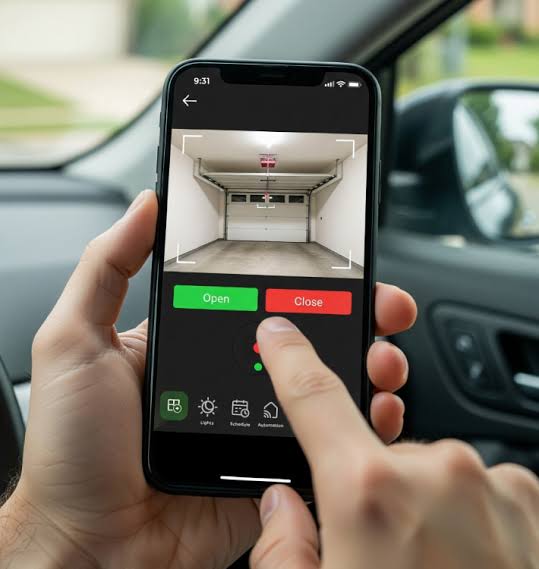
Have you ever pulled into your driveway during a heavy rainstorm, only to realize you left your physical remote inside the house? Or perhaps you are halfway to work when that nagging doubt creeps in: Did I actually close the garage door? These are common frustrations for modern homeowners. The good news is that technology has evolved significantly. If you are asking, “Can you use your phone to open your garage door?” the answer is a resounding yes. With the right smart devices, your smartphone can become the ultimate key to your home, offering convenience, security, and peace of mind.
How Does Smartphone Garage Control Actually Work?
Before diving into the installation process, it is essential to understand the mechanics behind this technology. Traditional garage door openers rely on radio frequency (RF) signals sent from a handheld clicker to a receiver unit attached to the motor. Your smartphone, however, does not have an RF transmitter built-in. Instead, it uses Wi-Fi or cellular data to communicate with the cloud.
To bridge this gap, you need a smart garage door controller. This small device connects to your existing garage door opener’s wiring and links to your home’s Wi-Fi network. When you tap “Open” on your phone app, the signal travels from your phone to the cloud, down to your home router, and finally to the controller, which triggers the motor.
This system allows for two-way communication. Unlike old remotes that simply send a signal and hope for the best, smart controllers send confirmation back to your phone. You will receive a notification stating exactly when the door opened or closed, adding a layer of transparency that traditional systems lack.
What Are the Best Ways to Connect Your Phone to Your Garage?
Not all smart garage solutions are created equal. Depending on your budget, technical comfort level, and existing ecosystem, there are three primary methods to achieve phone-based control.
1. Dedicated Smart Garage Controllers
These are aftermarket devices designed specifically for this purpose. Brands like Chamberlain MyQ, Meross, and RatGDO are popular choices. They are generally affordable (ranging from $30 to $100) and easy to install. Most require a simple connection to the “bell wire” terminals on your garage door motor unit.
2. Smart Plugs with Monitoring
For older garage doors that do not have smart-compatible motors, some users attempt to use smart plugs. However, this method is not recommended for safety reasons. Smart plugs can cut power to the motor but cannot safely trigger the open/close mechanism without complex and potentially dangerous wiring modifications. Stick to dedicated controllers for reliability.
3. Integrated Smart Home Hubs
If you already use a comprehensive smart home system like Samsung SmartThings, Apple HomeKit, or Amazon Alexa, you may find garage door modules that integrate directly into these ecosystems. These often offer superior automation capabilities, such as closing the garage automatically when your phone’s GPS detects you have left the area.
| Feature | Dedicated Controller (e.g., MyQ) | Smart Hub Integration | Physical Remote |
|---|---|---|---|
| Cost | Low ($30–$100) | Medium to High | Very Low |
| Installation | DIY Friendly | Moderate | Plug & Play |
| Remote Access | Yes (Anywhere) | Yes (Anywhere) | No (Line of Sight) |
| Status Alerts | Yes | Yes | No |
| Voice Control | Often Supported | Native Support | No |
Is It Safe to Control Your Garage Door via Phone?
Security is the most common concern when moving away from physical remotes. After all, if someone hacks your phone, do they have access to your home? While no digital system is 100% immune to threats, modern smart garage controllers employ robust security measures.
Most reputable brands use AES-128-bit encryption, the same standard used by banks and government agencies. This ensures that the signal between your phone and the garage cannot be easily intercepted or “replayed” by thieves using signal grabbers—a common vulnerability with older fixed-code remotes.
Furthermore, many apps now support Two-Factor Authentication (2FA). This adds an extra layer of protection, requiring a code sent to your email or another device before granting access to the garage controls. For more detailed information on cybersecurity standards in home automation, you can refer to general encryption protocols discussed on Wikipedia.
To maximize safety:
- Always update your app and firmware regularly.
- Use strong, unique passwords for your smart home accounts.
- Enable 2FA wherever available.
- Avoid connecting your garage controller to public Wi-Fi networks.
Step-by-Step Guide: Installing a Smart Garage Controller
Installing a smart garage controller is typically a straightforward DIY project that takes less than 30 minutes. Here is a general guide applicable to most major brands like Chamberlain MyQ or Meross.
Tools Needed:
- A sturdy ladder
- A screwdriver (usually Phillips head)
- Your smartphone with the manufacturer’s app installed
Installation Steps:
- Safety First: Unplug your garage door opener from the power outlet. This prevents accidental activation while you are working on the wiring.
- Locate the Terminals: Climb the ladder and find the back panel of your garage door motor unit. Look for two small screws labeled with a bell icon or marked as “Terminal 1 and 2.” These are where your wall-mounted button wires are connected.
- Connect the Wires: Loosen the two terminal screws slightly. Take the two thin wires from your new smart controller and insert one into each terminal. It usually does not matter which wire goes into which terminal. Tighten the screws securely.
- Mount the Device: Use the adhesive strip or screws provided to mount the smart controller box near the motor unit. Ensure it is within range of your home’s Wi-Fi signal. If your Wi-Fi is weak in the garage, consider installing a Wi-Fi extender.
- Power Up: Plug your garage door opener back in. The LED light on the smart controller should start blinking, indicating it is in pairing mode.
- App Configuration: Open the manufacturer’s app on your phone. Follow the on-screen instructions to connect the device to your Wi-Fi network. You will likely need to enter your Wi-Fi password.
- Test the System: Once connected, try opening and closing the door using the app. Stand clear of the door and ensure it moves smoothly. Check if you receive a push notification confirming the action.
What Are the Pros and Cons of Using Your Phone as a Remote?
Switching to phone-based control offers significant advantages, but it also comes with minor drawbacks. Understanding these will help you decide if it is the right move for your household.
Advantages
- Universal Access: You never lose your “remote” because you always have your phone. This is ideal for families where multiple people need access.
- Guest Access: You can grant temporary access to dog walkers, delivery personnel, or house sitters without handing over a physical key or remote.
- Automation Potential: Integrate your garage with other smart devices. For example, set your lights to turn on automatically when the garage door opens at night.
- History Logs: Review a log of who opened the door and when, providing an audit trail for security purposes.
Disadvantages
- Dependency on Internet: If your home internet goes down, you may lose remote access. However, most controllers still work with the physical wall button or local Wi-Fi if the internet is down but the router is on.
- Battery Drain: While minimal, keeping the app active and receiving notifications can slightly impact your phone’s battery life.
- Learning Curve: Elderly family members or those less tech-savvy might find tapping an app less intuitive than pressing a large physical button.
Frequently Asked Questions (FAQ)
1. Can I use my phone to open the garage door if the power is out?
No. If your home loses electricity, the garage door motor will not function, regardless of whether you are using a phone or a physical remote. However, most garage doors have a manual release cord (usually a red rope) that allows you to disengage the motor and lift the door manually.
2. Do I need a new garage door opener to use my phone?
In most cases, no. As long as your existing opener was manufactured after 1993 and has standard safety sensors and terminal connections, you can add a smart controller to it. Only very old models with proprietary wiring may require a full motor replacement.
3. Will using my phone drain my car battery or phone battery?
Using your phone to open the garage door consumes a negligible amount of data and battery life, similar to sending a text message. It will not have any impact on your car battery, as the phone communicates via Wi-Fi or cellular networks, not through the vehicle.
4. Can multiple phones control the same garage door?
Yes. Most smart garage apps allow you to create a “family” or “household” account. You can invite other users via their email addresses, granting them full or restricted access to the garage door. This is perfect for spouses, children, or trusted neighbors.
5. What happens if my Wi-Fi is down?
If your Wi-Fi is down, you will not be able to control the garage door remotely from outside your home. However, if you are at home and connected to the local network (even without internet), some advanced hubs may still allow local control. Always keep a physical remote or know the location of the manual release cord as a backup.
Conclusion
So, can you use your phone to open your garage door? Absolutely. Not only is it possible, but it is also one of the most impactful upgrades you can make for home convenience and security. By replacing clunky plastic remotes with a sleek smartphone interface, you gain the ability to monitor and control your home from anywhere in the world.
Whether you choose a simple aftermarket controller like MyQ or a fully integrated smart home system, the benefits of real-time status updates and remote access are undeniable. Just remember to prioritize security by using strong passwords and keeping your firmware updated.
Ready to upgrade your home? Share this guide with friends who are still fumbling for keys in the rain, and let them know that the future of garage access is already in their pocket!
Leave a Reply