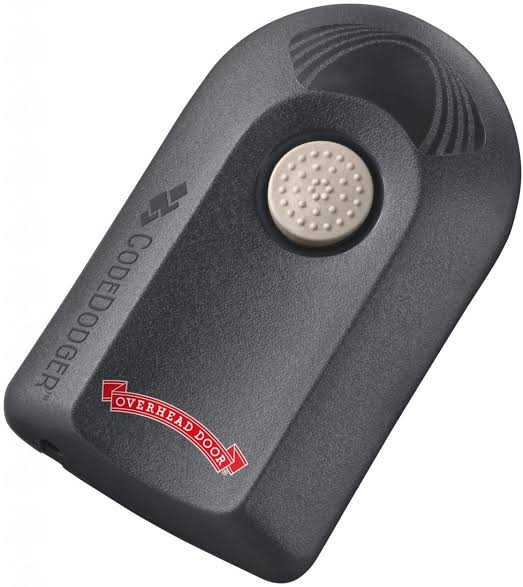
Have you ever stood in your driveway, rain pouring down, frantically pressing the button on your garage door remote only to realize it’s dead or lost? It is a frustrating scenario that happens to almost every homeowner at some point. The good news is that you do not need to replace your entire garage door system. If you are asking, “Can you buy a replacement remote for garage door opener?” the answer is a resounding yes. In fact, finding a compatible replacement is often easier and more affordable than you might think.
This guide will walk you through everything you need to know about purchasing, selecting, and programming a new remote, ensuring you get back into your garage quickly and securely.
Identifying Your Garage Door Opener Model
Before you rush to buy the first remote you see online, you must identify exactly what type of opener you have. Garage door openers are not one-size-fits-all. Using the wrong remote can lead to compatibility issues, security vulnerabilities, or simply a device that does not work at all.
To find your model number, look for a label or sticker on the motor unit hanging from your garage ceiling. This label usually contains:
- The manufacturer’s name (e.g., Chamberlain, LiftMaster, Genie, Craftsman).
- The model number.
- The serial number.
- The frequency (usually 315 MHz or 390 MHz).
If the label is faded or missing, check the original manual or look for branding on the old remote itself. Knowing these details is crucial because frequency matching is the most common reason replacements fail. A 315 MHz remote will not communicate with a 390 MHz opener, regardless of the brand.
OEM vs. Universal Remotes: Which Should You Choose?
Once you have your model details, you face a choice: buy an Original Equipment Manufacturer (OEM) remote or a universal third-party remote. Both have distinct advantages and drawbacks.
Original Equipment Manufacturer (OEM) Remotes
These are made by the same company that built your garage door opener. For example, if you have a LiftMaster opener, you buy a LiftMaster remote.
Pros:
- Guaranteed Compatibility: Designed specifically for your system.
- Ease of Programming: Often features “Learn Button” simplicity.
- Build Quality: Generally higher durability and weather resistance.
Cons:
- Higher Cost: Typically ranges from $30 to $50 per remote.
- Availability: May be out of stock for older models.
Universal Remotes
Pros:
- Cost-Effective: Usually priced between $15 and $25.
- Versatility: One remote can often control multiple openers from different brands.
- Wide Availability: Easy to find at hardware stores and online.
Cons:
- Complex Programming: May require dip-switch settings or complex code-learning procedures.
- Compatibility Gaps: Might not work with newer security protocols like Security+ 2.0.
| Feature | OEM Remote | Universal Remote |
|---|---|---|
| Price | High ($30–$50) | Low ($15–$25) |
| Compatibility | 100% Guaranteed | Varies by Model |
| Programming | Easy/Moderate | Moderate/Hard |
| Best For | Newer Systems | Older/Budget Systems |
Understanding Security Protocols and Frequencies
Not all garage door openers use the same technology. Over the years, manufacturers have upgraded security to prevent hacking and code grabbing. This is why understanding your opener’s era is vital.
Older openers (pre-1990s) often used Dip Switches. These are tiny switches inside the remote and the motor unit that must match physically. If you have an older system, you can buy a generic dip-switch remote and manually set the switches to match your opener.
Modern openers use Rolling Code Technology. This technology changes the access code every time you press the button, making it nearly impossible for thieves to intercept and reuse the signal. Major proprietary technologies include:
- Security+ (Chamberlain/LiftMaster): Uses a random code generation.
- Intellicode (Genie): Similar rolling code technology.
- SecureCode (Craftsman): Often compatible with Chamberlain systems.
If your opener uses rolling codes, you cannot use a simple dip-switch remote. You must buy a remote that supports the specific learning protocol of your brand. For a deeper technical understanding of how radio frequencies and security protocols evolve in home automation, you can refer to general technical resources such as Wikipedia’s entry on Radio Frequency Identification, which provides context on how wireless signals are secured in modern devices.
Step-by-Step Guide to Programming Your New Remote
Buying the remote is only half the battle. Programming it correctly ensures it works reliably. While steps vary by brand, most modern openers follow a similar “Learn Button” process.
Step 1: Locate the Learn Button Climb a ladder and find the motor unit. Look for a small button, usually colored yellow, purple, orange, or red. It may be labeled “Learn,” “Program,” or “Smart.”
Step 2: Clear Old Codes (Optional but Recommended) If you lost your remote due to theft, press and hold the Learn button for 10 seconds until the indicator light blinks. This erases all previously programmed remotes, ensuring security. Note: You will need to reprogram all existing remotes after this step.
Step 3: Initiate Programming Mode Press the Learn button once briefly. The indicator light will turn on or start blinking. You typically have 30 seconds to complete the next step.
Step 4: Sync the Remote Within 30 seconds, press and hold the button on your new remote that you wish to use. Hold it until the motor unit’s light blinks or you hear a click. This confirms the code has been accepted.
Step 5: Test the System Press the remote button again. The garage door should activate. If it does not, repeat the process, ensuring you are within range (usually 10–20 feet) during programming.
Where to Buy Replacement Remotes
You have several reliable options for purchasing replacements. Each channel offers different benefits regarding price and speed.
- Manufacturer Websites: Buying directly from Chamberlain, Genie, or Craftsman ensures authenticity. However, shipping times may be slower.
- Major Retailers: Stores like Home Depot, Lowe’s, and Amazon carry a wide range of both OEM and universal remotes. Amazon often offers next-day delivery, which is crucial if you are locked out.
- Local Hardware Stores: Smaller local shops may stock universal remotes. This is a good option if you need immediate assistance and want to speak with a knowledgeable staff member.
- Specialized Online Retailers: Websites dedicated to garage door parts often have experts available via chat to help you verify compatibility before you buy.
Frequently Asked Questions (FAQ)
1. Can I use any universal remote for my garage door?
No, not any universal remote will work. You must ensure the remote supports the same frequency (315 MHz or 390 MHz) and security protocol (rolling code vs. dip switch) as your opener. Always check the compatibility list on the remote’s packaging.
2. How much does a replacement garage door remote cost?
Prices vary significantly. Universal remotes typically cost between $15 and $25, while OEM remotes range from $30 to $50. Keychain remotes are cheaper, while visor clips or multi-button remotes cost more.
3. Can I program a replacement remote without the original?
Yes, in most cases. As long as you have access to the motor unit in your garage to press the “Learn Button,” you can program a new remote even if you have lost all previous remotes. If you cannot access the motor unit, you may need a professional locksmith or technician.
4. Why is my new remote not working after programming?
Common reasons include battery issues, incorrect frequency, or being out of range during programming. Ensure you installed fresh batteries and followed the timing instructions precisely. If it still fails, try clearing the memory and reprogramming.
5. Is it safe to buy used garage door remotes?
It is generally not recommended. Used remotes may have worn-out components, and if they were not properly cleared from the previous owner’s system, there could be security risks. Additionally, programming a used remote can be tricky if it retains old codes. Buying new is safer and more reliable.
6. Can I add a remote to an old garage door opener?
Yes, but compatibility is key. If your opener is very old (pre-1990s), you may need a dip-switch remote. If it is from the 1990s or early 2000s, ensure the universal remote supports the specific brand’s older rolling code technology. In some cases, installing a new receiver kit may be necessary.
Conclusion
So, can you buy a replacement remote for garage door opener? Absolutely. Whether you choose a cost-effective universal remote or a premium OEM model, getting back into your garage is a straightforward process. By identifying your model, understanding your security protocol, and following the programming steps carefully, you can save money and avoid the hassle of calling a technician.
Don’t let a lost or broken remote disrupt your day. Take a moment to check your motor unit’s label, pick the right remote, and get your convenience back. If you found this guide helpful, please share it with friends or neighbors who might be struggling with their own garage door woes. Stay secure, and keep your garage accessible!
Leave a Reply