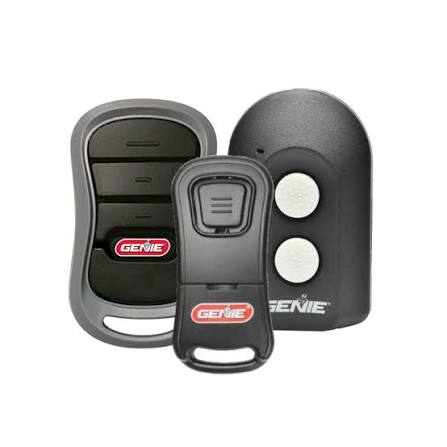
Have you ever stood in your driveway, rain pouring down, frantically pressing the button on your garage door opener only to realize it’s dead or lost? It is a frustrating scenario that happens to almost every homeowner at some point. If you are asking yourself, “Can you buy a replacement garage door opener remote?” the short answer is a resounding yes. You do not need to replace the entire motor unit or call an expensive technician just to get back inside.
In this guide, we will walk you through everything you need to know about purchasing, selecting, and programming a new remote. We will help you navigate the confusing world of frequencies, compatibility, and security codes so you can make an informed decision quickly.
Understanding Compatibility: Not All Remotes Are Created Equal
Before you click “buy” on any random remote online, it is crucial to understand that garage door openers are not universally compatible. The market is fragmented with different manufacturers using proprietary technologies.
Check Your Motor Unit Brand
The first step is identifying the brand of your garage door opener motor. Common brands include:
- LiftMaster
- Chamberlain
- Genie
- Craftsman
- Ryobi
Look for the label on the motor unit hanging from your garage ceiling. It will usually list the model number and the frequency (e.g., 315 MHz or 390 MHz). Matching the frequency is non-negotiable. If your opener operates at 315 MHz, a 390 MHz remote will simply not work, regardless of the brand.
The Era of Your Opener Matters
Garage door technology has evolved significantly over the last three decades.
- Pre-1993 (Dip Switches): Older units use physical switches inside the remote and motor to set the code. These are easy to clone but less secure.
- 1993–2011 (Learn Button): Most units from this era use a “Learn” button (usually yellow, red, purple, or orange) to program rolling codes.
- Post-2011 (Security+ 2.0): Newer models use advanced encryption to prevent code grabbing. These require specific compatible remotes.
For a deep dive into the history of radio frequency standards in consumer electronics, you can refer to Wikipedia’s article on Radio Frequency Identification, which provides context on how wireless communication protocols have standardized over time.
Universal vs. OEM Remotes: Which Should You Choose?
When searching for a replacement, you will encounter two main categories: Original Equipment Manufacturer (OEM) remotes and Universal remotes. Here is a breakdown to help you decide.
| Feature | OEM Remotes | Universal Remotes |
|---|---|---|
| Compatibility | Guaranteed for specific models | Works with most major brands |
| Price | Higher ($30–$50) | Lower ($15–$25) |
| Ease of Programming | Very Easy | Moderate (may require steps) |
| Build Quality | High, durable plastic | Varies by brand |
| Aesthetics | Matches original design | Generic look |
Expert Insight: According to industry technicians, OEM remotes are recommended if you have a newer, high-security opener (like Security+ 2.0). However, for older units, a high-quality universal remote is a cost-effective solution that performs just as well.
How to Program Your New Replacement Remote
Once you have purchased the correct remote, the next hurdle is programming it. While steps vary by brand, the general process for modern openers (post-1993) follows a standard logic.
Step-by-Step Programming Guide
- Locate the Learn Button: Find the “Learn” or “Smart” button on your garage door motor unit. It is typically located on the back panel near the antenna wire.
- Clear Old Codes (Optional): If you suspect security issues, press and hold the Learn button for 10 seconds until the indicator light blinks. This erases all previously paired remotes. Note: You will need to reprogram all existing remotes if you do this.
- Press the Learn Button: Press and release the Learn button. The indicator light will turn on or blink, signaling it is in programming mode. You usually have 30 seconds to complete the next step.
- Activate the Remote: Within 30 seconds, press and hold the button on your new remote that you wish to use. Hold it until the motor unit’s lights flash or you hear a click.
- Test the Door: Press the remote button again. The door should activate. If it does not, repeat the process, ensuring you are standing within 5 feet of the motor unit.
Pro Tip: If you have a keypad outside your garage, you may need to reprogram that as well if you cleared the memory in Step 2. Always keep your user manual handy, as some brands like Genie require you to press the remote button multiple times.
Troubleshooting Common Issues
Even with the right remote, things can go wrong. Here are the most common issues homeowners face and how to fix them.
- Remote Not Pairing: Ensure the battery is new. Even fresh batteries can be defective. Try a different brand. Also, check if the “Lock” feature is enabled on your motor unit, which disables remote controls for security.
- Interference: LED light bulbs in your garage can emit electromagnetic interference that blocks signals. If your remote works close up but not from the driveway, try switching to incandescent bulbs or shielded LEDs.
- Antenna Issues: Ensure the hanging wire antenna on your motor unit is not tucked away behind metal ducts or stored items. It needs to hang freely to receive signals.
Cost Analysis: Is It Worth Repairing?
Many homeowners wonder if buying a remote is worth it compared to upgrading the whole system. Let’s look at the numbers.
- Replacement Remote: $15–$40
- Professional Programming Service: $50–$100 (if you can’t do it yourself)
- New Garage Door Opener Unit: $250–$500+
Clearly, buying a replacement remote is the most economical choice. Unless your motor unit is making grinding noises or failing to lift the door mechanically, there is no financial reason to replace the entire system just because you lost a remote.
FAQ Section
1. Can I use a universal remote for any garage door opener?
Most universal remotes work with the major brands (LiftMaster, Chamberlain, Genie, Craftsman) manufactured after 1993. However, they may not work with very old dip-switch models or proprietary systems like some older Wayne Dalton units. Always check the compatibility list on the universal remote’s packaging.
2. How do I know if my remote uses rolling codes?
If your opener has a “Learn” button on the motor unit, it uses rolling codes. If it has small switches inside the remote and the motor that you have to match manually, it uses fixed codes (dip switches). Rolling codes are more secure as the code changes every time you press the button.
3. Can I program a replacement remote without the original?
Yes, you do not need the original remote to program a new one. You only need access to the motor unit in your garage to press the “Learn” button. The motor unit is the master controller; it does not require communication with the old remote to accept a new one.
4. Why is my new remote working intermittently?
Intermittent issues are often caused by weak batteries, signal interference from LED lights, or a damaged antenna on the motor unit. Try replacing the battery first. If that fails, check for nearby electronic devices that might be causing interference.
5. Is it safe to buy used garage door remotes?
It is generally not recommended to buy used remotes unless you can reset the security codes completely. A used remote might still be linked to the previous owner’s system if not properly cleared. For security and reliability, buying a new universal or OEM remote is a safer investment.
6. Can I add a remote to a smart garage door opener?
Yes, most smart openers (like MyQ) still support traditional RF remotes. You can program a standard remote alongside the Wi-Fi connectivity. This allows you to open the door via your phone or a physical button, providing redundancy if your internet goes down.
Conclusion
So, can you buy a replacement garage door opener remote? Absolutely. It is a straightforward, affordable, and DIY-friendly task that can save you hundreds of dollars. By identifying your opener’s brand and frequency, choosing between an OEM or universal remote, and following the simple programming steps, you can regain access to your garage in under an hour.
Don’t let a lost or broken remote disrupt your daily routine. Take control of your home security and convenience today. If you found this guide helpful, please share it with your neighbors or on social media—someone else might be standing in the rain right now wondering what to do!
Leave a Reply