Introduction
If you have ever stared at your old garage door opener and wondered if modernizing it is possible without a complete replacement, you are not alone. Many homeowners ask the same question: can you add MyQ to any garage door opener? The short answer is nuanced—while MyQ works with most major brands, it is not universally compatible with every single model on the market. Understanding the specific requirements can save you time, money, and frustration.
Understanding MyQ Compatibility
Before purchasing a MyQ device, it is crucial to understand what makes a garage door opener compatible. MyQ technology, developed by Chamberlain Group, is designed to work with a vast majority of garage door openers manufactured after 1993. This includes brands like Chamberlain, LiftMaster, Craftsman, and many others. However, “most” does not mean “all.”
Key Compatibility Factors
To determine if your opener is compatible, consider these three primary factors:
- Age of the Opener: Openers made before 1993 often lack the necessary safety sensors and electronic interfaces required for MyQ integration.
- Brand and Model: While Chamberlain and LiftMaster are natively compatible, other brands may require specific adapters or may not be supported at all.
- Type of Safety Sensors: MyQ requires standard photo-eye safety sensors. If your opener uses older mechanical safety mechanisms, it may not work.
For a comprehensive list of compatible brands, you can refer to the official Chamberlain MyQ compatibility page. Additionally, understanding the history of garage door automation can provide context on why certain older models are incompatible. For more background on garage door standards, visit Wikipedia’s page on garage doors.
How to Check If Your Garage Door Opener Is Compatible
Checking compatibility is a straightforward process. Follow these steps to ensure your opener will work with MyQ:
- Locate the Model Number: Find the label on your garage door opener motor unit. It is usually located on the back or side of the unit.
- Visit the Compatibility Checker: Go to the MyQ website and use their online compatibility tool. Enter your brand and model number.
- Check the Manufacturing Date: If your opener was made after 1993, it has a higher chance of being compatible. Look for a date code on the label.
- Inspect Safety Sensors: Ensure your opener has photo-eye sensors installed near the floor on both sides of the garage door. These are essential for MyQ functionality.
Common Compatible Brands
| Brand | Compatibility Status | Notes |
|---|---|---|
| Chamberlain | Fully Compatible | Native support for most models post-1993. |
| LiftMaster | Fully Compatible | Owned by Chamberlain Group; excellent integration. |
| Craftsman | Mostly Compatible | Most models post-2000 work seamlessly. |
| Genie | Partially Compatible | Some models require additional adapters. |
| Stanley | Limited Compatibility | Older models may not support MyQ. |
Step-by-Step Guide to Installing MyQ
If your opener is compatible, installing MyQ is a DIY-friendly task. Here is a detailed guide to help you through the process.
What You Will Need
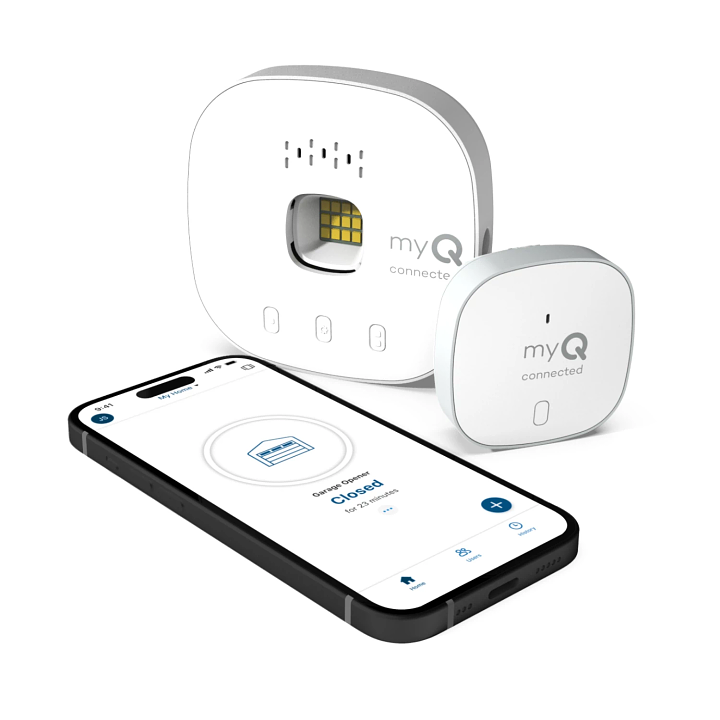
- MyQ Smart Garage Hub
- Smartphone with the MyQ app installed
- Wi-Fi network (2.4 GHz band)
- Ladder
- Screwdriver (if mounting bracket is required)
Installation Steps
- Power Down the Opener: Unplug your garage door opener to ensure safety during installation.
- Mount the MyQ Hub: Place the MyQ hub on the ceiling or wall within 6 feet of the opener motor. Use the included adhesive strips or screws for secure mounting.
- Connect the Wires: Locate the terminal points on your opener labeled “Common” and “Open/Close.” Connect the two wires from the MyQ hub to these terminals. Polarity does not matter for these connections.
- Power Up: Plug your garage door opener back in. The MyQ hub should light up, indicating it has power.
- Connect to Wi-Fi: Open the MyQ app on your smartphone. Follow the on-screen instructions to connect the hub to your 2.4 GHz Wi-Fi network. Note that MyQ does not support 5 GHz networks.
- Test the System: Use the app to open and close your garage door. Ensure the safety sensors are functioning correctly by placing an object in the door’s path while closing.
Troubleshooting Common Issues
- Wi-Fi Connection Failed: Ensure you are using a 2.4 GHz network. Move the hub closer to your router if the signal is weak.
- Door Not Responding: Double-check the wire connections at the opener terminals. Ensure they are tight and securely attached.
- App Not Updating: Restart the MyQ app and ensure your smartphone has a stable internet connection.
Benefits of Adding MyQ to Your Garage Door
Adding MyQ to your garage door opener offers several advantages beyond simple remote control.
Enhanced Security
With MyQ, you can monitor your garage door status in real-time. Receive instant alerts if the door is left open, allowing you to close it remotely. This feature provides peace of mind, especially when you are away from home.
Convenience and Integration
MyQ integrates with popular smart home platforms like Amazon Alexa, Google Assistant, and Apple HomeKit. You can use voice commands to open or close your garage door, making it easier to manage your daily routine. For example, saying “Alexa, close the garage door” is much simpler than finding your phone or remote.
Cost-Effectiveness
Compared to replacing your entire garage door opener with a new smart model, adding MyQ is significantly cheaper. A MyQ hub costs a fraction of the price of a new opener, making it an economical choice for upgrading your home.
Limitations and Considerations
While MyQ is a powerful tool, it has some limitations. First, it requires a stable Wi-Fi connection. If your garage has poor Wi-Fi coverage, you may need to install a Wi-Fi extender. Second, some older openers may require professional installation if the wiring is complex. Finally, MyQ relies on cloud services, so an internet outage may temporarily disable remote access.
FAQ Section
1. Can I add MyQ to a non-Chamberlain garage door opener?
Yes, MyQ is compatible with many non-Chamberlain brands, including Craftsman, Genie, and Stanley. However, you must check the specific model compatibility on the MyQ website before purchasing.
2. Does MyQ work with all garage door openers made after 1993?
Most openers made after 1993 are compatible, but not all. Some proprietary systems or very old models may lack the necessary terminals for connection. Always verify your model number using the MyQ compatibility checker.
3. Do I need a professional to install MyQ?
No, MyQ is designed for DIY installation. Most homeowners can install it in under 30 minutes using basic tools. However, if you are uncomfortable working with electrical components, hiring a professional is recommended.
4. Can I use MyQ without Wi-Fi?
No, MyQ requires a Wi-Fi connection to function. It uses your home network to communicate with the MyQ cloud servers, enabling remote access and app control. Without Wi-Fi, the hub cannot operate.
5. Is MyQ secure?
MyQ uses encryption to protect your data and communications. However, like any smart device, it is essential to use strong passwords and keep your app updated to ensure maximum security.
Conclusion
So, can you add MyQ to any garage door opener? While not every single model is compatible, the vast majority of openers manufactured after 1993 from major brands will work seamlessly with MyQ. By checking your model number and following the simple installation steps, you can transform your traditional garage door into a smart, secure, and convenient part of your home. Enjoy the peace of mind that comes with knowing your garage is secure, no matter where you are. If you found this guide helpful, please share it with your friends on social media who might be considering a similar upgrade!
Leave a Reply