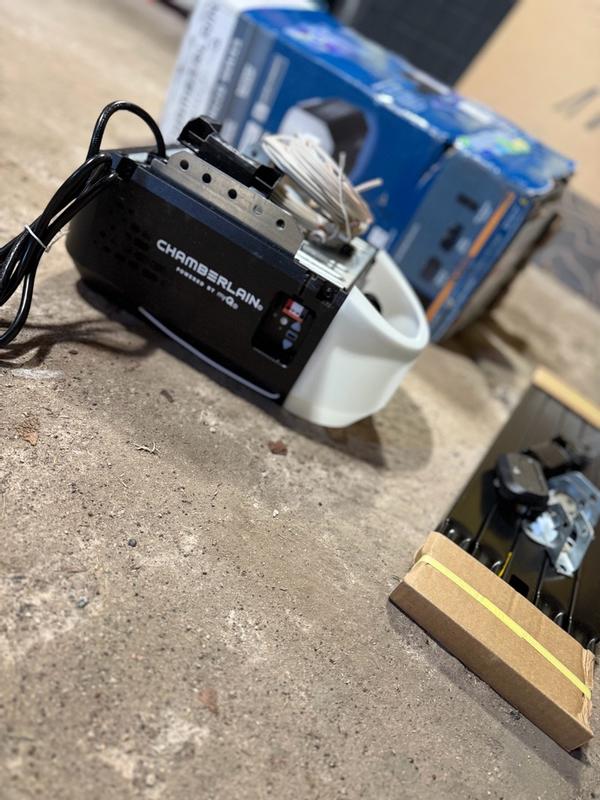
Have you ever been stuck outside your home during a power outage, unable to open your garage door? It is a frustrating scenario that many homeowners face, especially in areas prone to storms or unstable grids. If you are asking yourself, “Can you add battery backup to Chamberlain garage door opener,” the answer depends largely on your specific model, but there are reliable solutions available to keep your garage accessible when the lights go out.
Understanding Compatibility: Which Models Support Battery Backup?
Before rushing to buy a backup unit, it is crucial to determine if your current Chamberlain opener is compatible. Not all garage door openers are created equal, and compatibility is the first hurdle in ensuring safety and functionality.
Chamberlain has integrated battery backup technology into many of its newer models, particularly those in the MyQ-enabled series. Generally, if your opener was manufactured after 2015 and features Wi-Fi connectivity, it is highly likely to support a battery backup module. However, older chain-drive or screw-drive models may lack the necessary internal circuitry to accept an external battery pack.
To check your compatibility:
- Locate the model number on the motor unit (usually on the back or side).
- Visit the official Chamberlain website or consult your user manual.
- Look for mentions of “Battery Backup” or “BBU” (Battery Backup Unit) in the specifications.
If your model is not natively compatible, you cannot simply “add” a proprietary Chamberlain battery. In such cases, you would need to consider universal uninterruptible power supply (UPS) systems designed for garage doors, though these are less seamless than manufacturer-specific solutions.
How Does the Chamberlain Battery Backup Work?
Understanding the mechanics behind the backup system helps in maintaining it properly. The Chamberlain Battery Backup Unit (BBU) is essentially a rechargeable lithium-ion or lead-acid battery that connects directly to your garage door opener’s motor unit.
When the main power supply is cut, the BBU automatically detects the loss of voltage and switches to battery power within milliseconds. This ensures that you can still operate your garage door using your wall console, remote control, or the MyQ smartphone app.
Key technical details include:
- Capacity: Most standard Chamberlain BBUs provide enough power for approximately 20–50 open/close cycles, depending on the weight of your door and the frequency of use.
- Charging Time: After a power outage, the unit typically takes 24–48 hours to fully recharge.
- Indicator Lights: A green light usually indicates a full charge, while a red or flashing light signals low battery or a fault.
According to industry standards, having a backup power source is not just a convenience but a safety feature. It ensures that emergency vehicles can access your garage and that you are not trapped inside your home during severe weather events. For more information on residential safety standards, you can refer to Wikipedia’s page on Garage Door Openers, which outlines the evolution of safety mechanisms in modern units.
Step-by-Step Guide: Installing a Chamberlain Battery Backup
If you have confirmed that your model is compatible, installing the battery backup is a straightforward process that typically takes less than 30 minutes. You do not need to be an electrician, but basic handiness is required.
Tools Needed:
- Phillips-head screwdriver
- Ladder
- The Chamberlain Battery Backup Unit (model specific, e.g., BBU1200)
Installation Steps:
- Disconnect Power: Unplug your garage door opener from the electrical outlet. This is a critical safety step to prevent electrical shock.
- Locate the Battery Port: On the motor unit, find the battery backup port. It is usually located on the back or side of the unit and is covered by a small plastic cap.
- Mount the Battery Unit: Use the provided screws to attach the battery backup unit to the designated mounting brackets on the opener. Ensure it is secure and does not hang loosely.
- Connect the Cable: Plug the battery cable into the port on the motor unit. You should hear a click, indicating a secure connection.
- Restore Power: Plug the opener back into the electrical outlet. The battery unit will begin charging immediately.
- Test the System: To verify installation, unplug the opener again. Try operating the door using your remote. If the door moves smoothly, the installation was successful.
Note: Always refer to the specific instruction manual included with your BBU, as wiring configurations can vary slightly between models.
Benefits vs. Limitations: Is It Worth the Investment?
Adding a battery backup is not just about convenience; it is about resilience. However, it is essential to weigh the pros and cons to make an informed decision.
| Feature | Benefits | Limitations |
|---|---|---|
| Accessibility | Allows entry/exit during power outages. | Limited number of cycles (20–50) per charge. |
| Safety | Prevents being trapped in the garage. | Requires regular maintenance and testing. |
| Convenience | Works with MyQ app for remote monitoring. | Initial cost of the unit ($50–$100). |
| Peace of Mind | Reduces anxiety during storms. | Does not power other garage appliances. |
For homeowners in regions with frequent thunderstorms, hurricanes, or aging infrastructure, the benefits far outweigh the costs. The ability to open your garage door can be the difference between a minor inconvenience and a major logistical nightmare.
Maintenance Tips to Extend Battery Life
A battery backup is only useful if it works when you need it. Neglecting maintenance can lead to failure during critical moments. Here are expert-recommended tips to keep your BBU in top shape:
- Test Monthly: Perform a manual test once a month by unplugging the opener and operating the door. This keeps the battery chemistry active and verifies functionality.
- Keep It Clean: Dust and debris can accumulate on the motor unit and battery connections. Wipe them down gently with a dry cloth every six months.
- Monitor Indicator Lights: Pay attention to the LED status on the BBU. If it flashes red, replace the battery immediately. Most Chamberlain batteries last 3–5 years before needing replacement.
- Avoid Extreme Temperatures: While garage environments can be harsh, try to insulate your garage if possible. Extreme heat or cold can degrade battery performance faster.
Frequently Asked Questions (FAQ)
1. Can I use a generic car battery for my Chamberlain opener?
No, it is not recommended. Chamberlain openers are designed to work with specific voltage and amperage requirements provided by their proprietary BBU units. Using a generic car battery can damage the opener’s logic board or pose a fire hazard due to improper charging protocols.
2. How long does the battery last during a power outage?
The duration depends on usage. A fully charged Chamberlain BBU typically supports 20 to 50 cycles of opening and closing. If you only need to open the door once to get your car out, it will easily handle that. However, frequent use will drain the battery faster.
3. Will the battery backup work if the Wi-Fi is down?
Yes. The battery backup powers the motor and the radio frequency receiver for your remotes and wall console. While the MyQ app requires internet connectivity to function, the physical remote controls will still work via RF signals even if the Wi-Fi is down.
4. Can I install the battery backup myself, or do I need a professional?
Most homeowners can install the battery backup themselves as it involves simple plug-and-play connections. However, if you are uncomfortable working with ladders or electrical components, hiring a professional technician is a safe option.
5. What happens if the battery dies completely?
If the battery dies and there is no power, you can still open the door manually using the emergency release cord. This disengages the opener from the door, allowing you to lift it by hand. Always familiarize yourself with the location of this cord before an emergency occurs.
Conclusion
So, can you add battery backup to Chamberlain garage door opener? Yes, for most modern models, adding a battery backup is not only possible but highly advisable. It transforms your garage door from a potential liability during power outages into a reliable access point. By choosing the right compatible unit, installing it correctly, and maintaining it regularly, you ensure that you are never locked out when it matters most.
Don’t wait for the next storm to test your preparedness. Check your model today, invest in a quality battery backup, and enjoy the peace of mind that comes with knowing your home remains accessible, no matter what happens to the grid.
Found this guide helpful? Share it with your neighbors on Facebook or Twitter to help them stay prepared too!
Leave a Reply