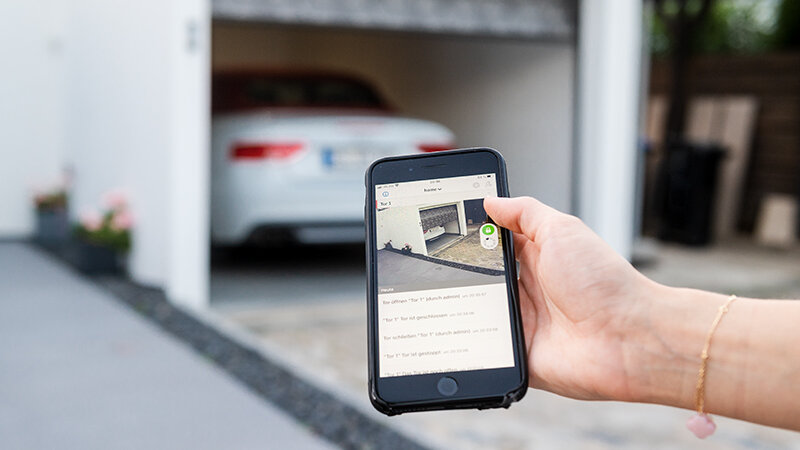
Have you ever pulled into your driveway only to realize you left the garage door remote inside the house? Or perhaps you’re halfway to work and suddenly wonder, did I actually close the garage? If you’ve found yourself asking, “Can I use my iPhone to open my garage door?” you are not alone. Millions of homeowners are transitioning from clunky plastic remotes to the convenience of smartphone control. The short answer is yes, but the method depends entirely on your existing hardware.
In this comprehensive guide, we will break down exactly how to transform your iPhone into a powerful garage door controller. We will cover native Apple solutions, third-party apps, and the necessary hardware upgrades to make it happen securely and reliably.
Understanding the Technology Behind Smart Garage Control
Before diving into the setup, it is essential to understand that your iPhone cannot directly communicate with your garage door opener out of the box. Traditional garage door openers use radio frequencies (usually 315 MHz or 390 MHz) that smartphones do not possess. Therefore, bridging this gap requires an intermediary device known as a smart garage controller.
These controllers connect to your home’s Wi-Fi network and interface with your opener’s motor unit. Once connected, they allow your iPhone to send digital signals via the internet to open or close the door. This technology also enables features like real-time status notifications, historical access logs, and voice control through Siri.
According to industry standards, modern smart home devices prioritize encryption to prevent unauthorized access. When selecting a solution, ensuring it uses end-to-end encryption is vital for your home’s security. For more information on how wireless communication protocols work in home automation, you can refer to this overview of home automation systems on Wikipedia.
Method 1: Using Apple HomeKit for Seamless Integration
If you are deeply invested in the Apple ecosystem, using Apple HomeKit is arguably the most secure and user-friendly way to control your garage door. HomeKit allows you to manage your garage door alongside your lights, locks, and thermostats in a single app.
Requirements for HomeKit Compatibility
To use this method, your garage door opener must be “HomeKit-enabled.” Many newer models from brands like LiftMaster, Chamberlain, and Genie come with this capability built-in. If your opener is older, you will need a HomeKit-compatible bridge or controller.
Step-by-Step Setup for HomeKit
- Download the Home App: Ensure the Apple Home app is installed on your iPhone and updated to the latest version.
- Add Accessory: Tap the “+” icon in the top right corner and select “Add Accessory.”
- Scan the Code: Use your iPhone’s camera to scan the HomeKit setup code found on your garage controller or opener manual.
- Assign to Room: Name your garage door and assign it to the “Garage” room for easier Siri commands.
- Test the Connection: Tap the icon in the Home app to open or close the door. You should see the status update in real-time.
Once set up, you can simply say, “Hey Siri, open the garage door,” and your iPhone will handle the rest. This method is highly recommended for users who prioritize privacy, as HomeKit processes much of the data locally on your home hub rather than in the cloud.
Method 2: Third-Party Apps (MyQ and Others)
If your garage door opener is not HomeKit compatible, you likely still have options through manufacturer-specific apps. The most prominent player in this space is MyQ, developed by Chamberlain Group, which manufactures LiftMaster and Chamberlain openers.
How MyQ Works
MyQ uses a small Wi-Fi hub that plugs into your garage door opener. This hub connects to your home network and communicates with the MyQ app on your iPhone. It is one of the most widely used systems in the United States due to its reliability and ease of installation.
Pros and Cons of Using Manufacturer Apps
| Feature | Apple HomeKit | Manufacturer Apps (e.g., MyQ) |
|---|---|---|
| Ease of Setup | Moderate (requires compatible hardware) | Easy (plug-and-play hub) |
| Voice Control | Excellent (Siri integration) | Good (Alexa/Google Assistant) |
| Privacy | High (local processing) | Variable (cloud-dependent) |
| Cost | Higher (if buying new opener) | Lower (hub costs ~$30-$100) |
| Compatibility | Limited to certified devices | Wide range of older openers |
Installation Steps for MyQ
- Purchase the Hub: Buy a MyQ Smart Garage Hub compatible with your opener model.
- Mount the Sensor: Place the door sensor on the garage door track to detect if the door is open or closed.
- Connect to Wi-Fi: Follow the in-app instructions to connect the hub to your 2.4 GHz Wi-Fi network.
- Link Your Account: Create a MyQ account and log in via the app on your iPhone.
- Calibrate: Run the calibration test to ensure the door stops and reverses correctly.
Method 3: Universal Smart Controllers
For those with older openers that lack smart features and are not compatible with specific brand hubs, universal smart controllers offer a versatile solution. Devices like the Tailwind iQ3 or Meross Smart Garage Door Opener are designed to work with almost any brand of garage door opener manufactured after 1993.
These devices typically involve wiring two wires from the controller to the “push button” terminals on your garage door motor. This mimics the action of pressing the wall-mounted button inside your garage. Because they are brand-agnostic, they are an excellent choice for DIY enthusiasts who want to avoid replacing their entire opener system.
Security Considerations When Using Your iPhone
When you ask, “Can I use my iPhone to open my garage door securely?” the answer is yes, provided you take basic precautions. Since your garage is often a primary entry point to your home, securing the digital link is crucial.
- Enable Two-Factor Authentication (2FA): Always enable 2FA on your garage door app account. This ensures that even if someone guesses your password, they cannot access your garage without your phone.
- Use Strong Passwords: Avoid using simple passwords for your smart home accounts. Use a password manager to generate complex, unique passwords.
- Keep Firmware Updated: Manufacturers regularly release updates to patch security vulnerabilities. Enable automatic updates for your garage controller firmware.
- Monitor Access Logs: Most smart apps provide a log of who opened the door and when. Review these logs periodically to detect any unusual activity.
Troubleshooting Common Connectivity Issues
Even with the best setup, you may encounter issues. Here are some common problems and solutions:
- Wi-Fi Signal Weakness: Garages are often far from the main router. If your controller frequently goes offline, consider installing a Wi-Fi extender or a Mesh Wi-Fi system to boost signal strength in the garage.
- App Not Responding: If the app fails to open the door, check your iPhone’s internet connection. Sometimes, switching from cellular data to Wi-Fi (or vice versa) can resolve latency issues.
- Sensor Misalignment: If the app shows the door is open when it is closed, check the physical sensor on the door track. It may need cleaning or realignment.
FAQ Section
1. Do I need a new garage door opener to use my iPhone?
No, you do not necessarily need a new opener. If your current opener has a standard push-button terminal, you can add a universal smart controller. However, if your opener is very old (pre-1993), it may lack the necessary safety features and compatibility, making replacement a safer option.
2. Can I open my garage door with my iPhone if I am away from home?
Yes, one of the primary benefits of smart garage controllers is remote access. As long as your iPhone has an internet connection (via cellular data or Wi-Fi) and your garage controller is connected to your home Wi-Fi, you can open or close the door from anywhere in the world.
3. Is it safe to let guests open my garage door via my iPhone?
Most smart garage apps allow you to share access with family members or trusted guests. You can grant them temporary or permanent access without sharing your main password. Some systems even allow you to set schedules, restricting access to certain times of the day.
4. What happens if my Wi-Fi goes down?
If your home Wi-Fi goes down, you will lose remote access via your iPhone. However, you can still open the garage door using the physical remote control, the wall-mounted button inside the garage, or the keypad outside (if equipped). The smart controller is an additional convenience, not a replacement for primary access methods.
5. Does using my iPhone to open the garage door drain the battery?
The impact on your iPhone’s battery life is negligible. The app only uses significant power when actively communicating with the server or using location services to trigger automatic opening. Background usage is minimal and comparable to other standard social media or messaging apps.
Conclusion
So, can I use my iPhone to open my garage door? Absolutely. Whether you choose the seamless integration of Apple HomeKit, the widespread compatibility of MyQ, or a universal smart controller, transforming your iPhone into a garage door remote is a straightforward process that enhances both convenience and security.
By following the steps outlined above, you can say goodbye to fumbling for remotes and hello to the peace of mind that comes with knowing exactly what your garage door is doing, no matter where you are. If you found this guide helpful, please share it with your friends and family on social media who might still be stuck in the era of plastic remotes!
Leave a Reply