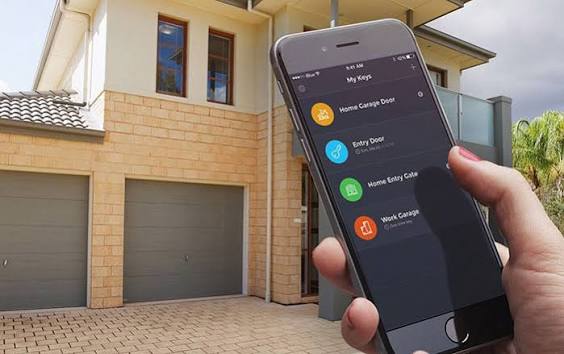
Have you ever pulled into your driveway only to realize you left the garage door remote inside the house? Or perhaps you’re halfway to work and suddenly wonder if you closed the garage door behind you? These are common frustrations for homeowners, but technology has offered a sleek solution. If you’ve been asking yourself, “Can I open a garage door with my phone?” the answer is a resounding yes. Modern smart home technology allows you to control, monitor, and secure your garage directly from your smartphone, offering peace of mind and unparalleled convenience.
Why Control Your Garage Door With Your Phone?
Before diving into the how, it’s essential to understand the why. Integrating your garage door with your smartphone isn’t just a novelty; it solves real-world problems.
- Remote Access: Open the door for deliveries, guests, or service providers even when you’re not home.
- Peace of Mind: Receive instant notifications if the door is left open, allowing you to close it from anywhere in the world.
- Enhanced Security: Monitor who enters and exits your garage and integrate with other smart home security systems.
- Convenience: No more fumbling for remotes or keypads in the rain or dark.
According to a recent study by the Consumer Technology Association, over 60% of smart home owners prioritize security devices, with smart garage controllers being one of the fastest-growing categories. This shift highlights a growing demand for integrated, accessible home management solutions.
How Does Smart Garage Door Technology Work?
At its core, a smart garage door opener connects your existing garage door mechanism to your home’s Wi-Fi network. This connection is facilitated by a small device called a smart garage controller or a built-in Wi-Fi module in newer garage door openers.
The process typically involves:
- Hardware Installation: A sensor is attached to your garage door to detect its position (open or closed).
- Network Connection: The controller connects to your home Wi-Fi.
- App Integration: You download a companion app on your smartphone, which communicates with the controller via the cloud.
- Control: When you tap “Open” or “Close” in the app, a signal is sent through the internet to your home network, triggering the garage door motor.
For a deeper technical understanding of how wireless communication protocols like Wi-Fi and Zigbee function in smart homes, you can refer to this Wikipedia article on Home Automation.
Methods to Open Your Garage Door With Your Phone
Not all garage doors are created equal, and neither are the solutions. Here are the three primary ways to achieve phone-based control.
1. Built-In Wi-Fi Garage Door Openers
Many modern garage door openers from brands like Chamberlain, LiftMaster, and Genie come with Wi-Fi capabilities built directly into the motor unit.
- Pros: Seamless integration, no extra hardware needed, often includes battery backup.
- Cons: Requires replacing your entire opener if you have an older model.
- Popular Brands: MyQ (Chamberlain/LiftMaster), Aladdin Connect (Genie).
2. Add-On Smart Garage Controllers
If you have an existing, functional garage door opener, you don’t need to replace it. Add-on controllers are small devices that retrofit onto your current system.
- Pros: Cost-effective, works with most standard openers, easy DIY installation.
- Cons: May require a separate hub for some brands, dependent on Wi-Fi strength in the garage.
- Popular Options: Meross Smart Garage Door Opener, Tailwind, Refoss.
3. Smart Home Hubs and Voice Assistants
Integrating your garage door with ecosystems like Amazon Alexa, Google Home, or Apple HomeKit allows for voice control and automation.
- Pros: Hands-free operation, can create routines (e.g., “Goodnight” routine closes the garage door).
- Cons: Requires compatibility between your garage controller and the smart home platform.
| Feature | Built-In Wi-Fi Opener | Add-On Controller | Smart Hub Integration |
|---|---|---|---|
| Cost | High ($300–$600+) | Low ($30–$100) | Varies (often requires add-on) |
| Installation | Professional recommended | Easy DIY | Moderate |
| Compatibility | New installations only | Most existing openers | Depends on ecosystem |
| Best For | New homes/renovations | Budget-conscious users | Tech enthusiasts |
Step-by-Step Guide: Setting Up an Add-On Smart Garage Controller
For most homeowners, an add-on controller is the most practical solution. Here is a general guide to setting one up. Note that specific steps may vary by brand.
What You’ll Need:
- Smartphone (iOS or Android)
- Stable Wi-Fi network in the garage
- Screwdriver
- Ladder
Installation Steps:
- Check Compatibility: Ensure your garage door opener has a standard push-button terminal. Most openers manufactured after 1993 are compatible.
- Download the App: Install the manufacturer’s app from the App Store or Google Play Store. Create an account.
- Mount the Controller: Place the controller near the garage door opener motor. Use the provided adhesive or screws. Ensure it is within range of your Wi-Fi router.
- Connect the Wires: Turn off the power to your garage door opener. Connect the two wires from the controller to the “push button” terminals on your opener motor. This mimics pressing the wall button.
- Attach the Door Sensor: Stick the magnetic sensor on the garage door track. One part goes on the moving door, and the other on the stationary frame. This tells the app whether the door is open or closed.
- Power Up and Pair: Restore power to the opener. Follow the in-app instructions to connect the controller to your Wi-Fi network. This usually involves pressing a pairing button on the device.
- Test the System: Use the app to open and close the door. Verify that the status updates correctly in real-time.
Security Considerations: Is It Safe?
When asking, “Can I open a garage door with my phone?” security is a valid concern. After all, your garage is a direct entry point to your home.
Key Security Features to Look For:
- Encryption: Ensure the app uses end-to-end encryption (AES-128 or higher) to protect data transmission.
- Two-Factor Authentication (2FA): Enable 2FA in the app settings to prevent unauthorized access even if your password is compromised.
- Activity Logs: Choose a system that keeps a history of who opened or closed the door and when.
- Regular Updates: Keep the firmware of your smart controller updated to patch any security vulnerabilities.
While no system is 100% hack-proof, reputable brands invest heavily in cybersecurity. According to cybersecurity experts, using strong, unique passwords and enabling 2FA reduces the risk of unauthorized access by over 90%.
Troubleshooting Common Issues
Even the best technology can hiccup. Here are quick fixes for common problems.
- Door Won’t Respond: Check your Wi-Fi connection in the garage. If the signal is weak, consider a Wi-Fi extender.
- Status Not Updating: Ensure the door sensor is properly aligned. The magnet and sensor must be within 1–2 inches of each other when the door is closed.
- App Crashes: Clear the app cache or reinstall the app. Ensure your phone’s operating system is up to date.
FAQ Section
1. Can I open my garage door with my phone if I don’t have Wi-Fi?
Most smart garage controllers require Wi-Fi to communicate with your phone when you are away from home. However, some systems offer Bluetooth connectivity for local control without Wi-Fi, though this limits remote access.
2. Do I need a professional to install a smart garage door opener?
For add-on controllers, professional installation is rarely necessary. Most users can complete the setup in under 30 minutes with basic tools. However, if you are installing a completely new garage door motor, professional installation is recommended for safety and warranty purposes.
3. Will a smart garage controller work with my old garage door?
Yes, as long as your garage door opener has a standard push-button terminal (most do). The smart controller essentially acts as a digital version of that wall button. If your opener is extremely old (pre-1993), you may need to consult the manufacturer’s compatibility list.
4. Can multiple family members control the garage door with their phones?
Absolutely. Most smart garage apps allow you to invite multiple users. You can grant full access or limited permissions to family members, ensuring everyone can enter and exit conveniently.
5. What happens if the power goes out?
If your garage door opener has a battery backup, it will continue to function during a power outage. However, the smart controller itself needs power to connect to Wi-Fi. If the router is also down, you won’t be able to control the door remotely until power is restored. You can still use the manual release cord or the physical wall button if the opener has battery backup.
6. Are there monthly fees for using smart garage door apps?
Most major brands, including MyQ and Meross, offer their basic app features for free. Some premium features, such as extended video history or advanced integrations, may require a subscription, but core functionality like opening and closing the door is typically free.
Conclusion
So, can you open a garage door with your phone? Definitely. Whether you choose a built-in Wi-Fi opener or a budget-friendly add-on controller, the ability to manage your garage from your smartphone offers significant benefits in convenience, security, and peace of mind.
By following the steps outlined above, you can transform your traditional garage into a smart entry point that fits seamlessly into your modern lifestyle. Don’t let an open garage door keep you awake at night or force you to turn around when you’ve already left for work. Embrace the technology, secure your home, and enjoy the freedom of control at your fingertips.
Found this guide helpful? Share it with your friends and family on social media to help them upgrade their homes too!
Leave a Reply