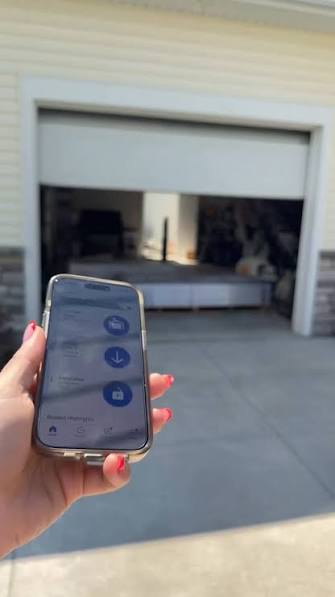
Have you ever driven halfway to work only to panic, wondering if you left the garage door open? Or perhaps you’re lying in bed, comfortable and warm, but suddenly realize you forgot to secure the house for the night. It is a common modern anxiety, but thankfully, technology has caught up with our busy lives. If you are asking yourself, “Can I close my garage door with my phone,” the answer is a resounding yes. With the right setup, you can monitor, open, and close your garage door from anywhere in the world using just your smartphone.
This guide will walk you through everything you need to know about transforming your traditional garage into a smart, secure, and convenient part of your connected home. We will explore the hardware options, installation processes, and critical security measures you must take to ensure peace of mind.
Why Smart Garage Control Is a Game-Changer
Before diving into the technical “how-to,” it is essential to understand why this upgrade is worth your investment. The ability to control your garage door via an app is not just a novelty; it is a significant enhancement to home security and energy efficiency.
According to recent home automation trends, over 60% of smart home users prioritize security devices as their first purchase. A garage door is often the largest entry point to a home and frequently the most vulnerable. By enabling phone control, you gain:
- Real-Time Monitoring: Know instantly if the door is open or closed.
- Remote Access: Let in delivery drivers, family members, or service providers without being home.
- Energy Savings: Ensure the door is closed to maintain indoor temperature regulation.
- Peace of Mind: Eliminate the “did I lock up?” anxiety that plagues many homeowners.
How Does Phone-Based Garage Control Work?
To understand how to implement this system, we must first look at the underlying technology. At its core, a smart garage system bridges the gap between your physical garage door opener and the internet.
Most traditional garage door openers use radio frequencies (RF) to communicate with a handheld remote. Smart systems intercept this signal or integrate directly with the opener’s motor unit. They then connect to your home Wi-Fi network, allowing data to travel to a cloud server. Your smartphone app communicates with this server, sending commands back to your garage.
For a deeper understanding of the history and evolution of automated door systems, you can refer to the comprehensive overview on Wikipedia’s page for Garage Door Openers. This resource provides excellent context on how mechanical systems have evolved into the digital interfaces we use today.
Methods to Close Your Garage Door With Your Phone
There are three primary ways to achieve smartphone control, ranging from DIY add-ons to full system replacements.
1. Smart Garage Door Controllers (Add-Ons)
This is the most popular and cost-effective method. These devices are small hubs that attach to your existing garage door opener.
- How it works: You mount the controller near your opener motor. It connects to your Wi-Fi and uses a sensor to detect whether the door is open or closed. When you tap “Close” in the app, it sends a signal to mimic the button press on your wall console.
- Best for: Homeowners with existing, functional garage door openers who want a budget-friendly upgrade.
- Popular Brands: Chamberlain myQ, Tailwind, Meross.
2. Smart Garage Door Openers (Full Replacement)
If your current opener is old, noisy, or broken, replacing it with a built-in smart opener is the best route.
- How it works: The intelligence is built directly into the motor unit. These systems often offer smoother operation, quieter motors, and tighter integration with the manufacturer’s ecosystem.
- Best for: New constructions or homes needing a complete opener replacement.
- Popular Brands: LiftMaster, Genie, Ryobi.
3. Smart Plugs and Switches (Not Recommended)
While some tech enthusiasts attempt to use smart plugs to cut power to the opener, this method is highly discouraged. Cutting power does not safely close the door; it merely stops the motor. It lacks safety sensors and status feedback, creating significant security and safety risks.
Comparison: Add-On Controller vs. New Smart Opener
| Feature | Smart Add-On Controller | New Smart Opener |
|---|---|---|
| Cost | $30 – $100 | $250 – $500+ |
| Installation Difficulty | Easy (DIY friendly) | Moderate to Hard |
| Compatibility | Works with most openers | Proprietary system |
| Features | Basic open/close/status | Advanced diagnostics, battery backup |
| Best For | Budget upgrades | Total system overhaul |
Step-by-Step Guide: Installing a Smart Garage Controller
If you choose the add-on route, here is a general guide to getting set up. Note that specific steps may vary by brand.
- Check Compatibility: Ensure your existing garage door opener has standard push-button terminals. Most openers manufactured after 1993 are compatible.
- Download the App: Install the manufacturer’s app (e.g., myQ, Tailwind) on your iOS or Android device. Create an account.
- Mount the Device: Use the included adhesive or screws to mount the smart controller on the ceiling or wall within 6 feet of your garage door opener motor.
- Connect Wires: Locate the terminal buttons on your opener motor. Connect the two wires from the smart controller to the same terminals where your wall button is connected. Note: Turn off the power to the opener before handling wires.
- Install the Sensor: Place the door position sensor on the garage door track and the magnet on the door itself. This tells the app if the door is physically open or closed.
- Connect to Wi-Fi: Follow the in-app instructions to connect the hub to your home Wi-Fi network. Ensure your garage has a strong signal; you may need a Wi-Fi extender.
- Test the System: Use the app to open and close the door. Verify that the status updates in real-time.
Security Considerations: Is It Safe?
A common concern is whether smart garages are vulnerable to hacking. While no internet-connected device is 100% immune to threats, modern smart garage systems use robust encryption protocols.
To maximize security:
- Enable Two-Factor Authentication (2FA): Always require a second verification step to log in to your app.
- Use Strong Passwords: Avoid reusing passwords from other accounts.
- Keep Firmware Updated: Manufacturers regularly release patches to fix security vulnerabilities. Enable automatic updates if available.
- Monitor Activity Logs: Regularly check the app’s history to see when the door was accessed and by whom.
Integrating With Voice Assistants and Automation
One of the biggest advantages of closing your garage door with your phone is the ability to integrate it into broader home automation routines.
- Voice Control: Link your smart garage app with Amazon Alexa, Google Assistant, or Apple HomeKit. You can simply say, “Alexa, close the garage door,” while your hands are full of groceries.
- Geofencing: Set up rules so the garage door automatically closes when your phone leaves a certain radius around your home.
- Sunset Schedules: Program the door to close automatically at sunset for added security during nighttime hours.
FAQ Section
1. Can I close my garage door with my phone if I don’t have Wi-Fi?
No, most smart garage controllers require a Wi-Fi connection to communicate with your phone. However, some systems use cellular backups or Bluetooth for local control, but these are less common. Ensure your garage has a stable Wi-Fi signal for reliable operation.
2. Will a smart garage controller work with my old opener?
Most smart controllers are designed to be universal and work with openers manufactured after 1993. They connect to the same terminals as your wall button. However, it is always best to check the compatibility list on the product page before purchasing.
3. Is it safe to let delivery drivers into my garage via my phone?
It can be safe if you use features like “one-time access codes” or temporary guest access. Many apps allow you to grant access for a specific time window. Always ensure valuable items are stored out of sight or in locked cabinets within the garage.
4. What happens if my internet goes down?
If your internet goes down, you will not be able to control the garage door remotely via your phone. However, your physical remote controls and wall buttons will still work normally, as they use radio frequencies independent of the internet.
5. Can multiple family members control the garage door?
Yes, most smart garage apps allow you to invite multiple users. You can assign different permission levels, such as full access for family members and limited access for guests or service providers.
6. Does closing the garage door with my phone drain my battery?
The impact on your phone’s battery is negligible. The app only uses power when actively sending a command or checking status. Background usage is minimal, especially if you disable unnecessary notifications.
Conclusion
So, can I close my garage door with my phone? Absolutely. Not only is it possible, but it is also one of the most practical and rewarding upgrades you can make to your home. Whether you choose a simple add-on controller or a complete smart opener replacement, the benefits of remote access, real-time monitoring, and enhanced security are undeniable.
By following the steps outlined above, you can eliminate the worry of an open garage door and enjoy the convenience of controlling your home from anywhere. Don’t let outdated technology leave you vulnerable. Take control of your garage today.
Found this guide helpful? Share it with your friends and family on social media to help them secure their homes too!
Leave a Reply