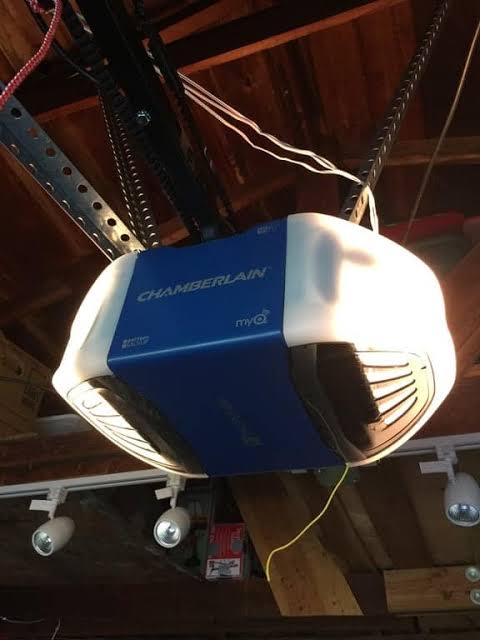
Have you ever pulled into your driveway only to realize you left the garage door open? Or perhaps you’ve wished you could let a delivery driver drop off a package inside while you’re still at work? These are common frustrations for homeowners who haven’t yet upgraded their home automation setup. If you are asking yourself, “Can I add WiFi to my garage door opener?” the answer is a resounding yes. You don’t need to replace your entire system; modern technology allows you to retrofit almost any existing opener with smart capabilities easily and affordably.
Understanding the Basics: How Smart Garage Technology Works
Before diving into the installation, it is helpful to understand what happens when you add WiFi to your garage door opener. Traditional openers use radio frequencies (usually 315 MHz or 390 MHz) to communicate between your handheld remote and the motor unit. A smart garage controller acts as a bridge between this radio signal and your home’s WiFi network.
When you install a smart module, it physically connects to your opener’s terminal block. When you press the “close” button in your smartphone app, the app sends a signal via the internet to your home router. The router communicates with the smart module, which then simulates the press of a physical wall button, triggering the opener to move. This process happens in seconds, providing you with real-time control and status updates from anywhere in the world.
According to Wikipedia, garage door openers have evolved significantly since their inception in the 1920s, transitioning from simple mechanical systems to complex electronic devices integrated into the Internet of Things (IoT). This evolution highlights why retrofitting is not just a trend, but a standard upgrade for modern home security.
Top Methods to Add WiFi to Your Existing Opener
There are three primary ways to achieve connectivity, depending on your budget and technical comfort level.
1. Dedicated Smart Garage Controllers
This is the most popular and user-friendly option. Devices like the Chamberlain MyQ, Tailwind, or Meross Smart WiFi Garage Door Opener are designed specifically for this purpose. They come with all necessary wiring and mounting hardware. Most connect directly to your home WiFi without needing a separate hub, though some older models may require one.
2. Universal Smart Plugs (For Older Models Only)
If you have a very old opener that lacks safety sensors or digital terminals, you might consider a smart plug. However, this method is not recommended for most users because it simply cuts power to the unit rather than sending a proper “open/close” signal. It does not provide status feedback (i.e., you won’t know if the door is actually open or closed), creating a significant security risk.
3. Integrated Smart Hubs
If you already use a comprehensive smart home ecosystem like Samsung SmartThings, Hubitat, or Home Assistant, you can use a Z-Wave or Zigbee garage door controller. These require a compatible hub but offer deeper integration with other devices, such as turning on lights when the garage opens.
Step-by-Step Guide: Installing a WiFi Module
Installing a smart garage controller is generally a DIY-friendly task that takes about 30–45 minutes. Here is a general guide applicable to most major brands like Chamberlain, LiftMaster, Genie, and Craftsman.
Safety First: Always disconnect the power to your garage door opener before starting any wiring.
- Check Compatibility: Verify that your opener has a “learn” button and standard terminal blocks. Most openers manufactured after 1993 are compatible.
- Mount the Sensor: Place the wireless sensor on the garage door track or header bracket. This sensor detects whether the door is open or closed. Ensure it is aligned correctly according to the manufacturer’s instructions.
- Connect the Wires: Locate the terminal block on your motor unit. You will typically see two terminals labeled for the wall console or push button. Connect the two wires from your smart module to these terminals. Polarity usually does not matter for these low-voltage connections.
- Power Up the Module: Plug the smart controller into a nearby electrical outlet. Use a surge protector if possible to protect the device from voltage spikes.
- Download the App: Install the corresponding app on your smartphone (iOS or Android). Create an account and follow the in-app instructions to pair the device with your WiFi network.
- Test the System: Stand clear of the door and use the app to open and close the garage. Verify that the status in the app matches the actual position of the door.
Benefits vs. Risks: Is It Worth It?
Adding WiFi to your garage door opener transforms convenience but also introduces new considerations. Here is a breakdown to help you decide.
| Feature | Benefit | Potential Risk |
|---|---|---|
| Remote Access | Open/close door from anywhere. | Dependency on internet connectivity. |
| Status Alerts | Get notified if left open. | False alarms due to sensor misalignment. |
| Integration | Link with Alexa, Google Home. | Privacy concerns with data collection. |
| Security | Encrypted communication protocols. | Vulnerability if weak passwords are used. |
Key Statistic: A study by the Consumer Technology Association found that smart home security devices, including garage controllers, are among the fastest-growing categories in home automation, with over 40% of smart home owners prioritizing entry-point security.
Critical Security Considerations
When you ask, “Can I add WiFi to my garage door opener?” you must also ask, “Is it safe?” The answer is yes, provided you follow best practices.
- Use Strong Passwords: Never use default passwords for your smart home app. Enable Two-Factor Authentication (2FA) if available.
- Keep Firmware Updated: Manufacturers regularly release updates to patch security vulnerabilities. Enable automatic updates in your app settings.
- Secure Your WiFi Network: Ensure your home WiFi uses WPA3 or WPA2 encryption. A compromised WiFi network can give hackers access to your garage.
- Disable Guest Access: Do not share your main admin credentials. Use guest features if you need to grant temporary access to family members or service providers.
Troubleshooting Common Issues
Even with the best equipment, you might encounter hiccups. Here are solutions to frequent problems:
- Device Offline: Check if your garage has strong WiFi signal. If not, consider installing a WiFi extender or mesh node near the garage.
- Sensor Misalignment: If the app shows the wrong status, check the magnet and sensor alignment on the door track. They must be within 1/2 inch of each other when the door is closed.
- Delayed Response: Latency can occur if your internet upload speed is slow. Ensure your router is not overloaded with too many devices.
Frequently Asked Questions (FAQ)
1. Will adding WiFi void my garage door opener’s warranty?
In most cases, no. Adding a smart controller involves connecting to low-voltage terminals designed for wall buttons. It does not modify the motor or internal electronics. However, always check your specific manufacturer’s warranty terms before proceeding.
2. Do I need a hub to add WiFi to my garage door?
Not necessarily. Many modern smart garage controllers connect directly to your 2.4GHz WiFi network. However, if you choose a Z-Wave or Zigbee device for broader smart home integration, you will need a compatible hub like SmartThings or Hubitat.
3. Can I control multiple garage doors with one app?
Yes. Most smart garage apps allow you to add multiple devices under a single account. You can label them “Main Garage” and “Workshop” for easy identification. Each door will require its own smart controller module.
4. What happens if my internet goes down?
Your garage door will still function normally using your physical remote controls and wall buttons. The smart features (remote access via app) will be unavailable until the internet connection is restored, but local operation is never affected.
5. Is it difficult to install if I’m not tech-savvy?
Most modern kits are designed for DIY installation. They come with clear, pictorial instructions and require only basic tools like a screwdriver and a ladder. If you are uncomfortable working with electrical terminals, hiring a professional handyman is a low-cost alternative.
6. Can I integrate my smart garage with Alexa or Google Assistant?
Absolutely. Most major smart garage brands offer seamless integration with Amazon Alexa, Google Assistant, and Apple HomeKit. This allows you to use voice commands like, “Alexa, close the garage door,” adding another layer of convenience.
Conclusion
So, can I add WiFi to my garage door opener? Absolutely. It is one of the most impactful and affordable upgrades you can make to your home. By choosing a reputable smart controller, you gain peace of mind through real-time status alerts, unparalleled convenience with remote access, and enhanced security features.
Whether you are looking to let in a dog walker, check if you forgot to close the door, or simply integrate your garage into your smart home ecosystem, the technology is ready and waiting. Don’t let an outdated opener hold you back. Take control of your entryway today.
Found this guide helpful? Share it with your neighbors on Facebook or Twitter to help them secure their homes too!
Leave a Reply