Introduction
There is nothing quite as frustrating as pulling into your driveway after a long day, pressing your garage door remote, and watching… absolutely nothing happen. You press it again. And again. Still silence. If you are asking yourself, “Why does my garage door not open with the remote,” you are not alone. This is one of the most common household maintenance issues in the United States, affecting millions of homeowners annually.
The good news? In over 80% of cases, the issue is minor and can be fixed without calling a professional technician. Whether it’s a dead battery, a misaligned sensor, or a simple programming glitch, we will walk you through the exact steps to diagnose and solve the problem. Let’s get your garage door moving again.
1. Is the Remote Battery Dead or Corroded?
Before we dive into complex wiring or motor issues, let’s start with the most obvious culprit: the power source. Garage door remotes are small, battery-operated devices that endure temperature fluctuations, drops, and daily wear.
How to Check and Replace the Battery
Most modern garage door remotes use a 3-volt coin-cell battery (commonly CR2032 or CR2025). Over time, these batteries lose charge, or the contacts inside the remote may become corroded.
Step-by-Step Replacement Guide:
- Open the Remote: Use a small flathead screwdriver or a coin to twist open the casing. Look for a small slot on the side.
- Inspect the Battery: Remove the old battery. Check for any white or green corrosion on the metal contacts. If present, clean it gently with a cotton swab dipped in rubbing alcohol.
- Insert New Battery: Place the new battery with the positive (+) side facing up (unless your model specifies otherwise). Ensure it sits flush.
- Test Immediately: Stand within 10 feet of the garage door and press the button.
Pro Tip: Even if the remote’s LED light blinks, the battery might still be too weak to send a strong enough signal to the opener. Always try a brand-new battery first.
2. Are the Safety Sensors Misaligned or Blocked?
If your remote clicks but the door doesn’t move—or moves slightly and then reverses—the issue is likely not the remote itself, but the safety reversal system. Since the mid-1990s, all garage door openers sold in the US are required by federal law to have photo-eye sensors.
These sensors are located near the floor on both sides of the garage door track. They emit an invisible beam; if the beam is broken, the door will not close or open fully to prevent injury.
Common Sensor Issues
- Misalignment: If one sensor is knocked out of place (even by a millimeter), the beam breaks. Look for blinking lights on the sensors. A steady light usually means they are aligned; a blinking light means they are not.
- Obstructions: Spider webs, dirt, leaves, or even direct sunlight hitting the sensor lens can interfere with the beam.
- Dirty Lenses: Wipe the sensor lenses with a soft, dry cloth.
For more detailed technical specifications on how these safety mechanisms work, you can refer to the general principles of automatic door operators on Wikipedia.
3. Has the Remote Lost Its Programming?
Sometimes, the remote and the opener simply “forget” each other. This can happen after a power outage, if the opener’s logic board resets, or if someone accidentally pressed the “Learn” button on the motor unit.
How to Reprogram Your Remote
While every brand (LiftMaster, Chamberlain, Genie, Craftsman) has slight variations, the general process is similar:
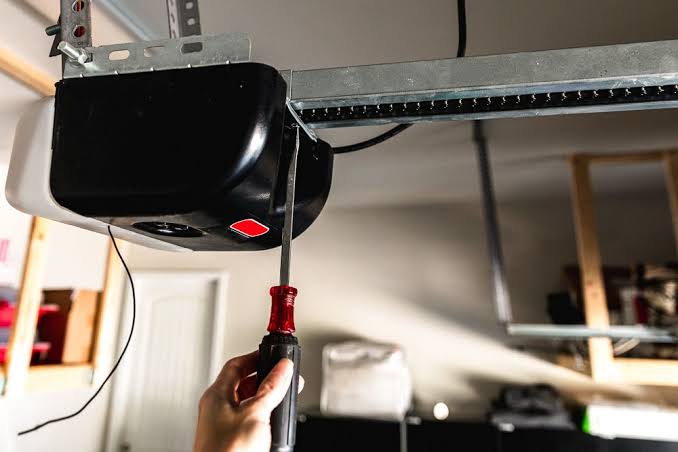
- Locate the Learn Button: Find the motor unit hanging from your garage ceiling. Look for a small button, usually colored yellow, purple, red, or green. It may be under a light cover.
- Press the Learn Button: Press and release it. The indicator light will turn on or blink. You typically have 30 seconds to complete the next step.
- Press the Remote Button: Within those 30 seconds, press and hold the button on your remote that you want to program. Hold it until the opener’s lights flash or you hear two clicks.
- Test: Press the remote button again to see if the door operates.
If you have multiple remotes, you must reprogram all of them once you hit the Learn button, as it often clears previous codes for security reasons.
4. Is There Signal Interference?
Garage door openers operate on radio frequencies, typically 315 MHz or 390 MHz. These signals can be interrupted by other electronic devices.
Sources of Interference
- LED Light Bulbs: Surprisingly, certain non-shielded LED bulbs in the garage opener unit or nearby fixtures can emit electromagnetic interference (EMI) that blocks the remote signal. Try switching back to incandescent bulbs temporarily to test this.
- Nearby Transmitters: Strong radio towers, amateur radio operators, or even a neighbor’s new security system can cause clashes.
- Car Window Tint: Some metallic window tints can block RF signals. Try rolling down your window and pressing the remote outside the car.
5. Are the Remote Buttons Worn Out?
If you have had your remote for five years or more, the physical buttons may simply be worn out. Inside the remote, there are rubber pads that make contact with the circuit board. Over time, these pads lose their conductivity.
Quick Diagnostic Test
- Visual Inspection: Open the remote and look at the black carbon pads on the underside of the buttons. Are they shiny, cracked, or missing?
- The “Other Button” Test: If your remote has two buttons (one for home, one for a second door or gate), try the other button. If one works and the other doesn’t, the issue is mechanical, not electronic.
You can sometimes fix this by cleaning the contacts with alcohol or replacing the rubber pad kit, which is available online for under $10.
Comparison: Remote Issue vs. Opener Issue
How do you know if the problem is the remote or the garage door opener itself? Use this quick comparison table.
| Symptom | Likely Cause | Solution |
|---|---|---|
| Remote LED doesn’t light up | Dead battery or broken remote | Replace battery or remote |
| Remote LED lights up, door doesn’t move | Programming loss or interference | Reprogram remote |
| Door moves slightly then stops | Safety sensors blocked/misaligned | Clean/align sensors |
| Wall switch works, remote doesn’t | Remote-specific issue | Focus on remote battery/programming |
| Neither wall switch nor remote works | Opener motor or power issue | Check circuit breaker/plug |
6. When to Call a Professional
While DIY fixes are great, some issues require a trained technician. You should call a professional if:
- The garage door springs are broken (dangerous high-tension components).
- The motor makes a humming noise but doesn’t move.
- You have tried all the above steps and the door still fails to respond.
- The circuit board on the opener shows signs of burning or damage.
FAQ Section
Q1: Why does my garage door remote work only when I am very close to the house?
This is a classic sign of a weak battery or signal interference. As the battery voltage drops, the transmission range decreases. Replace the battery first. If that fails, check for LED bulb interference in the garage.
Q2: Can I use my smartphone instead of a remote?
Yes! Many modern openers (like LiftMaster MyQ or Chamberlain) offer Wi-Fi connectivity. You can download the manufacturer’s app to control your door from anywhere. However, this requires a stable internet connection and a compatible opener model.
Q3: How often should I replace my garage door remote batteries?
It is recommended to replace them once a year, preferably at the start of winter. Cold temperatures can reduce battery efficiency, leading to unexpected failures.
Q4: Why did my remote stop working after a power outage?
Power surges or outages can reset the opener’s memory. You will likely need to reprogram your remote using the “Learn” button on the motor unit. In rare cases, a surge may have damaged the opener’s logic board.
Q5: Is it safe to bypass the safety sensors to make the door work?
No. Never bypass the safety sensors. They are a critical legal and safety requirement designed to prevent the door from crushing people, pets, or objects. If the sensors are faulty, replace them immediately rather than disabling them.
Conclusion
Dealing with a garage door that won’t open is inconvenient, but it is rarely a disaster. By systematically checking the battery, sensors, and programming, you can resolve the issue of “Why does my garage door not open with the remote” in under 15 minutes. Regular maintenance, such as annual battery changes and keeping sensor lenses clean, can prevent this problem from recurring.
Did this guide help you get your garage door working again? Share this article with your neighbors or on social media to help others save time and money on unnecessary service calls!
Leave a Reply