If you’re asking “Where Is The Learn Button On The Garage Door Opener”, you’re likely trying to program a remote, keypad, or even connect your car to your garage system. The Learn button is the key to all of these tasks—but it’s not always easy to find.
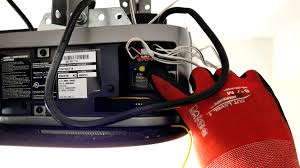
Don’t worry—this guide will show you exactly where to look, what it looks like, and how to use it step-by-step.
Read too: Tc1 Tricode Garage Door Opener Remote W/ Clip Chamberlain: Complete Guide
Where Is The Learn Button On The Garage Door Opener?
The Learn button is typically located on the motor unit of your garage door opener—the box mounted on the ceiling of your garage.
Most Common Locations:
- On the back panel of the motor unit
- Under the light cover
- Near the antenna wire
- Behind a removable panel
👉 In most cases, you’ll need a ladder to access it.
What Does the Learn Button Look Like?
The Learn button is usually small and colored.
Common Colors by Brand:
| Color | Meaning / Brand Type |
|---|---|
| Yellow | Newer models (Security+ 2.0) |
| Purple | Older LiftMaster/Chamberlain |
| Red/Orange | Older systems |
| Green | Early rolling code models |
💡 The button is often labeled “Learn” or “Program.”
Why Is the Learn Button Important?
The Learn button allows you to:
- Program remote controls
- Connect wireless keypads
- Sync your car (HomeLink system)
- Reset opener memory
👉 Without it, most programming tasks wouldn’t be possible.
How To Find the Learn Button (Step-by-Step)
Follow these steps to locate it quickly.
Step 1: Look at the Ceiling-Mounted Opener
Find the motor unit in your garage ceiling.
Step 2: Check the Back Panel
Most Learn buttons are located here.
Step 3: Remove the Light Cover
If you don’t see it:
- Open or slide the light cover
- Look inside for a colored button
Step 4: Look Near the Antenna
The antenna wire (usually hanging down) is often near the Learn button.
How To Use the Learn Button
Once you find it, here’s how to use it.
To Program a Remote:
- Press and release the Learn button
- LED light turns on
- Press remote button within 30 seconds
- Wait for light blink or click
To Reset the Opener:
- Press and hold Learn button for 6–10 seconds
- LED light turns off
- All devices are erased
What If You Can’t Find the Learn Button?
Here are possible reasons.
1. It’s Hidden Under a Cover
👉 Open the light panel or casing.
2. You Have an Older System
👉 Older units may use DIP switches instead.
3. It’s Labeled Differently
👉 Look for “Program,” “Set,” or similar labels.
Learn Button vs DIP Switch: What’s the Difference?
| Feature | Learn Button | DIP Switch |
|---|---|---|
| Technology | Modern | Older |
| Setup | Easy | Manual |
| Security | Rolling code | Fixed code |
How Garage Door Openers Use the Learn Button
Modern garage door systems rely on wireless communication.
- Pressing Learn activates pairing mode
- Devices send signals to the opener
- The opener stores the signal securely
This is part of how garage systems operate. Learn more here:
https://en.wikipedia.org/wiki/Garage_door_opener
Real-Life Example
Scenario:
A homeowner wants to program a new remote.
Problem:
Can’t find the Learn button.
Solution:
- Opens light cover
- Finds yellow button inside
Result:
Remote programmed in under 2 minutes.
Common Mistakes to Avoid
- Holding the button too long (resets memory)
- Missing the 30-second programming window
- Pressing the wrong button
- Not checking under the light cover
Safety Tips When Using the Learn Button
- Use a stable ladder
- Keep hands clear of moving parts
- Ensure garage door area is clear
- Don’t program while the door is moving
Maintenance Tips
- Keep opener clean and dust-free
- Check button functionality periodically
- Test remotes monthly
- Replace batteries regularly
FAQ: Where Is The Learn Button On The Garage Door Opener
1. Is the Learn button always visible?
No, it’s often hidden under a light cover or panel.
2. Can I program a remote without the Learn button?
Only if your system uses DIP switches (older models).
3. What color is the Learn button?
Common colors include yellow, purple, red, and green.
4. Why can’t I find my Learn button?
It may be hidden, labeled differently, or your opener is older.
5. What happens if I hold the Learn button too long?
It resets the opener and erases all programmed devices.
6. Do all garage door openers have a Learn button?
Most modern openers do, but older ones may not.
Conclusion
Now you know exactly where is the learn button on the garage door opener—and more importantly, how to find and use it quickly. Whether you’re programming a remote or troubleshooting your system, the Learn button is the key to getting everything working smoothly.
Take a few minutes to locate it today—you’ll make future setup and troubleshooting much easier.
If this guide helped you, feel free to share it on social media so others can find their Learn button without frustration! 🚪
Leave a Reply