Introduction
Losing your garage door remote or fumbling for keys in the rain is a frustration every homeowner knows all too well. It disrupts your day and raises immediate concerns about home security and convenience. The LiftMaster 878Max Garage Door Keypad Wireless And Keyless Entry System offers a sleek, reliable solution to this common problem, allowing you to enter your home with just a simple four-digit code.
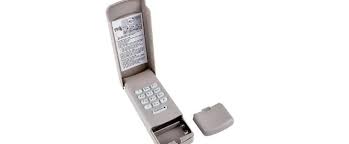
In this comprehensive guide, we will explore why this specific model remains a top choice for US homeowners, how it integrates with existing systems, and step-by-step instructions to get you up and running in minutes. Whether you are a tech-savvy DIY enthusiast or a beginner looking for simplicity, this review covers everything you need to know.
Why Choose the LiftMaster 878Max?
When upgrading your garage access, reliability is non-negotiable. The LiftMaster 878Max is not just a keypad; it is a robust security device designed to withstand the elements while providing seamless access. Unlike older models that relied on bulky remotes, this wireless keypad utilizes Security+ 2.0 technology, which encrypts your code every time you use it. This rolling code feature prevents hackers from “capturing” your signal, a significant upgrade over static-code systems used in the past.
According to industry standards, garages are among the most vulnerable entry points for intruders. By switching to a keyless system, you eliminate the risk of lost remotes falling into the wrong hands. The 878Max is compatible with most LiftMaster, Chamberlain, and Craftsman openers manufactured after 1993, making it a versatile choice for millions of American homes.
Is the LiftMaster 878Max Compatible With My Opener?
One of the most frequent questions users have is regarding compatibility. Before purchasing, it is crucial to ensure the keypad will communicate with your existing garage door opener motor.
The LiftMaster 878Max is designed to work with openers that feature a “Learn” button. To verify compatibility:
- Locate the motor unit of your garage door opener (usually mounted on the ceiling).
- Look for a square or rectangular button labeled “Learn,” “Smart,” or “Program.” It is typically colored yellow, orange, purple, or red.
- If your opener has this button, it is compatible with the 878Max.
If your opener is extremely old (pre-1993) and uses dip switches instead of a learn button, this keypad will not work. In such cases, you may need to upgrade your entire opener system to meet modern safety and security standards. For more technical details on garage door opener evolution, you can refer to general industry history on Wikipedia.
Step-by-Step Installation Guide
Installing the LiftMaster 878Max Garage Door Keypad Wireless And Keyless Entry System is a straightforward process that requires no wiring. You will need a ladder, a screwdriver, and about 15 minutes of your time.
Step 1: Prepare the Keypad
Remove the battery cover on the back of the keypad and insert a fresh 9V battery. Ensure the polarity is correct. Replace the cover securely.
Step 2: Clear Old Codes (Optional but Recommended)
If you are replacing an old keypad, it is good practice to clear your opener’s memory. Press and hold the “Learn” button on your motor unit until the indicator light blinks off. This erases all previously paired remotes and keypads.
Step 3: Program the Keypad
- Press and release the “Learn” button on your garage door opener motor unit. The indicator light will turn on or blink.
- Within 30 seconds, go to your new 878Max keypad.
- Enter your desired 4-digit PIN.
- Immediately press and hold the “ENTER” button.
- Release the “ENTER” button when the motor unit’s lights flash or you hear a click. This confirms the code has been accepted.
Step 4: Mount the Keypad
Choose a location outside your garage, ideally near the side entry door. Avoid direct exposure to heavy rain if possible, although the unit is weather-resistant.
- Use the provided screws to mount the keypad to the wall or door frame.
- Ensure it is high enough to be accessible but out of plain sight from the street to prevent tampering.
Step 5: Test the System
Close your garage door completely. Enter your 4-digit PIN followed by the “ENTER” button. The door should activate. Test this twice to ensure consistency.
Features Breakdown: Pros and Cons
To help you make an informed decision, here is a detailed comparison of the advantages and limitations of the 878Max model.
| Feature | Details |
|---|---|
| Security | Uses Security+ 2.0 encryption; codes change with every use. |
| Capacity | Supports one primary user PIN and up to 4 temporary PINs. |
| Power Source | Runs on a single 9V battery (lasts approx. 1–2 years). |
| Weather Resistance | Designed to withstand rain, snow, and extreme temperatures. |
| Backlight | Illuminated keys for easy night-time entry. |
| Compatibility | Works with most major brands post-1993. |
Pros:
- Enhanced Security: The rolling code technology is a significant deterrent to code-grabbing thieves.
- Temporary Access: Ideal for dog walkers, house sitters, or delivery personnel. You can set a temporary PIN that expires automatically.
- Ease of Use: Large, tactile buttons are easy to press even with gloves on.
Cons:
- Battery Dependency: If the 9V battery dies, you cannot enter via the keypad. Keep a spare battery in your car or home.
- No Smart Connectivity: Unlike newer Wi-Fi-enabled models, the 878Max does not connect to your phone app directly. It is a standalone RF device.
How to Manage Temporary PINs
A standout feature of the LiftMaster 878Max Garage Door Keypad Wireless And Keyless Entry System is the ability to create temporary access codes. This is particularly useful for short-term guests.
To set a temporary PIN:
- Enter your permanent 4-digit PIN and press “ENTER.”
- Within 10 seconds, enter a new 4-digit temporary PIN.
- Press and hold the “UP/DOWN” arrow buttons simultaneously until the light flashes.
This temporary code will work for a limited number of uses or a set timeframe, depending on your opener’s specific configuration. Once expired, the code is useless, ensuring your home remains secure after your guest departs.
Troubleshooting Common Issues
Even the best technology can encounter hiccups. Here are solutions to common problems:
- Keypad Not Responding: Check the 9V battery. Even if the light turns on, low voltage can prevent signal transmission. Replace it with a high-quality alkaline battery.
- Door Reverses Before Closing: This is usually a sensor issue, not a keypad issue. Check the safety eyes at the bottom of your garage door tracks. Ensure they are aligned and clean.
- Code Not Accepted: You may have missed the 30-second window during programming. Clear the memory and restart the pairing process. Ensure you are pressing the “Learn” button on the motor, not the wall console inside the garage.
FAQ Section
1. How long does the battery last in the LiftMaster 878Max?
Under normal usage conditions, the 9V battery typically lasts between 1 to 2 years. Cold weather can slightly reduce battery efficiency, so it is advisable to check it annually before winter sets in.
2. Can I use the 878Max with a Chamberlain opener?
Yes. LiftMaster and Chamberlain are owned by the same parent company and share the same frequency and coding technology. If your Chamberlain opener has a “Learn” button, the 878Max will work seamlessly.
3. What happens if I forget my PIN?
If you forget your PIN, you cannot retrieve it from the keypad. You must reset the system by clearing the memory on the garage door opener motor unit (using the “Learn” button) and reprogramming the keypad with a new code.
4. Is the keypad waterproof?
The 878Max is weather-resistant, meaning it can handle rain and snow. However, it is not fully submersible. For best longevity, install it under an eave or slight overhang if possible.
5. Can multiple family members have different PINs?
The 878Max supports one primary PIN and additional temporary PINs. For distinct, permanent individual PINs for multiple users, you might need to look into newer Wi-Fi-enabled hubs or smart keypads, but for most families, sharing one secure primary code is standard practice.
Conclusion
Upgrading to the LiftMaster 878Max Garage Door Keypad Wireless And Keyless Entry System is a smart move for any homeowner prioritizing security and convenience. It eliminates the hassle of lost remotes, provides encrypted protection against intruders, and offers the flexibility of temporary access codes for guests.
With its easy installation process and broad compatibility, it serves as a reliable bridge between traditional openers and modern security needs. While it lacks smart-home integration, its core function—secure, keyless entry—is executed flawlessly.
Ready to simplify your daily routine? Share this guide with friends or family who are still struggling with clunky garage remotes. A small upgrade like this can make a big difference in your daily home experience!
Leave a Reply