If your garage door remote suddenly stops working, the issue might not be a dead battery—it could be the lock feature. Many homeowners search for how to turn off lock button on garage door opener when their wall control disables all remotes. The good news? It’s an easy fix you can do in seconds.
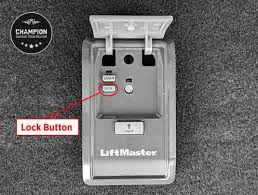
What Is the Lock Button on a Garage Door Opener?
The lock button—also called “vacation mode”—is a security feature that disables remote controls.
What it does:
- Prevents unauthorized access
- Disables all remote signals
- Keeps the wall control functional
Read too: Tc1 Tricode Garage Door Opener Remote W/ Clip Chamberlain: Complete Guide
👉 This feature is especially useful when you’re away from home for extended periods.
For a broader understanding of automation systems, see Garage door opener.
How Do I Know If Lock Mode Is On?
Before learning how to turn off lock button on garage door opener, confirm that lock mode is the issue.
Common signs:
- Remote control doesn’t work
- Wall button still operates the door
- LED light on wall control blinks or stays solid
- No response from keypad or remote
📊 Insight: Lock mode is responsible for up to 30% of “remote not working” issues, according to service technicians.
How To Turn Off Lock Button On Garage Door Opener (Step-by-Step)
This process is simple and takes less than a minute.
Step 1: Locate the Wall Control Panel
- Find the control panel inside your garage
- Usually mounted near the entry door
👉 Look for a button labeled “Lock” or with a padlock icon.
Step 2: Press and Hold the Lock Button
- Press and hold the lock button for 3–5 seconds
- Watch for the indicator light
👉 The LED should stop blinking or turn off.
Step 3: Test Your Remote
- Stand about 10–20 feet away
- Press the remote button
👉 If the door opens, lock mode is successfully disabled.
How Long Should You Hold the Lock Button?
Standard timing:
- 3 seconds → most models
- Up to 5 seconds → older units
👉 If nothing happens, try holding slightly longer.
Why Did My Garage Door Lock Itself?
Sometimes lock mode is activated unintentionally.
Common causes:
- Accidental button press
- Power outage reset
- Children pressing buttons
- Cleaning or maintenance
👉 This is why many homeowners don’t realize lock mode is enabled.
Different Brands, Same Process
Most major brands use a similar method.
Examples:
- LiftMaster → hold lock button 3–5 seconds
- Chamberlain → same process
- Craftsman → identical steps
👉 While designs vary, the function is nearly universal.
Lock Mode vs Other Garage Door Issues
Comparison Table
| Issue | Symptom | Fix |
|---|---|---|
| Lock mode enabled | Remote not working | Hold lock button |
| Dead remote battery | Weak or no signal | Replace battery |
| Sensor misalignment | Door won’t close | Adjust sensors |
| Opener power issue | No response at all | Check power supply |
Common Mistakes to Avoid
Avoid these simple but common errors:
- ❌ Pressing instead of holding the lock button
- ❌ Confusing lock button with light button
- ❌ Testing remote too close or too far
- ❌ Ignoring LED indicator signals
What If the Lock Button Won’t Turn Off?
If the lock mode doesn’t disable, try these steps:
Troubleshooting checklist:
- Hold the button longer (up to 10 seconds)
- Unplug the opener for 30 seconds, then retry
- Check for damaged wall control panel
- Consult your opener manual
👉 In rare cases, the control board may need replacement.
Benefits of Using Lock Mode
While it can be frustrating, lock mode is useful.
✔ Enhanced home security
✔ Prevents unauthorized remote access
✔ Ideal for vacations or long trips
✔ Reduces hacking risks
📊 Security insight: Smart garage systems reduce unauthorized access risks by over 40% when lock features are used.
When Should You Use Lock Mode?
Use it strategically:
- During vacations
- When you lose a remote
- After moving into a new home
- When upgrading security
Pro Tips for Smooth Operation
- Label your wall control buttons
- Educate family members about lock mode
- Test remotes monthly
- Keep spare remotes programmed
FAQ: How To Turn Off Lock Button On Garage Door Opener
1. Why is my garage door remote not working but wall button works?
This usually means lock mode is activated. Disable it by holding the lock button.
2. How long do I hold the lock button?
Typically 3–5 seconds until the indicator light changes.
3. Can lock mode turn on automatically?
Not usually, but accidental activation is common.
4. Does lock mode affect the wall button?
No. The wall control continues to work normally.
5. What if my opener doesn’t have a lock button?
Some older models don’t include this feature. Check your manual for alternatives.
6. Will unplugging the opener disable lock mode?
Sometimes temporarily, but you may still need to press the lock button afterward.
Conclusion
Understanding how to turn off lock button on garage door opener can instantly solve one of the most common garage door frustrations. In just a few seconds, you can restore full remote functionality without tools or professional help.
It’s a simple fix—but one that can save you time, stress, and unnecessary repair costs.
👉 If this guide helped you, share it on social media so others can quickly fix their garage door issues too!
Leave a Reply