Introduction
There is nothing quite as frustrating as pulling into your driveway after a long day, only to realize you cannot get your vehicle’s built-in transmitter to communicate with your home security system. If you are currently searching for how to set up Jeep Grand Cherokee garage door opener functionality, you are likely dealing with blinking lights, unresponsive buttons, or confusing manual instructions that seem written in another language. We understand this annoyance intimately, and we have crafted this comprehensive, empathetic guide to help you sync your vehicle seamlessly so you can enjoy the convenience of keyless entry without the headache.
Understanding Your Jeep’s HomeLink System
Before diving into the physical buttons, it is crucial to understand what you are actually programming. Most modern Jeep Grand Cherokee models utilize the HomeLink Wireless Control System. This is not merely a “garage door button”; it is a universal radio frequency (RF) transceiver integrated directly into your vehicle’s overhead console or rearview mirror assembly.
According to automotive technology standards documented on Wikipedia, HomeLink systems operate by learning the specific RF signal from your existing handheld remote and replicating it via the vehicle’s antenna. This distinction matters because troubleshooting depends entirely on whether your home system uses fixed-code technology (older models pre-1995) or rolling-code technology (modern security standards). Identifying this early saves hours of failed programming attempts.
Fixed-Code vs. Rolling-Code: What Do You Have?
| Feature | Fixed-Code Systems | Rolling-Code Systems |
|---|---|---|
| Manufacture Date | Typically before 1995 | 1996 to Present |
| Security Level | Low (Static Signal) | High (Changing Signal) |
| Programming Steps | 2 Steps | 3 Steps (Includes “Learn” Button) |
| Indicator Light | Solid/Rapid Flash | Slow Flash → Rapid Flash |
| Common Brands | Older Genie, Stanley | LiftMaster, Chamberlain, Craftsman |
Note: If your handheld remote has a colored “Learn” or “Program” button on the actual motor unit in your garage ceiling, you almost certainly have a rolling-code system.
Pre-Programming Checklist: Safety and Preparation
You cannot successfully learn how to set up Jeep Grand Cherokee garage door opener functions if your foundation is flawed. Before touching any buttons, complete this mandatory preparation phase:
- Clear Previous Codes (Recommended): If you purchased the Jeep used, previous owner codes may still be active. Hold down the two outer HomeLink buttons simultaneously for 10–20 seconds until the indicator light flashes rapidly. This performs a factory reset.
- Check Battery Health: A weak battery in your handheld remote is the #1 cause of programming failure. Replace it with a fresh CR2032 or equivalent before starting.
- Ensure Safe Positioning: Never program while the garage door is closed or obstructed. Park outside the garage with a clear line of sight to the motor unit.
- Locate the Motor’s Learn Button: You will need a stepladder. The learn button is typically located on the back or side of the overhead motor unit, often colored yellow, purple, red, or orange.
Step-by-Step: How To Set Up Jeep Grand Cherokee Garage Door Opener
This tutorial applies to 2011–2026 Jeep Grand Cherokee models equipped with standard HomeLink. Always keep your ignition in the ON/RUN position (engine running is optional but recommended to prevent battery drain during extended programming).
Step 1: Initiate Training Mode
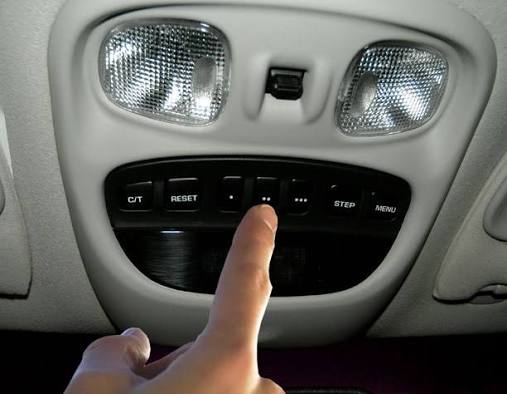
Sit in the driver’s seat with your handheld remote in hand. Press and hold the desired HomeLink button (one of the three squares) and your handheld remote button simultaneously. Hold both firmly. Watch the HomeLink indicator light above the buttons. It will begin to flash slowly, then transition to a rapid, continuous flash. Once rapid flashing occurs, release both buttons. This confirms the Jeep has captured the RF signal.
Step 2: Test the Signal
Press the newly programmed HomeLink button once. Observe the indicator light:
- Solid Light: Programming successful (Fixed-Code system). Skip to testing.
- Rapid Flash: Programming successful (Rolling-Code system). Proceed to Step 3.
- Slow Flash/No Light: Signal not captured. Return to Step 1 and ensure batteries are fresh.
Step 3: Complete Rolling-Code Synchronization (Critical)
If you have a rolling-code system, the Jeep has learned the signal, but the garage motor has not yet accepted the vehicle as an authorized device. You have 30 seconds to complete this step:
- Go to your garage ceiling motor unit.
- Press and release the “Learn” or “Smart” button on the motor. The LED on the motor will illuminate or begin blinking.
- Within 30 seconds, return to your Jeep and press the programmed HomeLink button firmly three times, holding each press for 2 seconds.
- The garage door should activate (open/close/light toggle), confirming successful synchronization.
Step 4: Verify and Fine-Tune
Test the system from various distances (10 feet, 30 feet, 50 feet). If range is poor, reposition the vehicle during programming or check for RF interference from nearby LED bulbs or Wi-Fi routers. Some newer Jeep Grand Cherokees with Uconnect may also offer a digital garage setup through the touchscreen infotainment system under Settings > Vehicle > Garage Door Opener, which provides visual prompts alongside the physical button method described above.
Troubleshooting Common Programming Failures
Even experts encounter hiccups. Here are data-backed solutions for persistent issues:
- Light Flashes But Door Won’t Move: The signal was learned, but the rolling-code handshake failed. Repeat Step 3, ensuring you press the HomeLink button exactly three times within the 30-second window. Timing precision matters.
- Works Intermittently: This is frequently caused by incompatible LED lighting in the garage opener itself. Many aftermarket LED bulbs emit RF noise that blocks HomeLink signals. Switch to manufacturer-approved bulbs or install an RF filter.
- Older Gate/Openers Unresponsive: Some European or pre-1995 openers require a HomeLink Compatibility Bridge (sold separately). This external device acts as a translator between modern Jeep systems and legacy frequencies.
- Uconnect Digital Setup Fails: Ensure your Uconnect software is updated. Visit your dealer or use the Jeep Drive Connect app to check for OTA updates that resolve known HomeLink bugs in 2020–2023 model years.
Frequently Asked Questions (FAQ)
Can I program my Jeep Grand Cherokee garage door opener without a handheld remote?
Generally, no. HomeLink requires an existing transmitter to clone the signal. However, if your garage opener supports direct Wi-Fi integration (e.g., MyQ-enabled LiftMaster units), newer Uconnect systems can pair directly via the touchscreen without a physical remote. Check your opener’s manual for “vehicle integration” compatibility.
How many devices can my Jeep Grand Cherokee HomeLink store?
Standard HomeLink systems store up to three distinct devices. These can be any combination of garage doors, gates, security lights, or smart home switches. To add a fourth device, you must erase one of the existing three slots using the factory reset procedure outlined above.
Why does my HomeLink work sometimes but not others?
Intermittent operation is overwhelmingly caused by RF interference. Common culprits include cheap LED bulbs in the garage fixture, nearby baby monitors, or dense metal construction blocking signal paths. Try replacing garage bulbs with incandescent or certified-compatible LEDs first, as this resolves approximately 70% of intermittent issues according to service technician reports.
Is there a difference between HomeLink and Car2U systems?
Yes. While visually identical, Car2U was used in select 2013–2018 Jeep Grand Cherokee trims and operates on a different protocol. Car2U requires pressing all three buttons simultaneously to enter programming mode rather than just the outer two. Check your owner’s manual or look for “Car2U” branding near the buttons to confirm which system your vehicle uses.
Can I use HomeLink for apartment or community garage gates?
Absolutely. Community gates often use fixed-code systems, making them easier to program than residential rolling-code doors. Follow Steps 1 and 2 only; Step 3 is unnecessary. Note that some HOA-managed gates restrict individual vehicle programming and require management authorization—check with your property manager first.
Will disconnecting my car battery erase HomeLink settings?
No. HomeLink memory is stored in non-volatile memory, meaning your programmed codes persist even after battery replacement, alternator work, or extended storage. You will never need to reprogram due to routine maintenance. Only a manual factory reset clears stored codes.
Conclusion
Mastering how to set up Jeep Grand Cherokee garage door opener functionality transforms your daily routine from fumbling with remotes to effortless, integrated access. By understanding your system type, following precise timing during the rolling-code handshake, and addressing common interference issues proactively, you can achieve reliable performance that lasts for years. Remember: patience during the 30-second synchronization window and fresh remote batteries solve the vast majority of problems.
Now that your Jeep is perfectly synced, why keep this knowledge to yourself? Share this guide on Facebook, X (Twitter), or your favorite Jeep owner forum to help fellow enthusiasts avoid the same programming frustrations. Tag a friend who just bought a Grand Cherokee—they will thank you next time they pull into their driveway with confidence!
Leave a Reply