Introduction
There is nothing quite as frustrating as sitting in your driveway, rain pouring down, while you fumble for a plastic clicker that has mysteriously vanished into the abyss of your center console. If you are a new owner of this fantastic Swedish SUV, figuring out how to set up garage door opener in Volvo XC60 should be at the top of your priority list for seamless daily convenience. We understand that vehicle manuals can be dense and confusing, so we have created this empathetic, jargon-free guide to get your integrated system working perfectly in minutes.
Understanding the Volvo Homelink System
Before diving into buttons and LEDs, it is vital to understand what you are actually programming. The Volvo XC60 does not use a proprietary “Volvo-only” frequency; instead, it utilizes the Homelink Universal Transceiver. This is an industry-standard wireless control system that replaces up to three separate handheld transmitters.
According to technical documentation referenced on Wikipedia, Homelink systems operate on specific radio frequencies (typically 315 MHz or 390 MHz in North America) and support both fixed-code and rolling-code security protocols. Understanding this distinction is critical because rolling code openers (manufactured after 1996) require an extra synchronization step at the garage door motor unit itself, whereas older fixed-code models do not.
Fixed Code vs. Rolling Code: Quick Comparison
| Feature | Fixed Code (Pre-1996) | Rolling Code (Post-1996) |
|---|---|---|
| Security Level | Low (Static Signal) | High (Changing Signal) |
| Programming Steps | Vehicle Only | Vehicle + Garage Motor Unit |
| LED Indicator Behavior | Solid Light During Programming | Rapid Flash After Initial Sync |
| Compatibility | Older LiftMaster/Genie Models | Modern Chamberlain/Craftsman |
| Reset Required? | Rarely | Yes, if changing remotes |
Note: Over 90% of garage door openers currently in US homes utilize rolling code technology due to federal safety mandates enacted in the late 1990s.
Pre-Programming Checklist: Safety and Preparation
Safety is not just a suggestion; it is a requirement when dealing with automated mechanical systems. Before you attempt to learn how to set up garage door opener in Volvo XC60, please complete these preparatory steps:
- Clear the Door Path: Ensure no people, pets, or objects are near the garage door. The programming process involves testing the door’s movement, and you must prevent accidental entrapment.
- Locate the Learn Button: Go to your garage ceiling unit before starting. Find the colored “Learn” or “Smart” button (usually yellow, purple, orange, or red). You will need a ladder and clear access to this panel during Step 4.
- Check Your Battery: While the XC60 powers the transmitter, having a fresh battery in your original handheld remote ensures it transmits a strong signal during the cloning phase.
- Ignition Status: For most Volvo XC60 model years (2018–2026), the ignition must be in the “ON” position (engine running or accessory mode active) for the Homelink module to receive power.
Step-by-Step: How To Set Up Garage Door Opener In Volvo XC60
Follow these precise instructions. Do not rush the timing, as the Homelink module requires specific hold durations to register signals.
Step 1: Clear Previous Memory (Recommended for Used Vehicles)
If you purchased your XC60 pre-owned, previous owners’ codes may still be stored. To factory reset the system:
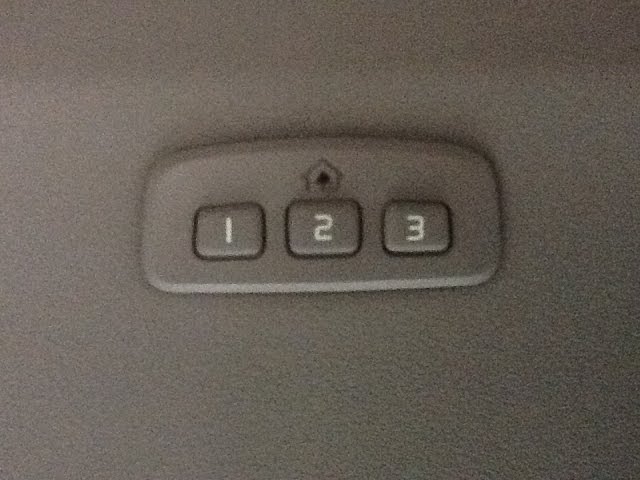
- Press and hold both outer Homelink buttons (Button I and Button III) simultaneously.
- Hold for approximately 10 seconds until the indicator LED begins to flash rapidly.
- Release both buttons. The memory is now wiped. Do not skip this step if unsure of prior programming.
Step 2: Position Your Handheld Remote
- Sit in the driver’s seat with the ignition ON.
- Hold your original garage door remote 1–3 inches away from the Homelink buttons located in your overhead console or rearview mirror assembly.
- Expert Tip: Some users find better success holding the remote at a slight angle rather than flat against the buttons.
Step 3: Initiate the Cloning Process
- Simultaneously press and hold the desired Homelink button (e.g., Button I) AND the button on your handheld remote.
- Watch the Homelink indicator LED closely. It will begin to flash slowly, then transition to a rapid, continuous flash.
- This rapid flash indicates the frequency and code have been successfully captured. Release both buttons.
- Troubleshooting: If the light never flashes rapidly after 30 seconds, move the remote closer or replace its battery before retrying.
Step 4: Synchronize Rolling Code Openers (Critical Step)
This step applies to all modern garage door openers. If your Homelink LED flashed rapidly in Step 3 but the door does not open, you must complete this synchronization:
- Walk to your garage door motor unit.
- Press and release the “Learn” or “Smart” button on the motor housing. The adjacent LED will illuminate or blink, indicating a 30-second programming window.
- Return to your XC60 within those 30 seconds.
- Press and hold the programmed Homelink button for 2 seconds, then release. Repeat this press-hold-release cycle up to three times until the garage door activates.
- Once the door moves, the pairing is complete.
Step 5: Test and Verify Range
Test the system from various distances. A properly configured Volvo XC60 Homelink should operate reliably from at least 50 feet. If range is poor, check for LED headlight interference (common in newer vehicles) or consider installing a Homelink repeater kit.
Common Troubleshooting Scenarios
Even professionals encounter hiccups. Here are solutions to the most frequent issues when learning how to set up garage door opener in Volvo XC60:
- LED Flashes Slowly But Never Rapidly: Your handheld remote may be incompatible, or its battery is dead. Try a different remote or verify compatibility via the Homelink website.
- Door Opens From Car But Not From Wall Switch: This indicates incomplete rolling code sync. Repeat Step 4 precisely, ensuring you press the motor’s Learn button immediately before returning to the vehicle.
- Intermittent Operation: LED headlights on some vehicles emit RF noise that interferes with 315 MHz signals. Test with headlights OFF to confirm. If confirmed, a shielded antenna extension or repeater is the solution.
- Only One Button Works: Each Homelink button must be programmed individually. Repeat Steps 2–4 for each additional device (gate, second garage, smart plug).
Frequently Asked Questions (FAQ)
Can I program my Volvo XC60 Homelink without an original remote?
Generally, no. The Homelink system is designed to clone existing signals for security reasons. However, if your garage door opener supports direct-to-Homelink pairing (some newer Chamberlain/myQ models), you may bypass the handheld remote entirely by using only the motor unit’s Learn button. Consult your opener’s manual for “direct Homelink programming” instructions.
Does the Volvo XC60 Homelink work with smart garage controllers like myQ?
Yes, but indirectly. Homelink operates via traditional RF signals, not Wi-Fi. It will trigger any smart controller that accepts standard remote inputs. For native app-based control, use the manufacturer’s smartphone app alongside Homelink for redundancy.
How many devices can the Volvo XC60 Homelink store?
The system stores three independent channels. You can program combinations such as: one garage door + one gate + one smart home light switch, or three separate garage doors. Factory resetting clears all three channels simultaneously.
Why did my Homelink stop working after a car battery replacement?
While rare, voltage fluctuations during battery changes can corrupt Homelink memory. Simply repeat the full programming sequence (Steps 1–4). This is also an excellent opportunity to verify your garage door opener’s safety sensors are functioning correctly.
Is there a subscription fee for using Homelink in my Volvo?
Absolutely not. Unlike some connected car services, Homelink is a hardware-based feature with zero recurring costs. Once programmed, it works indefinitely without apps, accounts, or monthly fees.
What model years of Volvo XC60 include Homelink as standard?
Homelink has been standard equipment on virtually all US-spec Volvo XC60 models from 2010 onward. Earlier models or base trims in certain markets may lack the overhead console buttons. Check your mirror housing or overhead console for the three-button array with the house icon to confirm presence.
Conclusion: Enjoy Seamless Entry Every Time
Mastering how to set up garage door opener in Volvo XC60 transforms your daily routine from clumsy fumbling to effortless automation. By following this comprehensive guide, you have leveraged professional-grade knowledge to integrate your vehicle with your home securely and efficiently. Remember, the key to success lies in patience during the rolling code synchronization and adherence to safety protocols throughout the process.
Your Volvo was engineered for premium convenience—now your garage entry matches that standard. Found this guide helpful? Share it with fellow Volvo owners on Facebook, Reddit’s r/Volvo community, or Pinterest to help others ditch the cluttered visor clips forever! Safe driving and smooth entries ahead.
Leave a Reply