Introduction
There is nothing quite as frustrating as pulling into your driveway after a long day of work, only to realize you cannot get your new truck to communicate with your home’s security system. If you are struggling to figure out how to set up garage door opener in Chevy Silverado, please know that you are not alone; this is one of the most common questions new Silverado owners ask. Fortunately, the process is straightforward once you understand the specific programming sequence for your vehicle’s integrated Homelink system. This guide will walk you through every step with empathy and precision, ensuring you can open your garage with a simple button press by the end of this article.
Understanding Your Silverado’s Homelink System
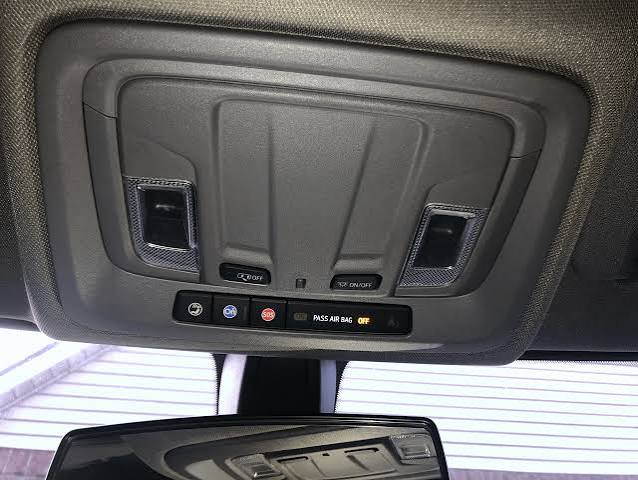
Before diving into buttons and sequences, it is vital to understand what technology you are actually using. Most modern Chevy Silverados come equipped with Homelink, a universal transceiver system built directly into the overhead console or rearview mirror. Unlike older aftermarket remotes, Homelink does not use batteries; it draws power from the vehicle and communicates via radio frequency (RF) signals.
According to automotive safety standards, this integration is designed to reduce clutter and improve driver focus. However, because Homelink acts as a “universal translator,” it must be taught the specific frequency and rolling code of your garage door motor. Think of it like introducing two friends who speak different dialects; your Silverado needs a moment to learn the language of your LiftMaster, Chamberlain, or Genie opener. For a deeper technical understanding of how these RF transceivers operate within vehicular systems, you can refer to the comprehensive overview on Wikipedia.
Compatibility Check: Rolling Code vs. Fixed Code
Not all garage doors are created equal. Identifying your opener type saves hours of frustration:
- Rolling Code (Post-1996): The security code changes every time the remote is used. This is standard for almost all Silverados from 2007 onwards.
- Fixed Code (Pre-1996): Uses a static dip-switch pattern. Requires an additional external receiver bridge for modern trucks.
- Smart/MyQ Systems: Wi-Fi enabled openers that may require a specific “Homelink Bridge” adapter rather than direct RF programming.
Step-by-Step: How To Set Up Garage Door Opener In Chevy Silverado
This tutorial assumes you have a Silverado with a functional Homelink system and a working original garage door remote. Please park your vehicle outside the garage during programming to prevent accidental door movement or injury.
Phase 1: Clearing Previous Memory
If your Silverado is pre-owned or has been serviced recently, old codes might interfere. Always start fresh.
- Locate the three Homelink buttons on your overhead console or mirror.
- Press and hold the two outer buttons simultaneously.
- Keep holding for approximately 10–20 seconds.
- Release when the indicator LED begins to flash rapidly. This confirms the memory is wiped and ready for new programming.
Phase 2: Programming the Vehicle Button
Now we teach the Silverado to recognize your handheld remote.
- Hold your original garage door remote 1–3 inches away from the Homelink buttons. Closer is better for signal clarity.
- Simultaneously press and hold the desired Homelink button AND your handheld remote’s transmit button.
- Watch the Homelink LED closely. It will transition from a slow blink to a rapid, solid flash.
- Slow Blink: Still learning.
- Rapid Flash: Signal captured successfully.
- Release both buttons immediately upon seeing the rapid flash.
- Test by pressing the programmed Homelink button once. The LED should stay solid, indicating transmission.
Phase 3: Synchronizing with the Garage Door Motor
Your truck now knows the remote, but the garage door doesn’t know the truck yet. This step requires physical access to the motor unit.
- Locate the “Learn” or “Smart” button on your garage door opener motor head. It is typically yellow, purple, orange, or red.
- Press and release the Learn button. You usually have 30 seconds to complete the next step before the motor exits learning mode.
- Return to your Silverado and press the newly programmed Homelink button firmly.
- Release and press it a second time within 2 seconds.
- Press it a third time if the door does not respond. Three cycles ensure the rolling code handshake is complete.
- Verify operation by opening and closing the door using only the Silverado’s button.
Troubleshooting Common Programming Failures
Even professionals encounter hiccups. Use this diagnostic table before assuming hardware failure:
| Symptom | Probable Cause | Recommended Solution |
|---|---|---|
| LED never flashes rapidly | Dead remote battery or wrong distance | Replace CR2032 battery; move remote to 1 inch from button |
| LED flashes but door won’t open | Rolling code sync failed | Repeat Phase 3; ensure Learn button was pressed within 30s |
| Works intermittently | Signal interference or weak antenna | Reposition vehicle; check garage door antenna wire integrity |
| LED stays solid but no action | Incompatible frequency band | Verify opener is 315MHz or 390MHz; consider Homelink Bridge |
| All buttons unresponsive | System locked or fuse blown | Check vehicle fuse box; perform hard reset by disconnecting battery 5 mins |
Expert Tip: If you have a newer Silverado (2019+) with the infotainment-integrated Homelink, the menu path may differ slightly. Navigate to Settings > Vehicle > Homelink on your touchscreen for visual prompts that supplement the physical button method.
Safety Considerations and Best Practices
Programming convenience should never compromise safety. The National Highway Traffic Safety Administration emphasizes that automated garage systems pose pinch and entrapment risks if sensors are misaligned.
- Always Test Auto-Reverse: After successful programming, place a 2×4 board flat on the ground under the door. Close the door via Homelink. It must reverse immediately upon contact. If it doesn’t, adjust the travel limits on your motor before regular use.
- Never Program Inside the Garage: Exhaust fumes accumulate quickly, and accidental activation can cause property damage or injury. Always program from outside with clear visibility.
- Secure Your Original Remotes: Once Homelink is active, store spare remotes securely. They still grant full access to your home.
- Update Firmware: Some 2020+ Silverados receive Homelink updates via OTA (Over-The-Air) through OnStar. Check your MyChevrolet app periodically for improvements.
Frequently Asked Questions (FAQ)
Can I program my Chevy Silverado Homelink without an original remote?
Generally, no. The Homelink system requires cloning an existing RF signal. However, if your garage door opener supports direct Wi-Fi integration or has a “direct learn” feature compatible with newer Homelink versions, you may bypass the remote. Consult your opener’s manual for “remote-free programming” options specific to your model.
Why does my Silverado Homelink work sometimes but not others?
Intermittent operation usually stems from signal interference or a failing garage door opener logic board. First, replace the battery in your original remote (even if unused during testing, as it aids synchronization). Next, inspect the garage door’s hanging antenna wire—it should be fully extended and not touching metal. If problems persist, the opener’s receiver may need professional servicing.
Does setting up garage door opener in Chevy Silverado void my warranty?
Absolutely not. Homelink is an OEM-approved accessory integrated by General Motors. Programming it follows manufacturer specifications and has zero impact on your powertrain, electrical, or bumper-to-bumper warranty. Always retain documentation of any third-party adapters used, but the base programming is fully covered.
How many devices can my Silverado Homelink store?
Standard Homelink systems in Chevy Silverados support three separate devices. You can program one button for your primary garage, another for a gate or second garage, and a third for community amenities or lighting. Each button operates independently and can be reprogrammed individually without affecting the others.
My LED flashes slowly forever—what am I doing wrong?
A persistent slow flash indicates the system is not receiving a valid signal. Ensure your original remote has a fresh battery and is positioned correctly (1–3 inches, angled toward the button). Try a different Homelink button to rule out a faulty switch. If multiple buttons fail identically, verify your garage door opener uses a supported frequency (315MHz or 390MHz); incompatible frequencies will never sync regardless of technique.
Can I use Homelink for non-garage devices like gates or lights?
Yes! Homelink is designed for universal RF control. Any device operating on compatible frequencies—including entry gates, outdoor lighting, ceiling fans, and security systems—can be programmed using the identical three-phase process outlined above. Just ensure the target device supports rolling code or fixed code RF protocols.
Conclusion
Mastering how to set up garage door opener in Chevy Silverado transforms daily convenience and enhances your ownership experience. By following the clearing, programming, and synchronization steps detailed above, you’ve eliminated fumbling for remotes and streamlined your arrival home. Remember, patience during the 30-second learn window and attention to safety testing are what separate successful setups from frustrating failures.
Your Silverado is now truly integrated with your home. If this guide helped you achieve seamless garage access, please share it on social media with fellow Chevy owners who might be stuck in their driveways! Tag us or leave a comment below with your specific Silverado year and opener brand—we love hearing about your success stories and helping troubleshoot unique configurations. Safe driving and happy parking!
Leave a Reply