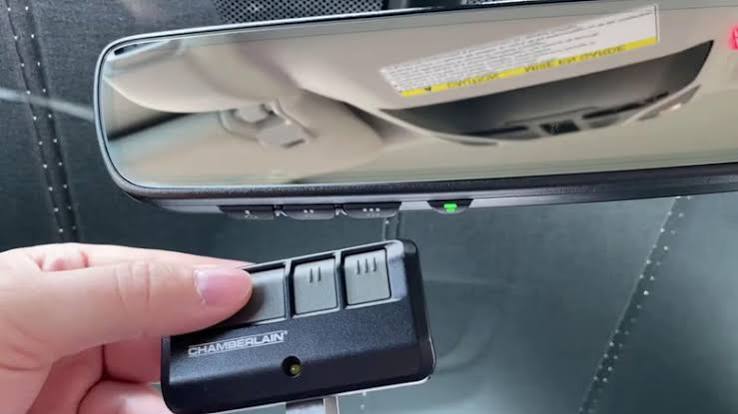
Tired of sitting in the rain fumbling for your bulky garage remote? Learning how to set up garage door opener in car is easier than you think, and it will completely change your daily routine. Let’s get your vehicle synced and ready to roll in just a few simple steps!
How To Set Up Garage Door Opener In Car: What You Need First
Before we dive into the buttons and lights, let’s identify what type of system you are working with. According to recent automotive industry data, over 80% of new vehicles sold in the US today include a built-in universal transmitter.
If your car is older or lacks this feature, don’t worry. You can easily use an aftermarket visor-clip remote. Here is a quick comparison to help you identify your setup:
| Feature | Built-In System (HomeLink/Car2U) | Aftermarket Visor-Clip Remote |
|---|---|---|
| Cost | Free (Included in vehicle) | $20 – $40 (One-time purchase) |
| Aesthetics | Seamless, integrated into rearview mirror | Visible on the sun visor |
| Power Source | Vehicle’s electrical system | Replaceable coin-cell battery |
| Compatibility | 99% of major garage door brands | 99% of major garage door brands |
No matter which system you have, the underlying technology is exactly the same. Both use radio frequencies to communicate with your garage door motor.
How to Program a Built-in Garage Door Opener (HomeLink)
If your vehicle has three buttons integrated into your rearview mirror or center console, you are using a HomeLink system. This is the most common built-in system in North America.
If you want to read more about the history and technical specifications of this technology, you can check out the HomeLink page on Wikipedia.
Here is the exact step-by-step process to program it:
Step 1: Clear the Old Memory
Before syncing a new door, you must erase the factory settings.
- Sit in the driver’s seat and turn the ignition to the “ON” or “ACC” position.
- Locate the two outer buttons on your HomeLink system.
- Press and hold both outer buttons simultaneously for exactly 20 seconds.
- Release the buttons when the indicator light begins to flash rapidly. Your system is now reset.
Step 2: Train the System with Your Original Remote
You will need your existing, working garage door remote for this step.
- Hold your original remote 1 to 3 inches away from the HomeLink buttons.
- Press and hold the button on your original remote that opens the garage.
- At the same time, press and hold the desired HomeLink button in your car.
- Keep holding both buttons until the HomeLink indicator light flashes slowly, then changes to a rapid flash. This usually takes about 10 to 30 seconds.
Step 3: Test the Connection
Press the newly programmed HomeLink button in your car. If the garage door activates, you are completely done! If it doesn’t, proceed to the next section regarding rolling codes.
How to Sync a Rolling Code Garage Door Opener
If your garage door was manufactured after 1993, it likely uses a “rolling code” security feature. This means the access code changes every single time you use the remote, preventing thieves from intercepting the signal.
Because of this advanced security, you must manually sync the car to the garage motor unit. Safety Note: You will need a sturdy stepladder to reach your garage door motor. Always ensure the ladder is on flat ground.
Step 1: Locate the “Learn” Button on the Motor
Head over to your garage door motor (the main unit hanging from the ceiling).
- Look for a square or round button labeled “Learn”, “Smart”, or “Set”.
- This button is usually located next to a small LED light and a wire antenna.
- The button is typically yellow, red, orange, or purple.
Step 2: Activate the Learning Mode
- Press the “Learn” button firmly for 2 to 3 seconds, then release it.
- Do not hold it down too long, or you will erase all existing remotes!
- The LED light next to the button will turn on or start blinking. You now have a 30-second window to complete the next step.
Step 3: Sync the Car to the Motor
- Go back to your car and sit in the driver’s seat.
- Press the HomeLink button you just programmed. Hold it for 2 seconds, then release.
- Repeat this press-and-release cycle three times.
- You should see the garage door lights flash, or hear the motor click. This confirms the rolling code has been successfully transferred.
Troubleshooting Common Syncing Issues
Even with perfect instructions, technology can sometimes be stubborn. Here are the most common reasons your setup might fail, and how to fix them instantly.
- The remote is too far away: During the initial training phase (Step 2), your original remote must be exactly 1 to 3 inches from the car’s buttons. Any further, and the signal won’t cross over.
- The “Learn” button timed out: The motor only stays in learning mode for 30 seconds. If you take too long walking back to the car, press the “Learn” button on the motor one more time to reset the timer.
- Dead battery in the original remote: If your original remote is struggling to open the door manually, its battery is likely dying. Replace the battery (usually a CR2032) before trying to program the car.
- Interference from LED bulbs: Surprisingly, certain cheap LED light bulbs in your garage door motor can block radio frequencies. If programming fails, temporarily unscrew the light bulbs, program the car, and then screw them back in.
Frequently Asked Questions (FAQ)
Can I set up a garage door opener in an older car?
Absolutely. If your older car does not have a built-in HomeLink system, you can purchase a universal visor-clip remote (like a Chamberlain or Genie universal remote) for about $25. The programming process is identical to the built-in system: you hold the old remote next to the new one until the lights flash.
How much does it cost to program a garage door opener in a car?
If your car already has a built-in system, it is 100% free. You do not need to pay a dealership or a technician to do it for you. If you need to buy an aftermarket universal remote for an older vehicle, expect to spend between $20 and $40 at any local hardware store.
Why does my car’s garage door button only work when I am very close?
This usually indicates one of two things. First, the battery in your car’s built-in system might be weak (though rare, as they draw from the car). Second, and more commonly, there is radio frequency interference. Check if you recently installed new LED bulbs in the garage door opener, as they can severely limit the range of the signal.
Can I add a third car to my existing garage door opener?
Yes, modern garage door openers can hold up to 40 or more different remote codes in their memory. You can easily program multiple cars, keypads, and visor remotes to operate the exact same door without overwriting the existing ones. Just ensure you do not hold down the “Learn” button on the motor for too long, as that will erase everything.
Conclusion
Learning how to set up garage door opener in car
Leave a Reply