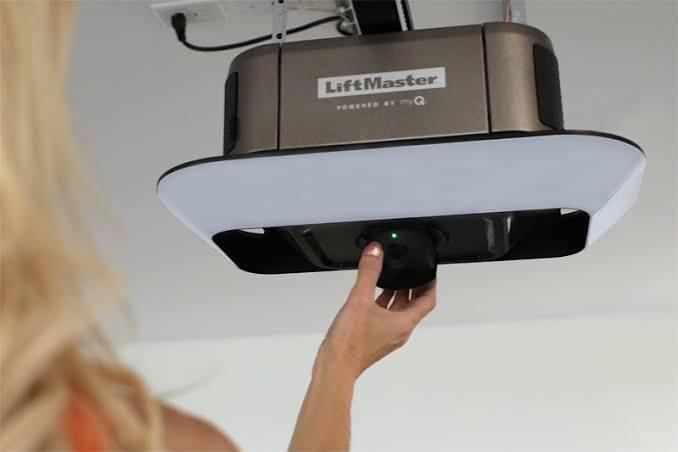
Struggling with a heavy manual garage door or staring at a box full of confusing parts? Learning how to set up a Liftmaster garage door opener doesn’t have to be overwhelming, and we are here to guide you through every single step with ease.
What Do You Need Before You Learn How To Set Up A Liftmaster Garage Door Opener?
Before we dive into the installation, gathering the right tools is crucial. Having everything within arm’s reach will save you time and prevent unnecessary trips to the hardware store.
Here is a quick checklist of what you will need for a smooth DIY garage door repair and installation:
- Power drill with a 3/16-inch and 5/16-inch drill bit
- Socket set and adjustable wrenches
- Stepladder (ensure it is tall enough to reach your ceiling)
- Locking pliers and a tape measure
- Safety goggles and work gloves
Pro tip: Always disconnect the power to your garage door area at the circuit breaker before starting any electrical work. Safety first!
Step-by-Step Hardware Installation for Beginners
Now that your tools are ready, let’s get to the physical installation. Follow these concrete steps to ensure your motor is mounted perfectly.
Step 1: Assemble the T-Rail and Mount the Motor Snap the rail sections together and secure them with the provided rivets. Next, hang the motor unit on the ceiling bracket. You must ensure the motor is mounted exactly 2 inches above the highest point of the garage door’s travel path.
Step 2: Attach the Door Bracket Locate the center of the top garage door panel. Use a level to ensure your marks are perfectly straight. Secure the top bracket using the provided 3/8-16 x 1-1/2 inch carriage bolts. If your door has steel struts, drill through both the steel and the door section for maximum stability.
Step 3: Connect the Arm and Emergency Release Connect the curved arm to the door bracket and the straight arm to the trolley. Slide the trolley onto the rail and lock it in place. Finally, pull the red emergency release cord to ensure it moves smoothly without catching.
How Do You Program a Liftmaster Remote and Keypad?
One of the most common questions users have is about Liftmaster remote programming. Fortunately, modern units make this incredibly simple.
First, locate the “Learn” button on the back or side of the motor unit. This button is usually yellow, purple, orange, or red.
- Press and release the Learn button. The indicator LED next to it will turn on or blink.
- You have exactly 30 seconds to complete the next step.
- Press and hold the button on your handheld remote for about 3 seconds.
- Release the button when you see the motor unit’s lights flash or hear a click.
For an external wireless keypad, simply enter your desired 4-digit PIN, press and hold the “Enter” button, and wait for the motor light to blink.
Liftmaster vs. Other Brands: Is It Worth It?
When choosing a unit, it helps to weigh your options. Here is a quick comparison to help you understand why Liftmaster remains a top choice for American homes.
| Feature | Liftmaster | Chamberlain | Genie |
|---|---|---|---|
| Smart Home Integration | Excellent (MyQ App) | Excellent (MyQ App) | Good (Aladdin Connect) |
| Noise Level | Very Quiet (Belt Drive) | Very Quiet (Belt Drive) | Moderate to Quiet |
| Durability | Heavy-duty steel/motor | Standard residential | Good, but plastic gears |
| Warranty | Lifetime on motor | Lifetime on motor | Limited lifetime |
The Verdict: Liftmaster is essentially the professional-grade version of Chamberlain. If you want commercial-level durability and top-tier smart home integration, Liftmaster is absolutely worth the investment.
Why Proper Setup Matters: Safety and Longevity
You might be tempted to rush through the alignment process, but precision is non-negotiable. According to the U.S. Consumer Product Safety Commission, improper garage door setups and spring tensions contribute to thousands of severe injuries each year.
Furthermore, a poorly aligned opener will strain the motor, reducing its lifespan by up to 40%. Understanding the basic mechanics of a garage door opener can help you appreciate why precise track alignment and force limit settings are critical.
To set the travel limits, locate the “Up” and “Down” adjustment screws on the motor. Adjust them in small increments until the door opens fully and closes tightly against the weather seal without reversing.
FAQ Section
How long does it take to set up a Liftmaster garage door opener?
For a beginner with basic DIY skills, the entire process typically takes between 3 to 5 hours. If you are replacing an old unit and the mounting brackets are already in place, you can finish the job in about 90 minutes.
Why is my Liftmaster garage door opener not connecting to the remote?
If the remote isn’t syncing, the most common culprit is a depleted battery. Replace the remote’s battery first. If that fails, clear the motor’s memory by holding down the Learn button for 6 seconds until the LED turns off, and then reprogram the remote from scratch.
Do I need a professional to set up my Liftmaster opener?
Not necessarily! If you are comfortable using a drill, a ladder, and basic hand tools, you can easily handle this yourself. However, if your garage door has a broken torsion spring, you should always hire a professional, as high-tension springs are extremely dangerous to handle without specialized training.
How do I reset my Liftmaster garage door opener to factory settings?
To perform a hard reset, locate the Learn button on the motor head. Press and hold it down for about 6 to 10 seconds, or until the indicator LED turns off. This will erase all programmed remotes, keypads, and smart home connections, returning the unit to its factory state.
Conclusion
You have successfully navigated the process and learned how to set up a Liftmaster garage door opener! By following these steps, you have not only saved hundreds of dollars on professional installation fees but also gained the peace of mind that comes with a secure, smoothly operating garage.
Remember to test the auto-reverse safety feature by placing a 2×4 piece of wood on the ground under the door. If the door doesn’t immediately reverse upon touching the wood, adjust the close-force settings accordingly.
Leave a Reply