If your garage remote isn’t working—or you’ve just bought a new one—you’re probably wondering How To Set Up A Garage Door Opener Remote quickly and correctly. You’re not alone. This is a common task for homeowners, and the good news is it only takes a few minutes with the right steps.
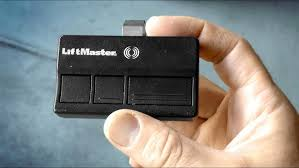
What Does It Mean to Set Up a Garage Door Opener Remote?
Setting up a garage door opener remote means programming it to communicate with your garage door opener system. Once paired, your remote can send signals to open or close the door securely.
Most modern systems use rolling code technology, which changes the signal each time you press the button. This significantly improves security.
👉 Learn more about this technology here:
https://en.wikipedia.org/wiki/Rolling_code
What Do You Need Before You Start?
Before you begin, gather the following:
- Garage door opener unit
- Compatible remote control
- Ladder (if needed)
- Fresh batteries
- Good lighting
Read too: How Do You Change Code On Garage Door Keypad Fast?
💡 Tip: Always install new batteries before setup to avoid pairing issues.
Where Is the Learn Button on a Garage Door Opener?
The Learn button is essential for programming your remote.
Common Locations:
- Back or side of the motor unit
- Under the light cover
- Near the antenna wire
Button Colors and Meaning:
| Color | Frequency | Typical Use |
|---|---|---|
| Yellow | 310 MHz | Newer models |
| Purple | 315 MHz | Mid-range systems |
| Red/Orange | 390 MHz | Older models |
| Green | 390 MHz | Legacy systems |
How To Set Up A Garage Door Opener Remote (Step-by-Step)
Step 1: Locate the Learn Button
Use a stable ladder and find the Learn button on the opener.
Step 2: Press the Learn Button
- Press and release the button
- An LED light will turn on
- You now have 30 seconds to program the remote
Step 3: Press the Remote Button
- Press and hold the button on your remote
- Hold for 3–5 seconds
Step 4: Wait for Confirmation
- The opener light will blink or click
- This indicates successful pairing
Step 5: Test the Remote
- Press the button again
- The garage door should respond
✅ Setup complete in under 2 minutes!
Alternative Method: Using a Wall Control Panel
Some newer garage systems allow programming via a wall console.
Steps:
- Press “Menu” or “Program”
- Select “Remote Setup”
- Press the remote button
- Wait for confirmation
Types of Garage Door Remotes
Understanding your remote type helps ensure compatibility.
Common Types:
- Standard Remotes: Basic open/close function
- Universal Remotes: Work with multiple brands
- Smart Remotes: App-enabled control
Remote Setup Methods Comparison
| Method | Time Required | Difficulty | Best For |
|---|---|---|---|
| Learn Button | 1–2 minutes | Easy | Most users |
| Wall Panel | 2–5 minutes | Easy | Hard-to-reach units |
| Smart App Setup | 10–20 minutes | Moderate | Advanced users |
Common Problems and How to Fix Them
Remote Not Pairing
Possible Causes:
- Dead battery
- Incorrect timing
- Incompatible remote
Fix:
- Replace battery
- Repeat steps within 30 seconds
- Check compatibility
Garage Door Not Responding
Possible Causes:
- Signal interference
- Faulty opener
Fix:
- Move closer to opener
- Reset system
Programming Fails Repeatedly
Possible Causes:
- Memory full
- Old codes interfering
Fix:
- Clear all remotes
- Reprogram devices
How to Reset a Garage Door Opener
If you need a fresh start:
Steps:
- Press and hold the Learn button
- Hold for 6–10 seconds
- LED light turns off
This removes all programmed remotes.
Benefits vs Drawbacks of Remote Setup
Benefits
- Convenient access
- Improved security
- Supports multiple users
Drawbacks
- Requires occasional reprogramming
- Compatibility issues possible
Expert Tips for Smooth Setup
- Stay within 3 feet of the opener
- Program one remote at a time
- Avoid interference from electronics
- Label remotes for easy identification
💡 Pro Tip: Experts recommend testing your remote monthly to ensure reliability.
How Many Remotes Can You Add?
Most garage door openers support:
- Up to 5–7 remotes
- Additional wireless keypads
Check your opener manual for exact limits.
Safety Tips During Setup
- Keep hands clear of moving parts
- Ensure the door area is clear
- Never program while the door is moving
FAQ: How To Set Up A Garage Door Opener Remote
Q1: How long does it take to set up a remote?
Usually 1–2 minutes.
Q2: Can I use a universal remote?
Yes, if it’s compatible with your opener’s frequency.
Q3: Why is my remote not working?
Common reasons include dead batteries or incorrect programming steps.
Q4: Do I need to reset before setup?
No, only if you’re experiencing issues.
Q5: Can I program multiple remotes?
Yes, most systems support several remotes.
Q6: What if the Learn button doesn’t work?
Check power supply or consult a professional.
Conclusion
Now you know exactly How To Set Up A Garage Door Opener Remote quickly and safely. With just a few simple steps, you can restore convenience, improve access, and enhance your home’s security.
Take a few minutes today to set up your remote and enjoy hassle-free garage access. If this guide helped you, share it on social media so others can benefit too!
Leave a Reply