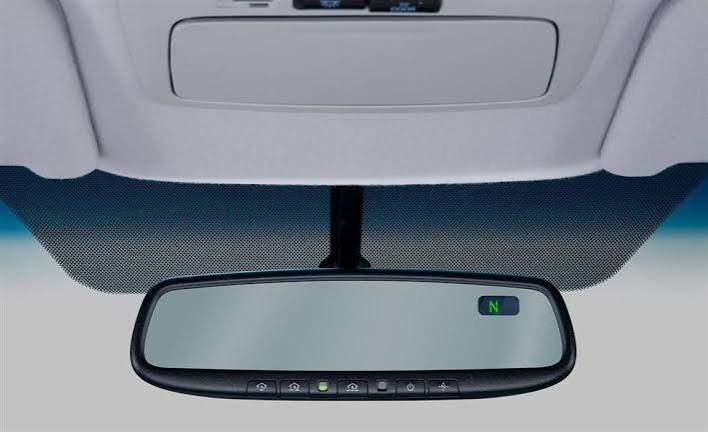
Have you ever pulled into your driveway, pressed the button on your sun visor, and watched your garage door stay stubbornly shut? It is a frustrating experience that disrupts the seamless convenience modern vehicles promise. If you are wondering how to set my garage door opener to my car, you are not alone; millions of drivers face this compatibility hurdle every year.
The good news is that syncing your vehicle with your garage door is usually a straightforward process. Whether you drive a Ford, Toyota, Honda, or BMW, most modern cars come equipped with built-in systems like HomeLink or Car2U. Even if your car lacks these features, universal remote solutions exist. This guide will walk you through every method, ensuring you can open your garage with the simple press of a button.
Understanding Your Vehicle’s Built-In System
Before diving into buttons and codes, it is crucial to identify what technology your car uses. Most vehicles manufactured after 2010 feature one of two major integrated systems: HomeLink or Car2U. Identifying your system is the first step in learning how to set my garage door opener to my car correctly.
What is HomeLink?
HomeLink is the most common integrated transceiver found in vehicles from brands like Ford, Honda, Toyota, Jeep, and Chrysler. It acts as a universal remote, capable of learning the signal from your existing garage door opener. According to HomeLink’s official documentation, the system uses radio frequency signals to mimic your original remote control.
What is Car2U?
Car2U is a newer system found primarily in General Motors vehicles (Chevrolet, GMC, Cadillac) and some Subaru models. It operates similarly to HomeLink but uses a different programming protocol. If you have a newer GM vehicle, you likely have Car2U instead of HomeLink.
Quick Identification Table
| Feature | HomeLink | Car2U |
|---|---|---|
| Common Brands | Ford, Toyota, Honda, Jeep, BMW | Chevrolet, GMC, Cadillac, Subaru |
| Button Location | Sun visor, rearview mirror, or overhead console | Rearview mirror or overhead console |
| Programming Method | Learn Button on Garage Motor | Smart Button or Frequency Matching |
| Compatibility | 99% of garage openers | Most modern rolling-code openers |
Step-by-Step: How to Program HomeLink to Your Garage
If your vehicle uses HomeLink, follow these precise steps. Note that patience is key; timing matters significantly during this process.
Step 1: Clear Previous Codes
If your HomeLink buttons have been used before, you must clear them.
- Press and hold the two outer HomeLink buttons simultaneously.
- Keep holding for about 20 seconds until the indicator light flashes rapidly.
- Release the buttons. The memory is now cleared.
Step 2: Position Your Vehicle
Park your car outside the garage, facing the door. Ensure the engine is running or the ignition is in the “On” position. This ensures consistent power during programming.
Step 3: Initiate Learning Mode
- Choose the HomeLink button you wish to use.
- Press and hold this button while simultaneously holding your original handheld garage remote close to the HomeLink buttons (about 1–3 inches away).
- Hold both until the HomeLink indicator light changes from a slow blink to a rapid flash. This may take up to 30 seconds.
- Release both buttons.
Step 4: Test the Connection
Press the programmed HomeLink button three times. If the garage door moves, you are done! If it does not, you may have a “rolling code” system, which requires an additional step.
Step 5: Programming Rolling Code Openers
Most modern garage doors use rolling codes for security. If Step 4 failed:
- Locate the “Learn” or “Smart” button on your garage door motor unit (inside the garage). It is usually colored yellow, purple, or orange.
- Press and release the Learn button. You have 30 seconds to complete the next step.
- Return to your car and press the programmed HomeLink button firmly three times.
- The garage door should activate. If it does, test it again to ensure consistency.
How to Set Up Car2U in GM Vehicles
For Chevrolet, GMC, and Cadillac owners, the process differs slightly. Car2U is designed to be more intuitive but requires strict adherence to timing.
- Clear Memory: Press and hold the two outer Car2U buttons for 10 seconds until the lights flash.
- Select Button: Press and hold the desired Car2U button.
- Sync with Remote: While holding the Car2U button, press and release the button on your handheld garage remote every two seconds. Continue this until the Car2U light flashes rapidly.
- Finalize: If your opener uses rolling codes, go to the motor unit, press the Learn button, and then return to the car to press the Car2U button three times within five seconds.
Using a Universal Remote Clip-On Solution
What if your car is older and lacks HomeLink or Car2U? Or perhaps you lease your vehicle and cannot program the built-in system? In this case, a universal clip-on remote is the best alternative.
These devices, such as those from Chamberlain or Genie, clip onto your sun visor. They are battery-operated and function exactly like a standard handheld remote.
Pros and Cons of Universal Remotes
- Pros:
- No complex programming required in many cases.
- Works with any vehicle, regardless of age.
- Easy to transfer between cars.
- Cons:
- Requires battery replacements.
- Takes up space on the sun visor.
- Not as sleek as integrated systems.
To set these up, simply follow the manual included with the device. Typically, you will press a “Learn” button on the universal remote, then press the “Learn” button on your garage motor. It is a plug-and-play solution that bypasses the need to learn how to set my garage door opener to my car via the dashboard.
Troubleshooting Common Sync Issues
Even with careful following of instructions, things can go wrong. Here are the most common issues and their fixes.
Issue 1: The Light Flashes but the Door Doesn’t Move
This usually indicates a frequency mismatch. Most garage openers operate at 315 MHz or 390 MHz. Check your old remote’s label. If your HomeLink system does not support that specific frequency, you may need a frequency-specific adapter or a universal remote.
Issue 2: The Door Moves Partially Then Stops
This is often a safety sensor issue, not a programming issue. Ensure the safety eyes at the bottom of your garage door tracks are aligned and clean. If they are blocked, the door will reverse immediately.
Issue 3: Programming Times Out
If you take too long between pressing the Learn button on the motor and the button in your car, the system times out. Reset the process and move faster. Have a second person help you: one person at the motor unit, one in the car.
FAQ: Common Questions About Garage Door Syncing
1. Can I program multiple garage doors to one car button?
No, each HomeLink or Car2U button can only store one frequency/code. However, you can program different buttons for different doors. For example, Button 1 for the home garage, Button 2 for the vacation home.
2. Is it safe to use integrated garage door openers?
Yes. Modern systems use rolling code technology, which changes the access code every time you use it. This prevents hackers from intercepting and reusing the signal. It is significantly more secure than older fixed-code remotes.
3. Why won’t my HomeLink clear?
If the light does not flash rapidly when holding the two outer buttons, your vehicle’s battery might be low, or the system is locked. Consult your vehicle’s owner manual, as some luxury cars require a specific menu sequence in the infotainment system to enable programming.
4. Do I need a professional to sync my garage door?
In 95% of cases, no. The process is designed for DIY users. However, if you have an obscure brand of garage opener or a very old vehicle, a professional locksmith or garage door technician can assist for a small fee.
5. Will resetting my car’s battery erase the HomeLink settings?
Generally, no. HomeLink and Car2U memories are non-volatile, meaning they retain data even without power. However, it is always wise to re-test the connection after a battery replacement just to be sure.
6. Can I use my smartphone instead of programming the car?
Yes, many modern garage openers (like MyQ by Chamberlain) offer Wi-Fi connectivity. You can use an app on your phone to open the door. While this doesn’t answer how to set my garage door opener to my car physically, it offers a digital alternative that works from anywhere.
Conclusion
Learning how to set my garage door opener to my car transforms a daily chore into a seamless experience. Whether you utilize the sophisticated HomeLink system in your Toyota, the Car2U interface in your Chevrolet, or a reliable universal clip-on remote, the result is the same: convenience and security.
By following the steps outlined above, you can avoid costly service calls and enjoy the luxury of hands-free entry. Remember, patience and precise timing are your best tools during the programming process.
Did this guide help you get your garage door synced? Share this article with friends who are still struggling with their visor buttons, and let us know in the comments which method worked best for your vehicle!
Leave a Reply