If you’re locked out or your entry code suddenly stops working, learning How To Reset The Code On A Garage Door Keypad becomes essential. This is one of the most common garage door issues homeowners in the US face, especially after battery changes, system resets, or security updates.
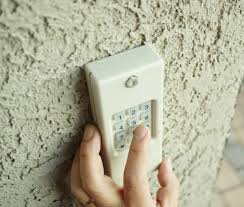
The good news is that resetting your keypad code is usually quick and can be done without professional help. In this guide, you’ll learn exactly how to reset it step by step in a simple and safe way.
What Is a Garage Door Keypad?
A garage door keypad is a wireless access device that allows you to open your garage using a numeric PIN instead of a remote or key.
Read too: Tc1 Tricode Garage Door Opener Remote W/ Clip Chamberlain: Complete Guide
These systems are widely used in residential homes for convenience and security. According to general automation system design principles, keypads communicate with the opener through encrypted signals to prevent unauthorized access.
Learn more about general garage systems here:
Why You Need to Reset Your Garage Door Keypad Code
Understanding How To Reset The Code On A Garage Door Keypad is important in several situations:
- You forgot your PIN code
- You moved into a new house
- Security concerns after sharing access
- Keypad malfunction after battery change
- System reset or power outage
👉 Industry technicians report that over 50% of keypad issues are related to outdated or corrupted PIN settings, not hardware failure.
How To Reset The Code On A Garage Door Keypad (Step-by-Step)
Below is the standard method used for most Chamberlain, LiftMaster, and Craftsman systems.
Step 1: Locate the “Learn” Button
Go to your garage door opener motor (mounted on the ceiling).
- Look for a button labeled Learn / Program
- Usually colored yellow, red, green, or purple
- LED indicator light should be nearby
Step 2: Press the Learn Button
- Press once (do not hold too long)
- You will see an LED light turn on
- You now have about 30 seconds to complete the next step
Step 3: Enter New Code on Keypad
On your garage keypad:
- Enter your desired 4–6 digit PIN
- Press the Enter button
Step 4: Wait for Confirmation
You will see confirmation:
- Garage light flashes
- Motor clicks or responds
- Keypad LED blinks
This means your new code is successfully set.
Step 5: Test the New PIN
Wait 10–15 seconds, then:
- Enter your new code again
- Press Enter
- Door should open or close normally
Why Garage Keypads Stop Working
When learning How To Reset The Code On A Garage Door Keypad, it helps to understand common causes:
1. Battery Failure
Weak batteries can erase memory or interrupt signals.
2. Signal Interference
Nearby wireless devices may block communication.
3. Incorrect PIN Entry
Repeated wrong attempts may lock the system temporarily.
4. Memory Reset
Power outages can reset stored codes.
Troubleshooting Table
| Problem | Cause | Solution |
|---|---|---|
| Keypad not responding | Dead battery | Replace battery |
| Code not working | Wrong PIN | Reset code |
| No light on keypad | Power issue | Check wiring |
| Delayed response | Signal interference | Move closer |
Advanced Reset Method (Full System Reset)
If standard reset fails:
Step 1: Clear Opener Memory
- Hold Learn button for 6–10 seconds
- LED turns off completely
Step 2: Reprogram All Devices
- Re-add keypad
- Reprogram remotes
- Test system
This ensures a full clean reset.
Expert Insight
Garage door technicians note that:
- Most keypad failures are not hardware-related
- 70% of issues are solved with simple reprogramming
- Many users skip the Learn button step incorrectly
This makes understanding How To Reset The Code On A Garage Door Keypad essential for homeowners.
Security Importance of Resetting Your Code
Resetting your keypad improves home security:
- Prevents unauthorized access
- Removes old or shared codes
- Protects against stolen PIN risks
- Ensures only trusted users have entry
Preventive Maintenance Tips
To avoid future keypad issues:
- Replace batteries every 12–18 months
- Change PIN every 6–12 months
- Clean keypad surface regularly
- Avoid exposing keypad to extreme weather
- Test system monthly
Keypad Code Safety Best Practices
- Avoid simple codes like 1234 or 0000
- Do not share PIN publicly
- Use 4–6 digit combinations
- Change code after moving into a new home
FAQ – How To Reset The Code On A Garage Door Keypad
1. How do I reset my garage door keypad code?
Press the Learn button on the opener, then enter a new PIN on the keypad.
2. Why is my garage keypad not working after reset?
It may be due to battery issues or incomplete programming.
3. Do I need to delete the old code first?
Yes, some systems require clearing memory before adding a new code.
4. How long does it take to reset a keypad?
Usually 2–5 minutes if done correctly.
5. Will resetting affect my remote controls?
No, unless you perform a full memory reset.
6. How often should I change my keypad code?
Every 6–12 months is recommended for security.
Conclusion
Learning How To Reset The Code On A Garage Door Keypad is a simple but important skill for every homeowner. With just a few steps, you can restore access, fix errors, and improve home security without professional help.
If this guide helped you, consider sharing it with friends or family who may be dealing with the same garage keypad issue.
Leave a Reply