Forgot your keypad code or dealing with a malfunction? It happens more often than you think. Knowing How To Reset A Chamberlain Garage Door Opener Keypad can quickly restore access and improve your home’s security without calling a technician.
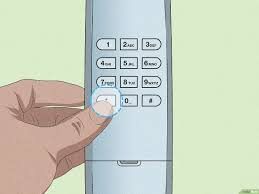
What Does Resetting a Chamberlain Keypad Do?
Resetting your keypad clears all stored codes and restores it to factory settings.
Read too: How Do You Change Code On Garage Door Keypad Fast?
Why You Might Need a Reset:
- Forgotten PIN code
- Keypad not responding
- Moving into a new home
- Security concerns
💡 A reset ensures that only authorized users can access your garage.
How To Reset A Chamberlain Garage Door Opener Keypad (Step-by-Step)
Follow these steps carefully to reset your keypad and set a new code.
Step 1: Locate the Learn Button on the Opener
- Find the garage door opener motor unit
- Look for the “Learn” button
- Common colors: yellow, purple, red/orange, or green
📍 Usually located near the antenna wire.
Step 2: Press and Hold the Learn Button
- Press and hold the Learn button for 6–10 seconds
- Release when the LED light turns off
⚠️ This will erase all programmed remotes and keypads.
Step 3: Enter a New Keypad Code
Now you’ll reprogram the keypad:
- Go to the keypad outside your garage
- Enter a new 4-digit PIN
- Press and hold the Enter button
✔️ The opener light should blink to confirm.
Step 4: Test the New Code
- Enter your new PIN
- Press Enter
- Check if the door opens or closes
✅ If successful, your keypad has been reset and reprogrammed.
How Long Does It Take to Reset the Keypad?
- Average time: 5–10 minutes
- No advanced tools required
👉 It’s one of the quickest garage door fixes.
Why Isn’t My Chamberlain Keypad Reset Working?
If the reset fails, consider these issues:
Common Causes:
- Dead keypad battery
- Incorrect timing during programming
- Faulty keypad hardware
- Interference from nearby devices
Do You Need to Reset Remotes After a Keypad Reset?
Yes, if you held the Learn button long enough to clear memory.
What Happens:
- All remotes are erased
- You must reprogram each device
When Should You Reset Your Keypad?
Recommended Situations:
- After losing a remote
- When moving into a new house
- If keypad behaves unpredictably
- For routine security updates
📊 Security experts recommend updating access codes regularly.
Advantages vs Disadvantages of Resetting
Pros and Cons
| Advantages | Disadvantages |
|---|---|
| Improves security | Requires reprogramming |
| Fixes common issues | Temporary inconvenience |
| Quick process | Must remember new code |
Common Mistakes to Avoid
❌ Mistakes:
- Holding the Learn button too briefly
- Choosing an easy PIN (e.g., 0000)
- Forgetting to test the new code
- Ignoring battery condition
Expert Insight: Why Resetting Matters
Garage security is often overlooked, yet it’s a primary entry point to your home. Resetting your keypad ensures that outdated or shared codes no longer work, significantly reducing security risks.
Maintenance Tips After Resetting
Keep your keypad working smoothly:
- Replace batteries every 1–2 years
- Test the keypad monthly
- Keep it clean and dry
- Avoid sharing your code widely
Signs You Should Replace the Keypad Instead
Resetting won’t fix everything.
Warning Signs:
- No response after reset
- Physical damage
- Intermittent operation
- Fading or unresponsive buttons
Understanding Garage Door Keypad Systems
Garage keypads communicate wirelessly with the opener using secure signals.
To learn more about how these systems work, visit:
https://en.wikipedia.org/wiki/Garage_door_opener
FAQ: How To Reset A Chamberlain Garage Door Opener Keypad
Q1: Can I reset my keypad without the Learn button?
Answer: No, the Learn button is required to clear and reprogram the system.
Q2: Will resetting delete all remotes?
Answer: Yes, if you hold the Learn button long enough.
Q3: What if I forget my new PIN?
Answer: You’ll need to reset the keypad again.
Q4: How often should I reset my keypad?
Answer: Only when needed or for security updates.
Q5: Why is my keypad still not working after reset?
Answer: It could be a battery issue or hardware failure.
Q6: Can I use the same PIN again?
Answer: Yes, but it’s safer to choose a new one.
Conclusion
Learning How To Reset A Chamberlain Garage Door Opener Keypad is a simple yet powerful way to regain control and improve your home’s security. With just a few steps, you can fix common issues and ensure only authorized access.
Don’t wait until a problem arises—reset and update your keypad when needed to stay protected. If this guide helped you, share it on social media so others can solve their keypad issues quickly!
Leave a Reply