If your garage door remote suddenly stops working or becomes unreliable, the issue is often as simple as a dead battery. Knowing how to replace battery in LiftMaster garage door opener remote can save you time and frustration. The good news? It’s a quick and easy fix that takes just a few minutes.
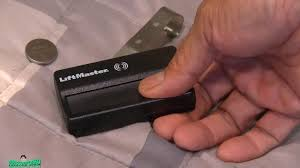
What Battery Does a LiftMaster Remote Use?
Before replacing the battery, it’s important to know which type your remote uses.
Common battery types:
- CR2032 (coin cell) – most common
- CR2016
- 9V battery (older models)
Read too: Tc1 Tricode Garage Door Opener Remote W/ Clip Chamberlain: Complete Guide
👉 You can check the battery type by opening the remote or looking at the back label.
For more details about battery types, see Button cell.
Signs Your LiftMaster Remote Battery Needs Replacement
Look for these symptoms:
- Remote only works at close range
- Delayed response when pressing buttons
- LED light becomes dim or doesn’t light up
- Remote stops working completely
📊 Insight: Most garage door remote batteries last 1–2 years, depending on usage.
Tools You’ll Need
Good news—you won’t need much.
Basic tools:
- Small flathead screwdriver (or coin)
- Replacement battery (e.g., CR2032)
- Clean cloth (optional)
How To Replace Battery In LiftMaster Garage Door Opener Remote (Step-by-Step)
Follow these simple steps carefully.
Step 1: Locate the Battery Compartment
- Turn the remote over
- Look for a small seam or slot on the side
👉 Most LiftMaster remotes snap open rather than using screws.
Step 2: Open the Remote Case
- Insert a flathead screwdriver or coin into the slot
- Gently twist to separate the casing
⚠️ Be careful not to use excessive force to avoid cracking the plastic.
Step 3: Remove the Old Battery
- Carefully take out the battery
- Note the positive (+) and negative (-) orientation
👉 Typical orientation: positive side facing up
Step 4: Insert the New Battery
- Place the new battery in the same position
- Ensure it sits securely in the compartment
📏 Example: Use a 3V CR2032 battery for most modern remotes.
Step 5: Close the Remote Case
- Align both halves of the casing
- Press firmly until it snaps shut
Step 6: Test the Remote
- Stand about 10–15 feet from the garage
- Press the button
👉 The door should respond immediately with improved range.
Battery Types Comparison Table
| Battery Type | Voltage | Common Use | Lifespan |
|---|---|---|---|
| CR2032 | 3V | Modern remotes | 1–2 years |
| CR2016 | 3V | Slim remotes | 1–2 years |
| 9V | 9V | Older remotes | 1 year |
Common Mistakes to Avoid
Avoid these simple errors:
- ❌ Installing the battery upside down
- ❌ Using the wrong battery type
- ❌ Touching battery surfaces with dirty hands
- ❌ Forcing the remote open
- ❌ Ignoring corrosion inside the compartment
What If the Remote Still Doesn’t Work?
If replacing the battery doesn’t fix the issue, try these:
Troubleshooting steps:
- Reprogram the remote to the opener
- Check for signal interference
- Inspect buttons for wear
- Replace the remote if damaged
👉 In rare cases, the garage door opener itself may need inspection.
How To Reprogram a LiftMaster Remote (Quick Overview)
Sometimes a battery replacement resets the remote.
Basic steps:
- Locate the “Learn” button on the opener
- Press and release it
- Press the remote button within 30 seconds
- Wait for confirmation (light blink or click)
Benefits of Replacing Your Remote Battery
✔ Restores full operating range
✔ Improves response time
✔ Prevents unexpected failures
✔ Saves money vs replacing the remote
📊 Fact: A $2–$5 battery can prevent replacing a $30–$60 remote.
How Often Should You Replace the Battery?
Recommended:
- Every 12–24 months
- Immediately when performance drops
👉 Pro tip: Replace batteries before winter, as cold weather reduces battery efficiency.
Pro Tips for Longer Battery Life
- Keep remote away from extreme heat
- Avoid pressing buttons unnecessarily
- Store spare batteries at room temperature
- Clean battery contacts occasionally
FAQ: How To Replace Battery In LiftMaster Garage Door Opener Remote
1. How do I know which battery my LiftMaster remote uses?
Check the back label or open the case to identify the battery model (commonly CR2032).
2. Can I use a different battery brand?
Yes, as long as the battery type and voltage match exactly.
3. Why is my remote still not working after battery replacement?
It may need reprogramming or could be damaged internally.
4. How long does it take to replace the battery?
Usually 2–5 minutes.
5. Do I need to reset the remote after changing the battery?
Not always, but sometimes reprogramming is required.
6. Is it safe to open the remote myself?
Yes, as long as you handle it gently and avoid damaging the casing.
Conclusion
Learning how to replace battery in LiftMaster garage door opener remote is one of the easiest maintenance tasks you can do. With just a few tools and minutes, you can restore full functionality and avoid unnecessary replacements.
It’s a small fix—but it makes a big difference in your daily convenience.
👉 If this guide helped you, share it on social media so others can quickly fix their garage door remote too!
Leave a Reply