Lost or broken remote? You’re probably wondering how to replace a garage door opener remote control quickly and safely. The good news is that replacing a garage remote is easier than most homeowners think—and you can often do it in minutes.
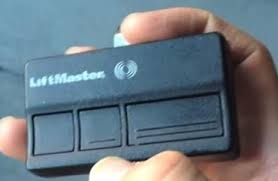
How To Replace A Garage Door Opener Remote Control (Step-by-Step Guide)
Replacing your remote involves three main steps: choosing the right remote, programming it, and testing it.
Read too: Tc1 Tricode Garage Door Opener Remote W/ Clip Chamberlain: Complete Guide
Step 1: Identify Your Garage Door Opener Brand
Before buying a replacement, you need to know your opener type.
Common brands:
- Chamberlain
- LiftMaster
- Genie
- Craftsman
👉 Look for a label on the motor unit inside your garage.
Step 2: Choose the Right Replacement Remote
Not all remotes are universal.
You have 2 options:
✔ OEM (Original Manufacturer Remote)
- Guaranteed compatibility
- Higher cost
✔ Universal Remote
- Works with multiple brands
- More affordable
👉 Learn more about Remote control.
Step 3: Check Frequency & Compatibility
Garage door remotes operate on specific frequencies.
Common frequencies:
- 300 MHz
- 310 MHz
- 315 MHz
- 390 MHz
👉 Make sure your replacement matches your opener.
Step 4: Program the New Remote
This is the most important step.
Standard programming process:
- Locate the “Learn” button on your opener
- Press and release the button
- Within 30 seconds, press the button on your new remote
- Wait for the opener light to blink
- Test the remote
📊 Fact: Over 70% of remote issues are solved by correct reprogramming.
Step 5: Test the Remote
Stand 10–20 feet away and test the signal.
Check:
- Response time
- Range
- Reliability
How Long Does It Take to Replace a Remote?
- Buying the remote: 5–10 minutes (online or in-store)
- Programming: 2–5 minutes
👉 Total time: Under 15 minutes
How Much Does a Replacement Remote Cost?
📊 Average Price Range
| Remote Type | Cost Range |
|---|---|
| OEM Remote | $25 – $60 |
| Universal Remote | $15 – $40 |
| Smart Remote/App | $30 – $80 |
Key Insight:
- Universal remotes save money
- OEM remotes offer better reliability
Signs You Need to Replace Your Remote
Sometimes the issue isn’t obvious.
Watch for:
- Remote not responding
- Reduced range
- Intermittent operation
- Physical damage
Remote Not Working? Try This First
Before replacing your remote, try these quick fixes:
✔ Replace the battery
✔ Reprogram the remote
✔ Check for signal interference
✔ Clean the remote buttons
📊 Fact: Nearly 50% of “broken” remotes only need a new battery.
Universal vs OEM Remotes (Pros & Cons)
📊 Comparison Table
| Feature | OEM Remote | Universal Remote |
|---|---|---|
| Compatibility | Perfect | Limited |
| Price | Higher | Lower |
| Setup | Easy | Slightly complex |
| Reliability | High | Medium |
Can You Use a Smartphone Instead?
Yes! Many modern systems support smart control.
Benefits:
- No physical remote needed
- Remote access from anywhere
- Integration with smart homes
Security Tips When Replacing a Remote
Replacing your remote is also a great time to improve security.
Do this:
- ✔ Erase old remotes from memory
- ✔ Reprogram all remotes
- ✔ Use rolling code technology
👉 This prevents unauthorized access.
Common Mistakes to Avoid
❌ Buying the wrong frequency
❌ Skipping compatibility checks
❌ Not resetting old remotes
❌ Ignoring battery issues
Real-World Example
Scenario:
A homeowner replaced a remote for $20 but it didn’t work.
Problem:
- Wrong frequency
Solution:
- Switched to compatible remote → worked instantly
👉 Lesson: Always verify compatibility first.
Troubleshooting Programming Issues
If your remote won’t program:
Try this:
- Reset the opener
- Replace remote battery
- Move closer to the opener
- Clear old codes and retry
FAQ: How To Replace A Garage Door Opener Remote Control
1. Can I replace my garage door remote myself?
Yes, most replacements take less than 15 minutes.
2. How do I know which remote to buy?
Check your opener brand, model, and frequency.
3. Do universal remotes work with all openers?
No, but many support multiple major brands.
4. Why is my new remote not working?
It may be incompatible or not programmed correctly.
5. Can I program multiple remotes?
Yes, most systems support several remotes.
6. Should I reset my opener when replacing a remote?
Yes, especially for security reasons.
Conclusion
Learning how to replace a garage door opener remote control is a simple process that can save you time and money. In most cases, all it takes is choosing the right remote and programming it correctly.
By following this guide, you can restore full control of your garage door in minutes—without calling a technician.
Leave a Reply