If you’re struggling with How To Program My Garage Door To My Car, you’re not alone. Many homeowners find the process confusing, especially with different car systems and garage door opener brands.
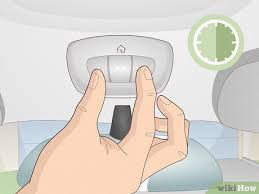
The good news? With the right steps, you can connect your car to your garage door in just a few minutes—no technician required.
Read too: Tc1 Tricode Garage Door Opener Remote W/ Clip Chamberlain: Complete Guide
What Does It Mean to Program Your Garage Door to Your Car?
Programming your garage door to your car means syncing your vehicle’s built-in system (often called HomeLink or Car2U) with your garage door opener.
This allows you to:
- Open/close your garage without a handheld remote
- Reduce clutter inside your car
- Improve convenience and security
Why This Matters
According to industry data, over 70% of modern vehicles in the U.S. come equipped with built-in garage door controls. Yet many owners never set them up.
What Do You Need Before You Start?
Before diving into How To Program My Garage Door To My Car, gather these essentials:
Checklist:
- Your garage door remote (working condition)
- Access to your garage door opener motor
- A step ladder (if needed)
- Your car parked inside or near the garage
Important Tip:
Make sure your garage door opener is compatible with your car system. Most modern openers use rolling code technology (learn more here: https://en.wikipedia.org/wiki/Garage_door_opener).
How To Program My Garage Door To My Car (Step-by-Step)
Step 1: Clear Previous Settings
If your car has been programmed before:
- Turn your car ignition to “ON” (engine off is fine)
- Press and hold the two outer buttons on your car’s garage system
- Hold for 10–20 seconds until the indicator light flashes
👉 This resets old codes and avoids interference.
Step 2: Pair the Remote with Your Car
- Hold your garage door remote 1–3 inches from your car’s control buttons
- Press and hold both:
- The desired button in your car
- The button on your remote
- Hold for 15–30 seconds
Result:
The indicator light should change from slow blinking to rapid blinking.
✔️ This means the signal has been copied successfully.
Step 3: Sync with the Garage Door Opener (Rolling Code)
If your system uses rolling codes (most do), you need one extra step:
- Go to your garage door opener motor
- Press the “Learn” button (usually red, yellow, or purple)
- You now have 30 seconds
Return to your car and:
4. Press the programmed button for 2–3 seconds
5. Repeat up to 3 times if needed
✔️ The garage door should move—this confirms success.
Step 4: Test the System
- Press your car’s programmed button
- Ensure the garage opens and closes smoothly
- Test from different distances
Why Won’t My Car Program to My Garage Door?
This is one of the most common questions related to How To Program My Garage Door To My Car.
Common Causes:
| Problem | Possible Cause | Solution |
|---|---|---|
| No response | Dead remote battery | Replace battery |
| Light won’t flash | Incorrect button hold | Repeat Step 2 |
| Door won’t move | Rolling code not synced | Repeat Step 3 |
| Works inconsistently | Signal interference | Reprogram system |
HomeLink vs Car2U: What’s the Difference?
Understanding your system helps avoid mistakes.
Comparison Table:
| Feature | HomeLink | Car2U |
|---|---|---|
| Found in | Most brands | Ford, Lincoln |
| Setup method | Remote-based | Opener-based |
| Compatibility | Very high | Moderate |
| Ease of use | Easy | Slightly complex |
Pro Tips to Make Programming Easier
1. Replace Remote Batteries First
Weak signals often cause failed programming.
2. Stay Close to the Opener
Distance matters—stay within 5–10 feet during syncing.
3. Avoid Sunlight Interference
Bright sunlight can affect signal detection.
4. Try Multiple Times
Sometimes it takes 2–3 attempts for full synchronization.
Benefits of Programming Your Garage Door to Your Car
Convenience
No more searching for remotes.
Security
Built-in systems reduce the risk of lost remotes.
Cleaner Interior
Less clutter inside your vehicle.
Common Mistakes to Avoid
- Skipping the reset step
- Holding buttons too briefly
- Ignoring the “Learn” button step
- Using a broken or weak remote
Troubleshooting Advanced Issues
If your garage still won’t connect:
Try These Fixes:
- Reprogram from scratch
- Check compatibility in your car manual
- Reset your garage door opener
- Ensure no nearby radio interference
When to Call a Professional
- System still fails after multiple attempts
- Opener is older than 15–20 years
- Wiring or sensor issues are suspected
FAQ: How To Program My Garage Door To My Car
1. How long does it take to program a garage door to a car?
Typically 5–10 minutes, depending on your system and experience level.
2. Can I program my car without a remote?
In most cases, no. You need the remote to transfer the signal.
3. Why does my garage door only work sometimes?
This could be due to:
- Weak battery
- Signal interference
- Incomplete programming
4. Do all cars support garage door programming?
No. Only vehicles with built-in systems like HomeLink or Car2U support it.
5. Can I program multiple garage doors?
Yes. Most systems allow up to 3 buttons, meaning 3 doors or devices.
6. Is it safe to use a built-in garage opener?
Yes. Modern systems use rolling codes, making them highly secure.
Conclusion
Learning How To Program My Garage Door To My Car is a simple yet powerful upgrade for your daily routine. With just a few steps, you can eliminate the need for remotes, improve convenience, and enhance your home’s security.
Take a few minutes today to set it up—you’ll thank yourself every time you pull into your driveway.
👉 If you found this guide helpful, share it with friends or family who might need it too!
Leave a Reply