If you’re tired of juggling multiple remotes, learning how to program my garage door opener in my car can simplify your daily routine. Many modern vehicles come equipped with built-in systems that let you control your garage door seamlessly. This guide will walk you through the exact steps, even if you’re a complete beginner.
What Does It Mean to Program a Garage Door Opener in Your Car?
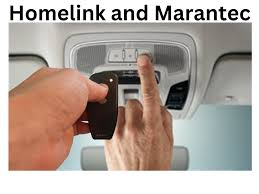
Programming your car’s garage door opener means syncing your vehicle’s built-in transmitter (often called HomeLink or Car2U) with your garage door system. Once connected, you can open and close your garage with just a button inside your car.
Read too: Tc1 Tricode Garage Door Opener Remote W/ Clip Chamberlain: Complete Guide
According to industry data, over 70% of vehicles manufactured after 2015 include integrated garage door systems, making this feature increasingly standard.
For deeper technical background, you can explore how garage systems work on Wikipedia:
https://en.wikipedia.org/wiki/Garage_door_opener
How To Program My Garage Door Opener In My Car (Step-by-Step)
Step 1: Prepare Your Remote and Vehicle
Before you start:
- Park your car close to the garage
- Turn the ignition to “ON” (engine doesn’t need to run)
- Have your handheld garage remote ready
💡 Tip: Make sure your garage opener is working properly before programming.
Step 2: Reset the Car’s System (If Needed)
If your car has been previously programmed:
- Press and hold the first and third buttons on your car’s system
- Hold for 10–20 seconds
- Wait until the indicator light flashes rapidly
This clears old settings.
Step 3: Sync Your Remote with the Car
- Hold your garage remote 1–3 inches from the car’s buttons
- Press and hold:
- The button you want to program in your car
- The button on your remote
- Hold both buttons for 15–30 seconds until:
- The car’s indicator light flashes rapidly
✔️ This means the signal has been copied successfully.
Step 4: Program Rolling Code Systems (Important!)
Most modern garage doors use rolling code technology for security.
To complete setup:
- Locate the “Learn” or “Smart” button on your garage motor unit
- Press it (you have about 30 seconds to finish the next step)
- Return to your car and press the programmed button 2–3 times
If the garage door moves, you’re done!
Step 5: Test the System
- Press the programmed button once
- Ensure the garage door opens/closes smoothly
If it doesn’t work, repeat Step 4 carefully.
Why Isn’t My Garage Door Programming Working?
Common Issues and Fixes
| Problem | Possible Cause | Solution |
|---|---|---|
| No response | Weak remote battery | Replace battery |
| Light doesn’t flash | Wrong button timing | Retry Step 3 |
| Works partially | Rolling code not synced | Repeat Step 4 |
| No “Learn” button found | Hidden unit | Check manual or behind cover |
Types of Garage Door Systems You May Have
Understanding your system helps avoid frustration.
1. Fixed Code Systems
- Older models (pre-1996)
- Easier to program
- Less secure
2. Rolling Code Systems
- Modern standard
- Changes code every use
- Requires “Learn” button step
Benefits of Programming Your Garage Door Opener in Your Car
Advantages vs Disadvantages
Advantages:
- No need for separate remote
- Cleaner car interior
- Added convenience and speed
- Enhanced security (rolling codes)
Disadvantages:
- Initial setup can be tricky
- Not all vehicles are compatible
- May require reprogramming after battery changes
Expert Tips for Faster Programming
- Always stand within 1–2 meters of the garage motor
- Perform setup during daylight for better visibility
- If failing repeatedly, reset both car system and opener
- Check your vehicle manual for brand-specific steps
According to automotive experts, most programming failures happen due to incorrect timing, not technical issues.
Which Cars Support Built-in Garage Programming?
Most major brands include this feature:
- Ford (HomeLink or Car2U)
- Toyota (HomeLink)
- Honda (HomeLink)
- Chevrolet (Universal Home Remote)
If unsure, check your visor or overhead console for buttons.
How Long Does It Take?
- First-time setup: 5–10 minutes
- Reprogramming: 2–5 minutes
Once done, you rarely need to repeat the process.
FAQ: How To Program My Garage Door Opener In My Car
1. Do all cars support garage door programming?
No. Only vehicles with built-in systems like HomeLink or Car2U can be programmed directly.
2. Can I program multiple garage doors?
Yes. Most systems allow up to 3 different doors or devices.
3. Why does my car button blink slowly?
A slow blink usually means it’s in learning mode but hasn’t received a signal yet.
4. Do I need the original remote?
Yes. The remote is required to transfer the signal to your car system.
5. What if I lost my garage remote?
You’ll need to reset the garage motor and program directly using the “Learn” button.
6. Will programming erase my old remote?
No, unless you reset the garage opener system manually.
Conclusion
Learning how to program my garage door opener in my car is a simple upgrade that saves time and reduces clutter. With just a few steps, you can enjoy seamless access to your garage every day.
Take a few minutes to set it up—you’ll wonder how you ever lived without it.
If you found this guide helpful, share it with friends or family who might benefit from a smarter, more convenient driving experience 🚗
Leave a Reply