Lost your garage remote or bought a new home without one? That situation can be frustrating, especially when you rely on quick garage access. The good news is you can still learn How To Program Lincoln Garage Door Opener Without Remote using your car’s built-in system—no extra device required.
What Does Programming Without a Remote Mean?
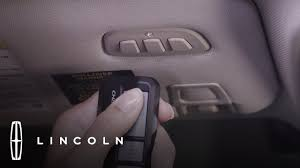
Programming without a remote means syncing your Lincoln vehicle’s built-in system (typically HomeLink) directly with your garage door opener using the Learn button method.
Read too: How Do You Change Code On Garage Door Keypad Fast?
Why This Matters:
- Eliminates the need for a physical remote
- Provides direct integration with your vehicle
- Enhances convenience and reduces clutter
- Still maintains strong security standards
Can You Program a Lincoln Garage Door Opener Without a Remote?
Yes—but only if your garage door opener supports rolling code technology and has a Learn button.
Requirements:
- Lincoln vehicle with HomeLink system
- Garage door opener with Learn button
- Access to the garage motor unit
💡 Important: Older systems without Learn buttons may require a remote.
How To Program Lincoln Garage Door Opener Without Remote (Step-by-Step)
Follow these steps carefully to complete the process.
Step 1: Locate the Learn Button on the Opener
- Find your garage door opener motor (ceiling-mounted)
- Look for the “Learn” button
- Common colors: yellow, purple, red/orange, or green
📍 It’s usually near the antenna wire.
Step 2: Press the Learn Button
- Press and release the Learn button
- A small LED light will turn on
- You now have 30 seconds to program your car
⏱ Timing is critical—move quickly.
Step 3: Enter Programming Mode in Your Lincoln
- Sit inside your vehicle
- Press and hold the desired HomeLink button
- Hold for 10–20 seconds until the indicator light changes
🔄 This prepares the system to receive a signal.
Step 4: Sync with the Garage Opener
- Press the same HomeLink button 2–3 times
- Each press should last about 1–2 seconds
- Wait for the garage door to respond
✔️ This completes the connection.
Step 5: Test the System
- Press the programmed button
- The garage door should open or close
✅ If successful, your setup is complete!
Why Isn’t My Lincoln HomeLink Working Without a Remote?
If the process fails, here are common reasons:
Possible Issues:
- Learn button timing expired
- Opener not compatible
- Car system not reset properly
- Signal interference
💡 Quick Tip: Repeat the process and ensure you act within 30 seconds.
Do You Need to Reset HomeLink Before Programming?
In many cases, yes.
Reset Steps:
- Press and hold the two outer HomeLink buttons
- Hold for 10–20 seconds
- Release when the indicator light flashes
🔄 This clears previous programming.
How Long Does Programming Take?
- Without remote: 5–10 minutes
- With experience: under 5 minutes
👉 It’s a quick DIY task for most homeowners.
Advantages vs Disadvantages of Programming Without Remote
Pros and Cons
| Advantages | Disadvantages |
|---|---|
| No remote needed | Requires Learn button access |
| Cleaner setup | Not compatible with all systems |
| Saves money | May require multiple attempts |
How Secure Is This Method?
Modern systems are designed for strong security.
Security Features:
- Rolling code encryption
- Dynamic signal changes
- Protection against signal duplication
To learn more about how garage systems operate, visit:
https://en.wikipedia.org/wiki/Garage_door_opener
Expert Insight: Why This Method Works
Automotive and home security experts confirm that direct Learn button programming is one of the safest ways to sync devices. It ensures only authorized signals are stored in the opener system.
Common Mistakes to Avoid
Avoid these errors to improve success rate:
❌ Mistakes:
- Waiting too long after pressing Learn
- Not resetting HomeLink first
- Pressing buttons too briefly
- Standing too far from the opener
What If Your Opener Doesn’t Have a Learn Button?
If your system is older:
Options:
- Purchase a compatible remote
- Upgrade to a newer opener
- Use a universal receiver kit
💡 Newer systems are more secure and easier to program.
Maintenance Tips After Programming
Keep your system working smoothly:
- Test the system monthly
- Keep opener unit clean
- Reprogram after car battery replacement
- Check for firmware updates (smart systems)
Signs You Need to Reprogram
Watch for these issues:
- Car button not responding
- Delayed door movement
- System stops working suddenly
- New garage opener installed
FAQ: How To Program Lincoln Garage Door Opener Without Remote
Q1: Can I program HomeLink without a remote?
Answer: Yes, if your garage opener has a Learn button.
Q2: Why does my HomeLink light blink but nothing happens?
Answer: You may have missed the Learn button timing step.
Q3: How many doors can I program?
Answer: Typically 2–3 garage doors, depending on your vehicle.
Q4: Do all Lincoln vehicles support HomeLink?
Answer: Most modern models do, but check your manual to confirm.
Q5: Is this method secure?
Answer: Yes, it uses rolling code technology for protection.
Q6: What should I do if programming fails?
Answer: Reset HomeLink and repeat the steps carefully.
Conclusion
Learning How To Program Lincoln Garage Door Opener Without Remote is a simple yet powerful way to regain control of your garage without extra devices. With just a few steps, you can sync your vehicle directly and enjoy seamless, secure access.
This method saves time, reduces clutter, and improves convenience in your daily routine. If you found this guide helpful, share it on social media—someone else might be facing the same problem!
Leave a Reply