Struggling with syncing your garage system? You’re not alone. Many homeowners search for How To Program LiftMaster Garage Door Opener To My Car because the process can feel confusing at first—but it’s actually simple once you know the steps.
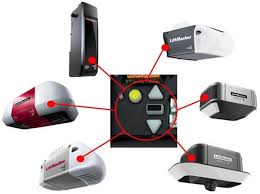
This guide will walk you through everything clearly, so you can connect your car and garage in just a few minutes.
How To Program LiftMaster Garage Door Opener To My Car (Step-by-Step Guide)
If your car has a built-in system like HomeLink, you can pair it with your LiftMaster opener easily.
Read too: Tc1 Tricode Garage Door Opener Remote W/ Clip Chamberlain: Complete Guide
What You’ll Need
- Your car (parked near the garage)
- LiftMaster garage door opener
- Existing remote control (important)
- Ladder (optional, for accessing motor unit)
Step 1: Clear Existing Codes (Optional but Recommended)
Before starting, reset your car’s system.
How:
- Hold the two outer buttons on your car’s HomeLink panel.
- Press for 10–20 seconds until the LED starts flashing rapidly.
- Release both buttons.
👉 This ensures no previous signals interfere.
Step 2: Program the Car with the Remote
Now you’ll sync your car to the existing remote signal.
- Hold your garage remote 1–3 inches away from the car’s HomeLink buttons.
- Press and hold:
- The remote button
- The desired HomeLink button in your car
- Keep holding for 15–30 seconds until the indicator light changes (slow blink → fast blink).
✅ This means the signal has been copied successfully.
Step 3: Sync with the LiftMaster Motor Unit
This is the most important step for modern LiftMaster systems (rolling code technology).
- Locate the “Learn” button on your LiftMaster motor unit (usually near the antenna wire).
- Press the Learn button once (LED will turn on for about 30 seconds).
- Return to your car immediately.
- Press the programmed HomeLink button 2–3 times (hold each press for 2 seconds).
✅ Your garage door should now respond.
Step 4: Test the System
- Stand inside your car.
- Press the programmed button once.
If the door opens/closes smoothly—you’re done!
What If Programming Doesn’t Work?
Sometimes the process fails on the first try. Here are quick fixes:
Troubleshooting Checklist
- Replace remote batteries
- Ensure you’re within 3–5 feet of the opener
- Repeat Step 3 (rolling code sync is often missed)
- Check compatibility (older cars may need an adapter)
What Is HomeLink and How Does It Work?
HomeLink is a wireless control system integrated into many vehicles.
It allows you to control:
- Garage doors
- Gates
- Home lighting systems
It works using radio frequency signals, similar to traditional remotes.
For more technical details, you can explore how garage systems operate here:
https://en.wikipedia.org/wiki/Garage_door_opener
LiftMaster Compatibility Guide
Not all systems behave the same. Here’s a quick breakdown:
Compatibility Table
| System Type | Works with HomeLink | Extra Step Needed |
|---|---|---|
| LiftMaster (new) | Yes ✅ | Learn button |
| LiftMaster (old) | Yes ✅ | No |
| MyQ-enabled | Yes ✅ | Learn button |
Common Mistakes to Avoid
Avoid these frequent errors:
- ❌ Skipping the “Learn” button step
- ❌ Holding buttons too briefly
- ❌ Programming too far from the opener
- ❌ Using a weak remote battery
These small mistakes cause most setup failures.
Benefits of Programming Your Garage to Your Car
Why bother syncing your system?
Advantages
- No need for separate remote
- Cleaner car interior
- Faster access
- Improved convenience
Real-World Insight
A 2023 home automation survey found that over 70% of smart home users prefer integrated car controls for garage access due to convenience and reduced clutter.
How Long Does Programming Take?
Most users complete the process in:
- 2–5 minutes (standard setup)
- 5–10 minutes (if troubleshooting needed)
Advanced Tips for Better Performance
1. Keep Firmware Updated
Modern vehicles may require updates for compatibility.
2. Reprogram After Power Outage
Some systems reset after power loss.
3. Use Backup Remote
Always keep a physical remote as backup.
FAQ: How To Program LiftMaster Garage Door Opener To My Car
1. Why won’t my car connect to my LiftMaster opener?
Most likely due to missing the “Learn” button step or weak remote batteries. Repeat the full process carefully.
2. Do all cars support HomeLink?
No. Most modern vehicles do, but older models may require an external adapter.
3. How many buttons can I program?
Typically 3 buttons, allowing control of multiple garage doors or gates.
4. Do I need internet or WiFi?
No. Programming uses radio signals, not internet.
5. What is a rolling code system?
A security feature that changes the signal each time you use the opener, preventing hacking.
6. Can I program without a remote?
It’s possible but more complex. You’ll need direct access to the motor unit and follow manual pairing instructions.
Conclusion
Learning How To Program LiftMaster Garage Door Opener To My Car is easier than it seems. With just a few steps—clearing codes, syncing the remote, and pressing the Learn button—you can enjoy seamless garage access directly from your vehicle.
This simple upgrade saves time, reduces clutter, and improves daily convenience.
👉 If this guide helped you, share it on social media so others can program their garage doors easily too!
Leave a Reply