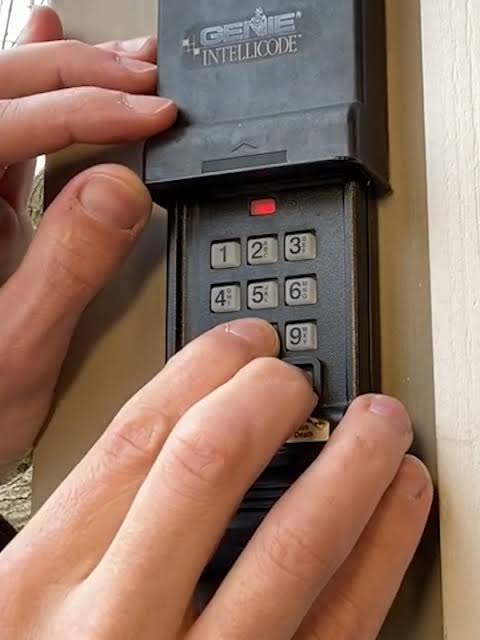
Locked out or just moved into a new home? Learning how to program keypad for Genie garage door opener is easier than you think, and we are here to help you secure your property in just a few minutes.
Why You Need to Know How To Program Keypad For Genie Garage Door Opener
According to the International Door Association (IDA), over 70% of homeowners use their garage as the primary entrance to their home. This makes your garage door security just as critical as your front door.
When you need to grant access to a dog walker, a teenager, or a house sitter, a wireless keypad is the perfect solution. It completely eliminates the need to hide physical keys under the welcome mat.
Think of me as your friendly neighborhood DIY guide. Grab your ladder, and let us get this sorted out together!
What Button Do You Press to Program a Genie Garage Door Opener?
Before we start pressing buttons, we need to locate the brain of your system. You will find the “Learn Code” button on the back of the motor head hanging from your garage ceiling.
Depending on your specific model, this button might look a little different. Genie uses a technology called Intellicode, which rolls the access code every time you use it for maximum security.
Here is a quick comparison table to help you identify your motor type:
| Model Type | Learn Button Color | Frequency | Compatibility Era |
|---|---|---|---|
| Intellicode 1 | Square (Red/Orange) | 315 MHz | 1995 to 2005 |
| Intellicode 2 | Square (Purple) | 315 MHz | 2006 to Present |
| Intellicode 3 | Round (Blue) | 315 MHz | 2011 to Present |
If you are curious about the engineering behind these rolling codes, you can read more about the Garage door opener on Wikipedia. It is a fascinating piece of modern home technology!
Step-by-Step Guide: How To Program Keypad For Genie Garage Door Opener
Now for the main event. Follow these concrete steps carefully, and you will have your keypad working perfectly.
Step 1: Locate and Press the Learn Button Climb up your ladder safely and look at the back of the motor head. Press and release the Learn Code button. The small LED indicator light next to it will start blinking red. You have exactly 30 seconds to complete the next steps before it times out.
Step 2: Enter Your Desired PIN Walk over to your external wireless keypad. Enter a new 4-digit PIN of your choice (for example, 4-8-2-9). Avoid using obvious combinations like 1-2-3-4 or your house number for security reasons.
Step 3: Sync the Keypad to the Motor Immediately after entering your 4-digit PIN, press and hold the Up/Down or Program button on the keypad. Hold it down for about 2 to 3 seconds, then release it.
Step 4: Test the Connection Walk back to the motor head. The blinking LED light should stop blinking and turn solid, or turn off completely. This confirms the sync was successful. Press your new PIN followed by the Up/Down button on the keypad to test it. Your garage door should activate immediately!
Keypad Entry vs. Traditional Remote Controls
You might be wondering if a keypad is actually better than just using a traditional car remote. Let us break down the advantages and disadvantages to help you decide.
Pros of Keypad Entry:
- No batteries to carry around: You never have to worry about forgetting it inside the house.
- Perfect for guests: Service workers can enter without needing a physical remote.
- Long battery life: A single CR2032 3-volt lithium battery typically lasts 1 to 2 years.
Cons of Keypad Entry:
- Requires wall mounting: You need to drill holes and mount it outside.
- Weather exposure: While weather-resistant, extreme cold can slightly reduce battery life.
How Do You Reset a Genie Keypad Without a Code?
Did you buy a house and the previous owners left their old code active? Or perhaps you completely forgot your current PIN? Do not worry; we can wipe the memory clean.
To erase all previously programmed remotes and keypads, you need to perform a hard reset on the motor head.
- Locate the Learn Code button on the motor.
- Press and hold the button down for exactly 10 to 15 seconds.
- Watch the LED indicator light. It will blink, then turn completely off.
- Once the light is off, release the button. The memory is now completely cleared.
After doing this, you will need to reprogram your car remotes and your keypad using the step-by-step guide above.
Simple Maintenance Tips for Your Genie Keypad
To ensure your keypad lasts for years, keep these simple tips in mind.
First, replace the battery proactively every 12 to 18 months, even if it still works. Second, clean the keypad buttons gently with a soft, dry cloth. Avoid using harsh chemical cleaners that could damage the weather-resistant seal.
Finally, check the wall mounting screws once a year to ensure the unit remains securely attached to your exterior wall.
Troubleshooting Common Keypad Issues
Sometimes technology does not cooperate on the first try. Here are a few quick fixes for common problems.
The Keypad is Blinking But Not Working If your keypad is flashing rapidly, the battery is likely dead. Use a small Phillips head screwdriver to open the battery compartment. Replace the old battery with a fresh CR2032 3-volt lithium battery, ensuring the positive side faces up.
The Motor Light Blinks But the Door Does Not Move This usually means the safety sensors are misaligned. Look at the small LED lights on the photo-eye sensors near the floor. If they are not glowing solid, gently adjust the brackets until they align perfectly.
Frequently Asked Questions (FAQ)
Let us answer some of the most common questions homeowners have about this process.
1. How do I know if my Genie keypad is compatible with my opener? Check the model number on the back of your keypad and compare it with your motor’s manual. Generally, any Genie Intellicode keypad works with all Genie Intellicode openers manufactured after 1995.
2. Can I program multiple keypads to one Genie opener? Yes, absolutely! You can program up to 40 different remotes and keypads to a single modern Genie motor unit. Just repeat the programming steps for each additional device.
3. How do I change the PIN on my Genie keypad later? To change your code, simply press and release the Learn Code button on the motor head. Then, enter your old 4-digit PIN followed by the Up/Down button. Next, enter your new 4-digit PIN and press the Up/Down button again to save it.
4. Why is my Genie keypad completely unresponsive? First, check if the battery is installed correctly and has enough charge. If the battery is fine, ensure the keypad is within 50 feet of the motor unit and that there are no massive metal obstructions blocking the signal.
5. Do I need an internet connection to program the keypad? No, you do not need Wi-Fi or an internet connection. The keypad communicates directly with the motor head using secure radio frequency signals.
Conclusion
Securing your home does not have to be a stressful experience. By learning how to program keypad for Genie garage door opener, you gain total control over who enters your property and when. It takes less than five minutes and requires no special tools.
Enjoy the convenience of keyless entry and the peace of mind that comes with a secure home!
If you found this guide helpful, please share this article on your social media or send it to a friend who just bought a new house. Happy DIY-ing!
Leave a Reply