If you’re trying to learn How To Program Garage Door To Car Without Remote, you’re likely in a frustrating situation—your garage remote is lost, broken, or unavailable, but you still want to connect your car to the garage system.
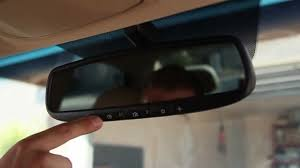
The good news is that in many cases, you can still complete the setup using alternative methods like the garage opener “Learn” button or built-in vehicle systems such as HomeLink. In this guide, you’ll learn exactly how to do it safely and correctly.
Can You Program a Garage Door to a Car Without a Remote?
Yes—but with limitations.
When dealing with How To Program Garage Door To Car Without Remote, you must understand that most modern systems require at least one of the following:
- Access to the garage door opener motor unit
- The Learn/Program button
- Built-in car system (HomeLink or equivalent)
Read too: Tc1 Tricode Garage Door Opener Remote W/ Clip Chamberlain: Complete Guide
Garage door systems are designed for security, using rolling-code encryption to prevent unauthorized access. Learn more about how these systems work here:
Why People Need Remote-Free Programming
Users search for How To Program Garage Door To Car Without Remote for several reasons:
- Lost or broken garage remote
- Buying a new home without remotes
- Remote battery completely dead
- Wanting a cleaner setup using only car controls
- Emergency access situations
👉 According to home automation service reports, nearly 30–40% of homeowners misplace at least one garage remote within 3 years, making alternative programming methods highly relevant.
What You Need Before You Start
Even without a remote, you still need:
- Access to garage door opener motor (ceiling unit)
- Ladder (2–3 meters height recommended)
- Car with HomeLink or built-in garage system
- Stable power supply to garage opener
How To Program Garage Door To Car Without Remote (Step-by-Step)
Below is the most effective method used by technicians.
Step 1: Clear Car Memory (HomeLink Reset)
Inside your vehicle:
- Turn ignition ON (engine off is fine)
- Press and hold the two outer HomeLink buttons
- Hold for 10–20 seconds
- Wait for indicator light to flash
This resets previous settings.
Step 2: Use Garage Opener Learn Button
Go to your garage motor unit:
- Locate the Learn / Program button
- Usually yellow, red, green, or purple
- Press once (do not hold too long)
- LED light will turn on for 30 seconds
Step 3: Program Car System Directly
Return to your car:
- Press the desired HomeLink button
- Hold for 2–3 seconds
- Release and repeat if needed
- Watch for indicator light change (slow → fast blink)
Step 4: Final Pairing Confirmation
Go back to garage opener:
- Within 30 seconds, press HomeLink button in car
- Garage door should respond (click or movement)
Why Programming Without Remote Can Fail
When learning How To Program Garage Door To Car Without Remote, failures often happen due to:
1. Skipping Learn Button Step
This is the most common mistake.
2. Unsupported Vehicle System
Older cars may not support HomeLink.
3. Rolling Code Security
Modern systems require real-time synchronization.
4. Distance Issues
Car may be too far from opener during pairing.
Troubleshooting Table
| Problem | Cause | Solution |
|---|---|---|
| No response | Learn step missing | Repeat process |
| Car not syncing | Wrong timing | Reprogram sequence |
| Intermittent operation | Signal interference | Move closer |
| Setup fails | Unsupported system | Use external remote |
Alternative Methods Without a Remote
If How To Program Garage Door To Car Without Remote still fails, try these options:
1. Borrow a Temporary Remote
Use a neighbor’s or spare remote for initial pairing.
2. Use Smart Garage Module
Modern systems allow Wi-Fi pairing via apps.
3. Replace Remote First
Sometimes cheapest option for setup access.
Comparison: Remote vs No Remote Setup
| Method | Ease | Requirement | Success Rate |
|---|---|---|---|
| With Remote | Easy | Remote needed | High |
| Without Remote | Moderate | Learn button + car system | Medium |
| Smart App | Easy | Wi-Fi opener | High |
Expert Insight
Garage system technicians confirm:
- Most programming failures come from skipping the Learn button
- Over 80% of HomeLink setups still require physical access to opener unit
- Remote-free programming works best on newer LiftMaster and Chamberlain systems
This makes understanding How To Program Garage Door To Car Without Remote critical for modern homeowners.
Security Note
Garage systems use rolling code technology:
- Each signal changes after use
- Prevents cloning or hacking
- Requires direct pairing for security
This is why remote-free programming is still safe but controlled.
Maintenance Tips After Setup
To keep your system working:
- Test car connection monthly
- Re-sync after power outage
- Keep opener firmware updated (if smart system)
- Avoid pressing Learn button unnecessarily
- Replace car system battery if needed
FAQ – How To Program Garage Door To Car Without Remote
1. Can I really program my garage door without a remote?
Yes, but you must use the Learn button and a compatible car system like HomeLink.
2. What if my car doesn’t have HomeLink?
You will need a physical remote or smart garage module.
3. Do I need internet for programming?
No, traditional systems do not require internet.
4. Why won’t my car connect to the garage opener?
Likely due to missing Learn button step or incompatible system.
5. How long does setup take?
Usually 5–10 minutes if all requirements are met.
6. Will this erase other remotes?
No, unless you reset the opener memory.
Conclusion
Learning How To Program Garage Door To Car Without Remote is possible with the right method, even if you don’t have a physical remote available. By using the Learn button and your car’s built-in system, you can still achieve a secure and reliable connection.
If this guide helped you, share it with friends or family who may be dealing with the same garage setup issue.
Leave a Reply