Have you ever pulled into your driveway, only to realize you need to dig through your bag or glove compartment to find that bulky garage remote? It is a minor inconvenience, but one that adds up over time. Learning how to program garage door opener to car Ford can transform this daily routine into a seamless, hands-free experience. With just a few buttons on your rearview mirror or dashboard, you can open your garage without ever leaving the comfort of your vehicle.
Integrating your garage door with your Ford vehicle is not just about convenience; it is about modernizing your home access. Whether you drive a Ford F-150, Explorer, Mustang, or Escape, most modern models come equipped with built-in technology designed specifically for this purpose. In this guide, we will walk you through the exact steps to get your system up and running, troubleshoot common issues, and ensure your connection is secure and reliable.
Understanding Your Ford’s Built-In System
Before pressing any buttons, it is crucial to identify which type of garage door integration system your Ford vehicle uses. Most Ford vehicles manufactured after 2010 come equipped with either HomeLink or Ford SYNC Connect. Knowing the difference is the first step toward successful programming.
HomeLink vs. Ford SYNC: What’s the Difference?
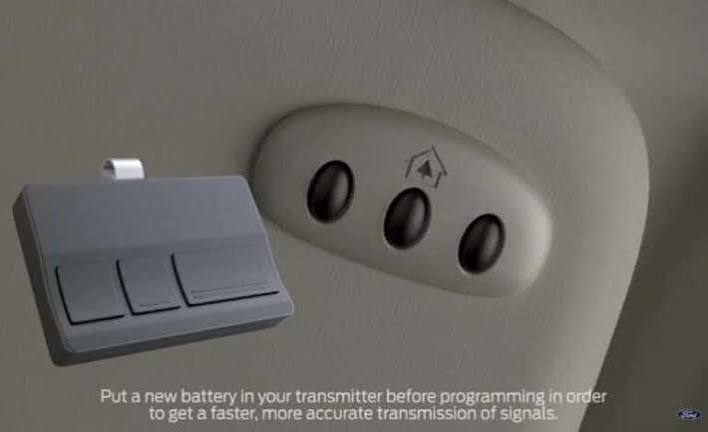
HomeLink is the most common universal transceiver found in Ford vehicles. It is typically located on the overhead console near the rearview mirror or integrated directly into the mirror itself. It features three programmable buttons that can control not just garage doors, but also gate operators, security lights, and even home alarm systems.
On the other hand, Ford SYNC (specifically SYNC 3 and SYNC 4) may offer app-based integration or voice command features, but for direct radio-frequency (RF) communication with older garage door openers, HomeLink remains the standard hardware solution. If your car has physical buttons labeled with a garage door icon or simply numbered 1–3 on the mirror, you are likely using HomeLink.
| Feature | HomeLink System | Ford SYNC App Integration |
|---|---|---|
| Location | Overhead console/mirror | Infotainment screen |
| Compatibility | Universal (95% of openers) | Specific smart openers only |
| Operation | Physical button press | Touchscreen or voice command |
| Setup Complexity | Low to Medium | Medium (requires Wi-Fi) |
For the purpose of this guide, we will focus primarily on the HomeLink system, as it is the standard method for directly programming your car to communicate with your garage door opener motor.
Step-by-Step Guide: How to Program Garage Door Opener to Car Ford
Programming your Ford’s HomeLink system is a straightforward process, but it requires precision. The entire procedure usually takes between 5 to 10 minutes. Ensure your vehicle is parked outside your garage with the engine running or in accessory mode to maintain consistent power during the setup.
Step 1: Clear Existing Memory (If Necessary)
If your Ford is pre-owned or if you have previously programmed a button, you must clear the memory first. This ensures there are no signal conflicts.
- Press and hold the two outer HomeLink buttons simultaneously.
- Keep holding them for about 20 seconds.
- Watch the indicator light. It will start flashing slowly and then rapidly.
- Once the light flashes rapidly, release the buttons. The memory is now cleared.
Step 2: Initiate Training Mode
Now, you will teach your car the frequency of your garage door opener.
- Choose the HomeLink button you wish to use (e.g., Button 1).
- Press and hold this button. Do not release it yet.
- While holding the car button, bring your original handheld garage remote within 1 to 3 inches of the HomeLink buttons.
- Press and hold the button on your handheld remote that operates the garage door.
- Keep both buttons pressed until the HomeLink indicator light changes from a slow flash to a rapid flash. This indicates that the frequency has been learned.
- Release both buttons.
Step 3: Test the Connection
At this stage, your car knows the frequency, but it may not yet have the correct rolling code security protocol.
- Stand outside your garage with the door closed.
- Press and hold the programmed HomeLink button in your Ford for 2–3 seconds, then release.
- Observe the garage door. If it opens, proceed to Step 4. If it does not move, you likely have a rolling code system, which is common in openers manufactured after 1996.
Step 4: Complete Rolling Code Programming
Most modern garage door openers use rolling codes for security, meaning the code changes every time you press the button. To sync this with your Ford:
- Locate the “Learn” or “Smart” button on your garage door opener motor unit (hanging from the ceiling in your garage). It is usually colored yellow, purple, or red.
- Press and release the “Learn” button on the motor unit. You typically have 30 seconds to complete the next step.
- Return to your Ford vehicle.
- Press and hold the programmed HomeLink button for 2 seconds, release it, and repeat this cycle (press-hold-release) three times.
- Your garage door should activate. If it does, the programming is complete.
For more technical details on universal receiver standards, you can refer to the general overview of HomeLink technology on Wikipedia.
Troubleshooting Common Programming Issues
Even with careful following of instructions, things do not always go smoothly. Here are the most common hurdles users face when learning how to program garage door opener to car Ford and how to fix them.
The Indicator Light Does Not Flash Rapidly
If the light stays solid or continues to flash slowly, your car did not pick up the signal from the handheld remote.
- Solution: Move the handheld remote closer to the HomeLink buttons. Try different angles. Ensure the battery in your handheld remote is fresh. A weak battery often fails to transmit a strong enough signal for the car to learn.
The Garage Door Moves Partially Then Reverses
This is a safety feature triggered by misaligned sensors or incorrect force settings.
- Solution: Check the safety eyes at the bottom of your garage door tracks. Ensure they are clean and aligned. If they are blinking, realign them until the light becomes solid.
Compatibility Issues with Older Openers
If your garage door opener is very old (pre-1995), it might use a fixed dip-switch code rather than a rolling code.
- Solution: You may need to match the dip switches inside your handheld remote to the settings required by the HomeLink system. Consult your garage door opener’s manual for “dip switch matching” instructions.
Benefits of Integrating Your Garage with Your Ford
Why go through the trouble of programming? The advantages extend beyond mere novelty.
- Enhanced Security: You no longer need to leave a plastic remote visible on your seat, which can attract thieves. Your car’s integrated system is discreet and secure.
- Weather Protection: In harsh US winters or rainy seasons, staying inside your warm, dry vehicle while opening the garage is a significant comfort benefit.
- Clutter Reduction: Eliminating the need for multiple remotes helps keep your keychain and car interior organized.
- Resale Value: A fully functional, programmed HomeLink system is a desirable feature for future buyers of your Ford vehicle.
FAQ Section
1. Can I program more than one garage door to my Ford?
Yes. Most Ford HomeLink systems have three separate buttons. You can program each button to a different garage door, gate, or even a neighbor’s garage if needed. Simply repeat the programming steps for each individual button.
2. What if my Ford doesn’t have HomeLink buttons?
If your vehicle lacks built-in HomeLink buttons, you can purchase an aftermarket universal garage door opener visor clip. These devices plug into your car’s power outlet or use batteries and can be mounted on your sun visor, offering similar functionality to the built-in system.
3. Does programming my car void my garage door warranty?
No. Programming your vehicle’s HomeLink system is a standard user operation supported by both Ford and major garage door manufacturers like LiftMaster and Chamberlain. It does not involve altering the internal wiring of the garage motor, so your warranty remains intact.
4. Why does my garage door close immediately after opening via the car?
This usually indicates a rolling code sync issue. Repeat Step 4 of the programming guide. Ensure you press the “Learn” button on the motor unit and then cycle the car button three times within the 30-second window. If the issue persists, check the travel limits on your garage door opener.
5. Is it safe to leave my car running while programming?
Yes, it is recommended to keep the car in accessory mode or running to ensure the electrical system maintains a steady voltage. However, always ensure your vehicle is in “Park” and the parking brake is engaged for safety.
6. Can I use voice commands to open my garage with Ford SYNC?
Direct RF voice control for non-smart garage doors is not standard. However, if you have a smart garage door opener (like MyQ) connected to Wi-Fi, you may be able to integrate it with Ford SYNC through specific apps or third-party services like Amazon Alexa or Google Assistant, depending on your model year.
Leave a Reply