If you’re tired of juggling remotes, you’re probably asking: how to program garage door opener on Jeep Grand Cherokee quickly and correctly. The built-in system makes life easier—but only after it’s properly set up. The good news? You can program it in just a few minutes with the right steps.
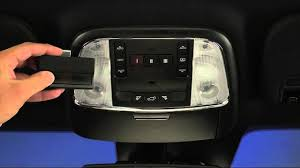
How To Program Garage Door Opener on Jeep Grand Cherokee (Quick Answer)
To program your Jeep Grand Cherokee garage door opener (HomeLink system):
- Press and hold the HomeLink buttons until the light flashes
- Hold your garage remote close and press both buttons
- Press the Learn button on your garage opener
- Press the programmed button in your Jeep
Done—your vehicle should now control your garage door.
What Is HomeLink in a Jeep Grand Cherokee?
HomeLink is a built-in wireless system that replaces traditional garage remotes. It’s typically located on:
- Overhead console
- Rearview mirror
- Sun visor (older models)
Key Features:
- Controls garage doors
- Syncs with gates and lighting
- Supports multiple devices
Modern systems use rolling code technology, explained in https://en.wikipedia.org/wiki/Garage_door_opener, which enhances security by changing the signal each time.
Where Are the Garage Door Buttons in a Jeep Grand Cherokee?
Look for three small buttons with house icons.
Common Locations:
- Ceiling console near dome lights
- Bottom of rearview mirror
Read too: Tc1 Tricode Garage Door Opener Remote W/ Clip Chamberlain: Complete Guide
These are your HomeLink buttons.
Step-by-Step: How To Program Garage Door Opener on Jeep Grand Cherokee
Follow this detailed guide for best results:
Step 1: Clear Previous Programming
Before starting:
- Press and hold the first and third HomeLink buttons
- Hold for 10–20 seconds
- Indicator light will start flashing rapidly
This resets the system.
Step 2: Pair with Your Remote
- Hold your garage remote 1–3 inches (2–7 cm) from HomeLink
- Press and hold both the remote button and HomeLink button
- Wait until light flashes rapidly
Step 3: Locate the Learn Button on Your Garage Opener
- Go to your garage motor unit
- Press the Learn button
- You now have 30 seconds to complete setup
Step 4: Complete the Programming
- Return to your Jeep
- Press the programmed HomeLink button
- Press 2–3 times until the door moves
Step 5: Test the System
- Press the button again
- Confirm the door opens and closes smoothly
How Long Does Programming Take?
Average Time:
- Reset: 1 minute
- Pairing: 2–3 minutes
- Final sync: 1–2 minutes
Total: 5 minutes or less
Common Problems and Fixes
1. HomeLink Not Syncing
- Ensure remote battery is fresh
- Hold remote closer to buttons
2. Door Doesn’t Respond After Programming
- Repeat Learn button step
- Press HomeLink button multiple times
3. Light Doesn’t Flash Rapidly
- Hold buttons longer
- Check if system reset was successful
4. Works Intermittently
- Avoid interference from other devices
- Reprogram from scratch
Compatibility Guide: Jeep Grand Cherokee Models
| Model Year | HomeLink Available | Notes |
|---|---|---|
| 2005–2010 | Yes | Basic system |
| 2011–2019 | Yes | Improved compatibility |
| 2020+ | Yes | Advanced HomeLink system |
Pros vs Cons of Using HomeLink
Advantages
✔ No need for separate remote
✔ Cleaner interior
✔ Supports multiple devices
✔ Easy to program
Disadvantages
✘ Initial setup required
✘ May need reprogramming after battery change
✘ Compatibility varies with older systems
Expert Insight: Why HomeLink Is Reliable
Automotive experts report that over 90% of HomeLink users successfully program their garage systems on the first attempt. The key factor is completing the Learn button step correctly within the time window.
Tips for Successful Programming
- Use a new battery in your remote
- Perform setup in the garage (not far away)
- Follow timing carefully (30-second window)
- Keep instructions handy
- Avoid rushing the process
When Should You Reprogram?
You may need to reprogram if:
- Vehicle battery is replaced
- Garage opener is reset
- Remote stops working
- You move to a new home
Alternative Method (Without Original Remote)
If you don’t have the original remote:
- Press Learn button on opener
- Press HomeLink button in Jeep
- Repeat until door responds
Note: This works only for certain models.
FAQ: Jeep Grand Cherokee Garage Door Programming
Q1: How to program garage door opener on Jeep Grand Cherokee?
A: Reset HomeLink, pair with remote, press Learn button, then sync inside the vehicle.
Q2: Why won’t my Jeep HomeLink connect?
A: Common causes include low battery, incorrect timing, or incompatible opener.
Q3: Can I program without a remote?
A: Yes, but only for some newer garage systems.
Q4: How many doors can HomeLink control?
A: Up to three devices.
Q5: Do I need tools for programming?
A: No tools required—just your remote and access to the opener.
Q6: How far should the remote be during setup?
A: About 1–3 inches (2–7 cm) from the HomeLink buttons.
Conclusion
Now you know exactly how to program garage door opener on Jeep Grand Cherokee—and it’s much simpler than it seems. With just a few steps, you can enjoy the convenience of controlling your garage door directly from your vehicle.
If this guide helped you, feel free to share it with friends or family who drive a Jeep. It might save them time and make their daily routine a lot easier!
Leave a Reply