Introduction
There are few things more frustrating than fumbling for a separate garage remote every time you pull into your driveway, especially when your vehicle already has built-in technology designed to eliminate that hassle. If you have been searching for how to program garage door opener in Mazda CX-5, you are likely ready to streamline your daily routine and integrate your home access directly into your vehicle’s overhead console. This comprehensive guide will walk you through the exact steps to sync your HomeLink system safely, ensuring you can open your garage with a simple button press on your visor.
Understanding HomeLink Technology in Your Mazda CX-5
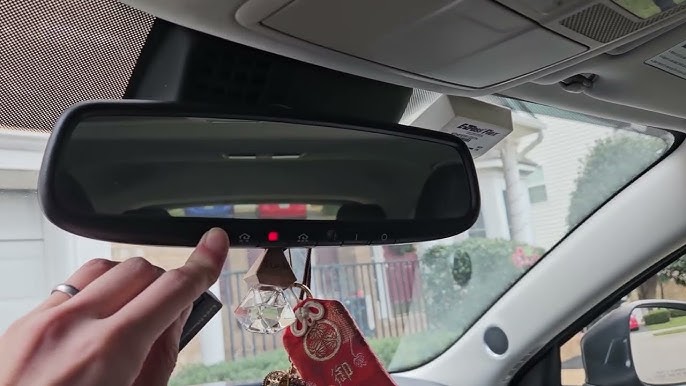
Before diving into the programming sequence, it is vital to understand what you are actually configuring. The Mazda CX-5 is equipped with the HomeLink Universal Transceiver System, typically located in the overhead console near the rearview mirror or integrated directly into the frame of the mirror itself depending on the trim level and model year.
Unlike older radio-frequency remotes, HomeLink acts as a programmable bridge between your car and your garage door motor. According to technical documentation referenced on Wikipedia, this system supports both fixed-code and rolling-code security protocols, making it compatible with the vast majority of garage door openers manufactured after 1996. Understanding this compatibility is the first step in successful programming, as the method differs slightly between older fixed-code systems and modern rolling-code security systems.
Why Proper Programming Matters
Attempting to guess the programming sequence can lead to signal interference or incomplete syncing. By following the manufacturer-approved method, you ensure:
- Security Integrity: Maintaining the rolling code encryption that prevents thieves from cloning your signal.
- Signal Reliability: Ensuring the opener responds consistently from various distances.
- System Longevity: Preventing unnecessary wear on the vehicle’s transmitter module through repeated failed attempts.
Pre-Programming Checklist: What You Need Before Starting
To successfully learn how to program garage door opener in Mazda CX-5, preparation is just as important as execution. Gather the following items before sitting in the driver’s seat:
- Your Original Handheld Remote: Even if the battery is dead, having the physical remote is often necessary for the “learn” phase on newer rolling-code openers.
- Fresh Batteries: Replace the battery in your handheld remote before starting. Weak signals are the number one cause of programming failure.
- Vehicle Owner’s Manual: Keep it handy for trim-specific button locations.
- Garage Door Opener Manual: Required to locate the “Learn” or “Smart” button on the motor unit.
- A Safe Parking Spot: Park outside the garage with the engine running (in Park) to avoid carbon monoxide buildup and ensure consistent power to the HomeLink module.
⚠️ Safety Warning: Never program your HomeLink system while the vehicle is inside a closed garage. Exhaust fumes can accumulate rapidly, posing a severe health risk. Always perform these steps outdoors with adequate ventilation.
Step-by-Step: How To Program Garage Door Opener In Mazda CX-5
This tutorial covers the universal method applicable to most Mazda CX-5 model years (2017–2026). The process involves two distinct phases: clearing old codes and syncing the new device.
Phase 1: Clearing Previous HomeLink Codes
If your CX-5 is pre-owned or you have previously programmed buttons, start fresh to avoid conflicts.
- Turn the ignition to the ON position (engine running is recommended).
- Press and hold the two outer HomeLink buttons simultaneously.
- Hold for approximately 10–20 seconds until the indicator light begins to flash rapidly.
- Release both buttons. The system is now erased and ready for new programming.
Note: Do not skip this step unless you are certain the specific button you intend to use is completely blank.
Phase 2: Training the HomeLink Button
This phase teaches your Mazda CX-5 the unique frequency of your garage door remote.
- Hold your handheld remote 1–3 inches away from the HomeLink buttons on the overhead console.
- Simultaneously press and hold the desired HomeLink button AND the button on your handheld remote.
- Watch the HomeLink indicator light closely:
- Slow Flash: Still learning. Keep holding.
- Rapid Flash / Solid Light: Programming successful. Release both buttons.
- Test the newly programmed button by pressing it once. If the garage door activates, you have a fixed-code system and are finished.
- If the light flashes but the door does not move, proceed to Phase 3 (Rolling Code Sync).
Phase 3: Synchronizing Rolling-Code Openers
Most modern garage doors use rolling-code technology for enhanced security. If Phase 2 did not activate your door, complete this critical step within 30 seconds.
- Locate the “Learn” or “Smart” button on your garage door motor unit (usually on the back or side panel).
- Press and release the Learn button. An LED on the motor will illuminate or blink, indicating it is in pairing mode.
- Return to your vehicle immediately.
- Press and hold the programmed HomeLink button for 2 seconds, then release.
- Repeat the press-hold-release cycle up to three times until the garage door moves.
| Indicator Behavior | Meaning | Action Required |
|---|---|---|
| Slow, steady flash | Signal being received | Continue holding buttons |
| Rapid flash / Solid | Frequency learned | Release buttons; test function |
| No light change | Signal not detected | Check remote battery; reduce distance |
| Flashes then stops | Rolling code detected | Proceed to motor unit Learn button |
Troubleshooting Common Programming Issues
Even when you know how to program garage door opener in Mazda CX-5, technical hiccups can occur. Here are expert-backed solutions for the most frequent problems:
- Remote Battery is New but Won’t Sync: Some aftermarket remotes transmit at frequencies outside the HomeLink range. Verify your remote operates at 315 MHz or 390 MHz, which are standard for North American HomeLink systems.
- Door Opens Only When Very Close: This indicates weak signal transmission. Try reprogramming while holding the remote at different angles (vertical vs. horizontal) relative to the HomeLink buttons.
- LED Never Changes Pattern: The vehicle may not be receiving the signal. Ensure no metallic objects or phone cases are blocking the remote. Try programming from outside the vehicle with the window down if interior interference is suspected.
- Previously Worked, Now Fails: The rolling code may have desynchronized. Simply repeat Phase 3 (the Learn button sync) without retraining the initial frequency.
Frequently Asked Questions (FAQ)
Can I program my Mazda CX-5 HomeLink without an original remote?
Generally, no. For rolling-code systems, the original remote is required to transfer the encrypted seed code to the vehicle. However, some newer “HomeLink Direct” systems allow direct pairing via the motor’s Learn button without a handheld remote. Consult your garage door opener’s manual to confirm if direct-to-motor programming is supported.
How many devices can I store in my Mazda CX-5 HomeLink?
The standard HomeLink system in the Mazda CX-5 supports up to three distinct devices. These can be any combination of garage doors, gate operators, entry door locks, or smart home lighting systems. Each button corresponds to one device.
Will programming HomeLink erase my existing garage door remotes?
No. Programming your vehicle’s HomeLink system does not affect other remotes or keypads already paired with your garage door opener. The motor unit treats HomeLink as an additional authorized transmitter, not a replacement.
Is HomeLink compatible with all garage door brands?
HomeLink is compatible with over 95% of garage door openers sold in North America, including LiftMaster, Chamberlain, Genie, Craftsman, and Overhead Door. Compatibility issues typically only arise with very old fixed-code units (pre-1996) or certain European/Asian frequency standards not designed for the US market.
Why does my HomeLink work intermittently in cold weather?
Extreme temperatures can affect battery performance in handheld remotes and signal propagation. If intermittent issues occur only in winter, replace your remote battery with a lithium-based option rated for extreme temperatures, and ensure the vehicle’s HomeLink module is not obstructed by ice or condensation on the windshield.
Can I use HomeLink for community gates or apartment garages?
Yes, but with caveats. Community gates often use commercial-grade receivers that may require a property manager to authorize your vehicle’s HomeLink ID. Contact your HOA or building management before attempting to program, as unauthorized syncing attempts may trigger security alerts.
Conclusion
Mastering how to program garage door opener in Mazda CX-5 transforms a minor daily inconvenience into a seamless, secure experience. By following the structured phases outlined above—clearing old codes, training the frequency, and completing the rolling-code synchronization—you can confidently integrate your home access into your vehicle’s native technology. Remember, patience during the learning phase and attention to safety precautions are the hallmarks of a successful setup.
Now that your HomeLink is fully operational, enjoy the convenience of hands-free garage access every time you return home. Found this guide helpful? Share it with fellow Mazda owners on Facebook, X (Twitter), or Reddit so they can ditch the cluttered visor clips too! Your share could save someone hours of frustration and help them unlock the full potential of their CX-5.
Leave a Reply