Lost your remote or can’t find it when you need it most? You’re not alone. Many drivers search How To Program F150 Garage Door Opener Without Remote when trying to connect their truck to a garage system. The good news is that your Ford F-150 likely has a built-in solution—and you can program it directly using the opener itself.
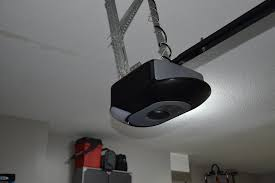
How To Program F150 Garage Door Opener Without Remote (Quick Answer)
To program your F150 garage door opener without a remote:
- Locate the Learn button on your garage opener
- Press and release the Learn button
- Within 30 seconds, press the desired button in your F150
- Hold until the indicator light flashes or door moves
Read too: Tc1 Tricode Garage Door Opener Remote W/ Clip Chamberlain: Complete Guide
This method works for most modern garage door openers with rolling code technology.
What Is the F150 Garage Door Opener System?
Most Ford F-150 trucks are equipped with HomeLink, a built-in wireless control system.
Key Features:
- Controls garage doors, gates, and lighting
- Eliminates need for separate remotes
- Uses rolling code security for safety
HomeLink is integrated into your vehicle’s overhead console.
Why Program Without a Remote?
There are several reasons you might not have a remote:
- Lost or broken remote
- Buying a used home
- Remote battery failure
- Wanting a cleaner, keyless setup
Programming directly via the opener is a reliable alternative.
Step-by-Step: How To Program F150 Garage Door Opener Without Remote
Follow these steps carefully:
Step 1: Locate the Learn Button on Your Garage Opener
The Learn button is typically found:
- On the back or side of the motor unit
- Near the antenna wire
Common Colors:
- Yellow
- Red/Orange
- Purple
- Green
Step 2: Press the Learn Button
- Press and release (do NOT hold)
- A small LED light will turn on
- You now have 30 seconds to complete pairing
Step 3: Go to Your F150 and Press the HomeLink Button
- Sit inside your truck
- Press and hold the desired HomeLink button
Timing:
- Hold for 5–20 seconds
- Watch for a flashing indicator light
Step 4: Confirm the Connection
- The garage door should move, or
- The HomeLink light will blink rapidly
If nothing happens, repeat the process once more.
Step 5: Test the System
Press the programmed button again:
- Door opens/closes → Success
- No response → Reprogram
How Long Does Programming Take?
Estimated Time:
- Locating Learn button: 2–5 minutes
- Programming process: 1–2 minutes
Total: Under 10 minutes
What If It Doesn’t Work?
Common Issues:
- Learn button timing expired
- Incompatible opener system
- Weak vehicle battery
- Incorrect button pressed
Fixes:
- Repeat steps within 30 seconds
- Clear previous HomeLink memory
- Check opener compatibility
How To Clear HomeLink Memory
If you’re starting fresh:
- Press and hold the two outer HomeLink buttons
- Hold for 10–20 seconds
- Indicator light will flash rapidly
This resets the system.
Compatibility: Will This Work on All Garage Doors?
Works With:
✔ Most openers made after 1996
✔ Rolling code systems
✔ Major brands (LiftMaster, Chamberlain, Genie)
May Not Work With:
✘ Very old fixed-code systems
✘ Non-standard openers
For more background on garage systems, see
https://en.wikipedia.org/wiki/Garage_door_opener
Pros vs Cons of Programming Without a Remote
Advantages
✔ No remote needed
✔ Quick setup
✔ Cleaner, integrated system
✔ Enhanced security
Disadvantages
✘ Requires access to opener unit
✘ May need ladder or tools
✘ Not compatible with all systems
Expert Tip: Stay Within Range
When programming:
- Park your F150 inside or near the garage
- Maintain a distance of 3–10 feet from the opener
This improves signal strength and success rate.
Common Mistakes to Avoid
- Holding the Learn button too long
- Waiting more than 30 seconds
- Programming too far from the opener
- Not clearing previous codes
Avoiding these mistakes saves time and frustration.
Advanced Tip: Programming Multiple Doors
You can program up to 3 different devices:
- Garage doors
- Gates
- Lighting systems
Each button works independently.
DIY vs Professional Programming
| Feature | DIY Setup | Professional Help |
|---|---|---|
| Cost | Free | $50–$150 |
| Time | 10 minutes | 30–60 minutes |
| Difficulty | Easy | Very easy |
| Convenience | High | Highest |
FAQ: F150 Garage Door Programming
Q1: How To Program F150 Garage Door Opener Without Remote?
A: Use the Learn button on your garage opener and pair it with your HomeLink button within 30 seconds.
Q2: Where is the Learn button located?
A: On the back or side of the garage opener motor unit.
Q3: Can I program without a ladder?
A: Usually not, unless the opener is easily reachable.
Q4: Why is my HomeLink not working?
A: It may need resetting or may be incompatible with your opener.
Q5: How many devices can I program?
A: Up to three devices using different buttons.
Q6: Does this work on all F150 models?
A: Most modern F150 models with HomeLink support this feature.
Conclusion
Learning How To Program F150 Garage Door Opener Without Remote is easier than most people think. With just a few simple steps and access to your garage opener, you can sync your truck in minutes—no remote required.
This method is fast, secure, and convenient for everyday use. If this guide helped you, don’t forget to share it on social media so others can solve the same problem quickly.
Leave a Reply